GTT - TO Move PC
GTT - Gruppo Torinese Trasporti
Download GTT - TO Move on PC With GameLoop Emulator
GTT - TO Move on PC
GTT - TO Move, coming from the developer GTT - Gruppo Torinese Trasporti, is running on Android systerm in the past.
Now, You can play GTT - TO Move on PC with GameLoop smoothly.
Download it in the GameLoop library or search results. No more eyeing the battery or frustrating calls at the wrong time any more.
Just enjoy GTT - TO Move PC on the large screen for free!
GTT - TO Move Introduction
TO Move is compatible with NFC-enabled Android phones.
With TO Move, you can purchase and use GTT tickets for buses, trams, and the metro in Turin, in the urban and suburban areas, and in the extra-urban area. You can also read the contents of your BIP smart card.
The interactive map lets you see the location of vehicles in real time and view stop information directly from the app, including schedules and vehicle characteristics. You can also read any warnings or diversions for individual lines.
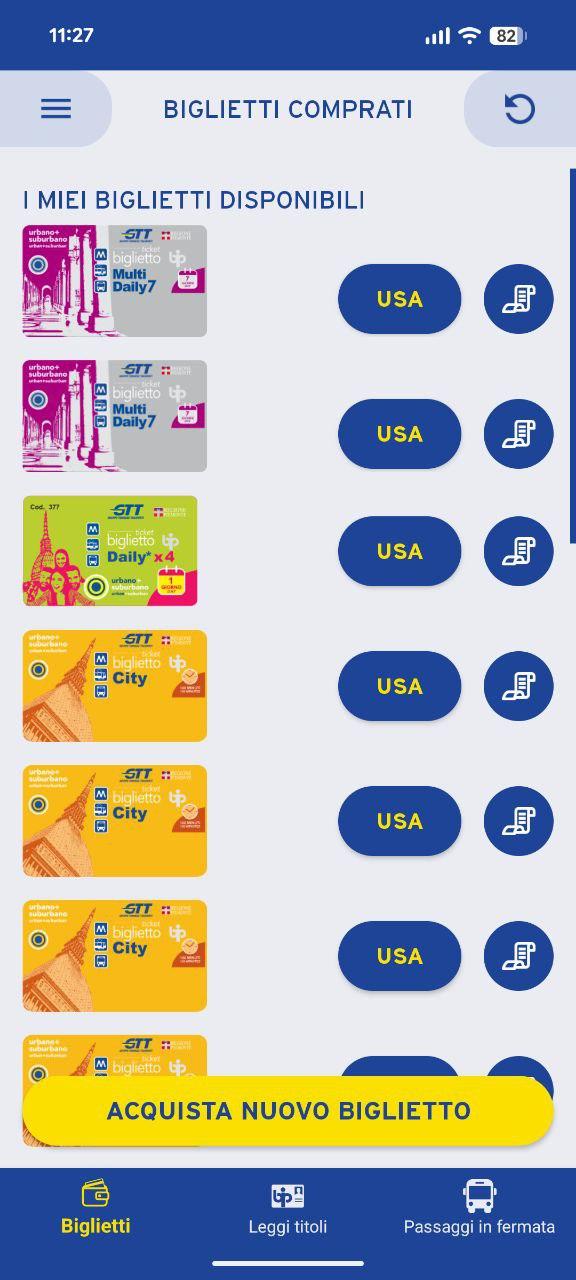
You can purchase the following types of tickets: City (valid for 100 minutes on the GTT urban and suburban network and a single metro ride); Daily (valid until the end of service on the day of first validation, on GTT buses in the urban and suburban network and on the metro); Multidaily (consisting of 7 Daily tickets, not shareable); Tour 48/72 hours (tickets valid from the first validation and usable by one person only); GTT bus tickets for suburban transport (single and multiple 6-ride tickets) with variable fares depending on the time slot.
TO Move allows you to use your travel tickets via NFC technology, now available on Android smartphones. GTT uses NFC because it guarantees absolutely secure data transmission.
The NFC antenna is essential for TO MOVE to read smart cards and beep tickets purchased with the app. If you want to use TO Move, check that your device supports NFC technology and remember to keep it activated when you want to use TO Move.
Before boarding public transport, remember to buy your travel ticket. It's very simple: go to the "Buy new ticket" section. Select "Use," get on board, and beep!
Enjoy your trip with GTT TO Move!
Gruppo Torinese Trasporti S.p.A. Gruppo Torinese Trasporti S.p.A. C.so Turati 19/6, 10128 Turin
Preview
Tags
Travel-&Information
Developer
GTT - Gruppo Torinese Trasporti
Latest Version
1.8.1
Last Updated
2025-11-10
Category
Travel-local
Available on
Google Play
Show More
How to play GTT - TO Move with GameLoop on PC
1. Download GameLoop from the official website, then run the exe file to install GameLoop
2. Open GameLoop and search for “GTT - TO Move” , find GTT - TO Move in the search results and click “Install”
3. Enjoy playing GTT - TO Move on GameLoop
Minimum requirements
OS
Windows 8.1 64-bit or Windows 10 64-bit
GPU
GTX 1050
CPU
i3-8300
Memory
8GB RAM
Storage
1GB available space
Recommended requirements
OS
Windows 8.1 64-bit or Windows 10 64-bit
GPU
GTX 1050
CPU
i3-9320
Memory
16GB RAM
Storage
1GB available space