openCanvas 7
PGN Inc
- United States$59.99$59.99Go to shop
- Argentina$2.86$2.86Go to shop
- Turkey$7.16$7.16Go to shop
Download openCanvas 7 on PC With GameLoop Emulator
openCanvas 7, is a popular steam game developed by openCanvas 7. You can download openCanvas 7 and top steam games with GameLoop to play on PC. Click the 'Get' button then you could get the latest best deals at GameDeal.
Get openCanvas 7 steam game
openCanvas 7, is a popular steam game developed by openCanvas 7. You can download openCanvas 7 and top steam games with GameLoop to play on PC. Click the 'Get' button then you could get the latest best deals at GameDeal.
openCanvas 7 Features
openCanvas is a painting software dedicated to Windows Operating System, that is suitable to beginners to advanced users.
Equipped with analog-like brush strokes and functional yet user-friendly interface, openCanvas has the higher basic performance and the unique "Event" function that enables to record and replay the drawing procedure.
Various functions and excellent performance of openCanvas strongly support visualizing your creativity.
Enjoy creating an illustration with openCanvas!
Why don't you open a new "Canvas" on your desktop?
Function
- Brushes enabling the various expressions
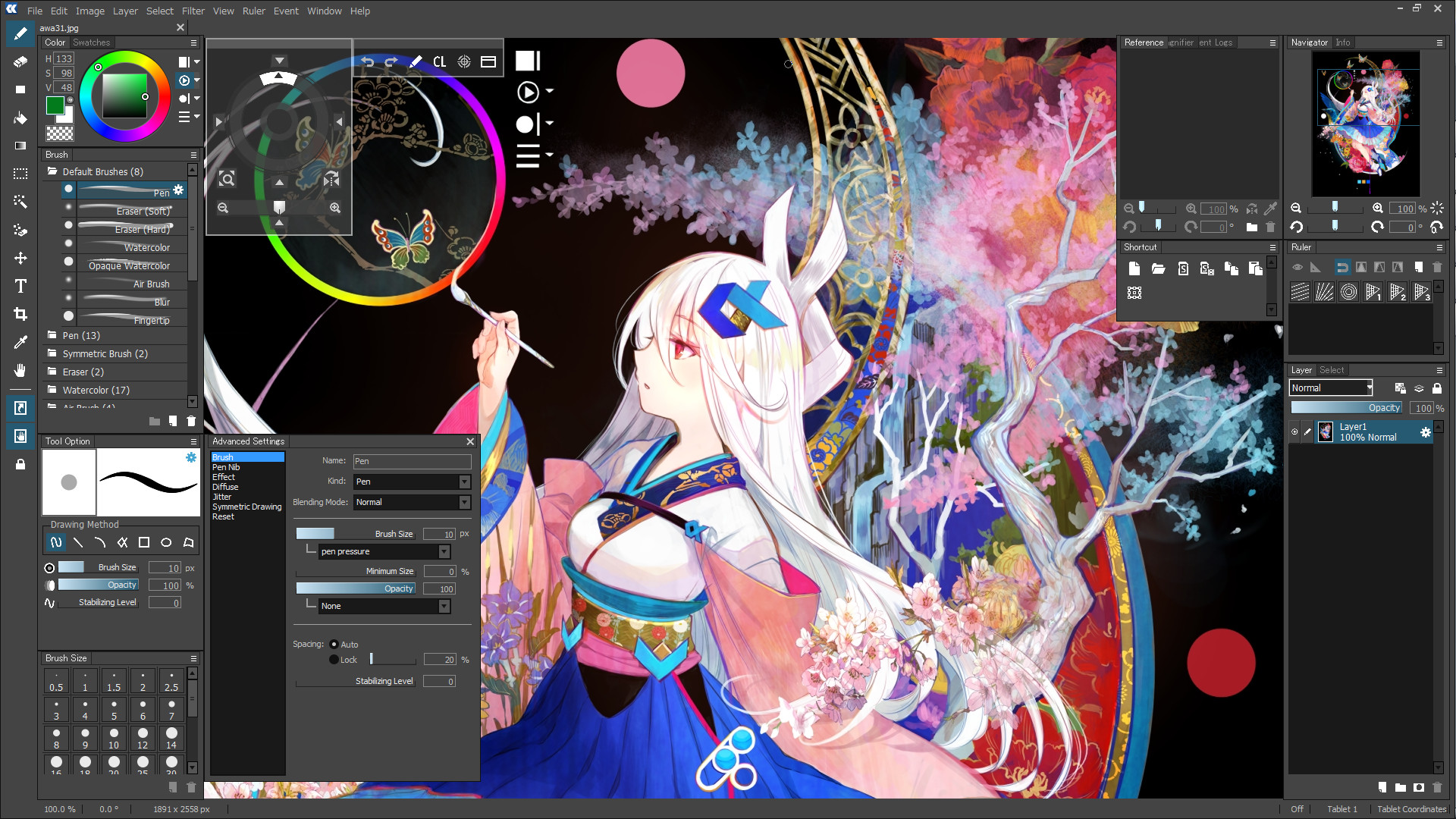
openCanvas brush option offers pencil, pen, watercolor, air brush, and more that enables to create various unique expressions.
openCanvas7 is equipped with the refurbished, improved brush engine that enables even more various expressions.
- Extensive Brush Preset
There are more than 150 types of default brush preset.
A brush can be customized freely so that you can create and save your own brush.
- New Brush Engine
The drawing engine has been improved and it now supports multiple threading.
This made the drawing performance substantially improved. And it enables to support a pen tablet tilt/ rotation and to set up the further detailed parameter setting.
Even further expressions is available.
Below functions are available with the new brush engine:
- Pen Tablet Tilt and Rotation (*for the supported devices only)
- Scatter Drawing
- Roller Drawing
- Symmetrical Drawing
- Layer Mode
22 types of Layer Mode let you express an unlimited possibility, such as by adjusting brightness, altering contrast, changing color tone, and more. Layer Mode except few options has compatibility to Adobe Photoshop.(※)
※Please note that it is the Layer Mode compatibility, but the display result is not guaranteed.
- Filter
openCanvas has 40 types of filter. Filter lets you adjust colors, apply texture, and more.
- Ruler
Perspective ruler helps you to create a three-dimensional illustration and to draw a precise building. There are one-point, two-point, and three-point perspective rulers. Parallel, radial, concentric circle rulers are not only convenient for creating effect lines but also useful for drawing background objects.
- Event Function
Have you ever wondered, "How has the illustration been created?"
The greatest feature of GraphicEditor openCanvas is the Event function that enables you to record/replay the drawing procedure. By using this function, it shows the drawing procedure, that you have never been able to watch, via openCanvas software or the PGN community website.
You can learn drawing techniques, brush setting, filter usage, and many more from advanced users.
GraphicEditor openCanvas is not just the drawing software but also lets you enjoy and learn illustration techniques.
- Compatible to PSD format
openCanvas supports saving as the PSD(Photoshop) format. You can open the openCanvas file in other software such as Adobe Photoshop, SAI, CLIP STUDIO PAINT, etc. while keeping most of layer information and layer modes. (※)
※Please note that there might be a slight difference in the display result in other software due to the difference of composition algorithm.
- TabletPC Function Support
Pen pressure (*1) and multi-touch gesture (*2) are available in TabletPC.
It will make you feel like drawing on paper and let you control canvas intuitively.
※1 Only with the pen pressure supported device.
※2 Only with the multi-touch supported device.
UI
- Refurbished User Interface Design
The theme color and icons has been refurbished, and which offers the user-friendly User Interface design.
- Supporting High DPI Display
High-definition display offers a wider canvas and fine texts/ icons.
- Grabber Control
openCanvas' unique Hand tool lets you move, rotate, scale, flip vertical easily. Hand is available by pressing the space key. You can also temporarily switch to Hand while using the brush tool.
It is located within the canvas, and which enables users to touch it easily.
Background is translucent so that it will not disrupt your drawing progress.
- Shortcut Control
Frequently used tools are consolidated.
You can resize the control however you like, vertically and horizontally.
Background is translucent so that it will not disrupt your drawing progress.
Download openCanvas 7 on PC With GameLoop Emulator
Get openCanvas 7 steam game
openCanvas 7, is a popular steam game developed by openCanvas 7. You can download openCanvas 7 and top steam games with GameLoop to play on PC. Click the 'Get' button then you could get the latest best deals at GameDeal.
openCanvas 7 Features
openCanvas is a painting software dedicated to Windows Operating System, that is suitable to beginners to advanced users.
Equipped with analog-like brush strokes and functional yet user-friendly interface, openCanvas has the higher basic performance and the unique "Event" function that enables to record and replay the drawing procedure.
Various functions and excellent performance of openCanvas strongly support visualizing your creativity.
Enjoy creating an illustration with openCanvas!
Why don't you open a new "Canvas" on your desktop?
Function
- Brushes enabling the various expressions
openCanvas brush option offers pencil, pen, watercolor, air brush, and more that enables to create various unique expressions.
openCanvas7 is equipped with the refurbished, improved brush engine that enables even more various expressions.
- Extensive Brush Preset
There are more than 150 types of default brush preset.
A brush can be customized freely so that you can create and save your own brush.
- New Brush Engine
The drawing engine has been improved and it now supports multiple threading.
This made the drawing performance substantially improved. And it enables to support a pen tablet tilt/ rotation and to set up the further detailed parameter setting.
Even further expressions is available.
Below functions are available with the new brush engine:
- Pen Tablet Tilt and Rotation (*for the supported devices only)
- Scatter Drawing
- Roller Drawing
- Symmetrical Drawing
- Layer Mode
22 types of Layer Mode let you express an unlimited possibility, such as by adjusting brightness, altering contrast, changing color tone, and more. Layer Mode except few options has compatibility to Adobe Photoshop.(※)
※Please note that it is the Layer Mode compatibility, but the display result is not guaranteed.
- Filter
openCanvas has 40 types of filter. Filter lets you adjust colors, apply texture, and more.
- Ruler
Perspective ruler helps you to create a three-dimensional illustration and to draw a precise building. There are one-point, two-point, and three-point perspective rulers. Parallel, radial, concentric circle rulers are not only convenient for creating effect lines but also useful for drawing background objects.
- Event Function
Have you ever wondered, "How has the illustration been created?"
The greatest feature of GraphicEditor openCanvas is the Event function that enables you to record/replay the drawing procedure. By using this function, it shows the drawing procedure, that you have never been able to watch, via openCanvas software or the PGN community website.
You can learn drawing techniques, brush setting, filter usage, and many more from advanced users.
GraphicEditor openCanvas is not just the drawing software but also lets you enjoy and learn illustration techniques.
- Compatible to PSD format
openCanvas supports saving as the PSD(Photoshop) format. You can open the openCanvas file in other software such as Adobe Photoshop, SAI, CLIP STUDIO PAINT, etc. while keeping most of layer information and layer modes. (※)
※Please note that there might be a slight difference in the display result in other software due to the difference of composition algorithm.
- TabletPC Function Support
Pen pressure (*1) and multi-touch gesture (*2) are available in TabletPC.
It will make you feel like drawing on paper and let you control canvas intuitively.
※1 Only with the pen pressure supported device.
※2 Only with the multi-touch supported device.
UI
- Refurbished User Interface Design
The theme color and icons has been refurbished, and which offers the user-friendly User Interface design.
- Supporting High DPI Display
High-definition display offers a wider canvas and fine texts/ icons.
- Grabber Control
openCanvas' unique Hand tool lets you move, rotate, scale, flip vertical easily. Hand is available by pressing the space key. You can also temporarily switch to Hand while using the brush tool.
It is located within the canvas, and which enables users to touch it easily.
Background is translucent so that it will not disrupt your drawing progress.
- Shortcut Control
Frequently used tools are consolidated.
You can resize the control however you like, vertically and horizontally.
Background is translucent so that it will not disrupt your drawing progress.
Preview
Information
Developer
PGN Inc
Latest Version
1.0.0
Last Updated
2017-09-20
Category
Steam-game
Show More
Reviews
- gamedeal user
Aug 20, 2022
- gamedeal user
Feb 5, 2018
- gamedeal user
Feb 6, 2018
- gamedeal user
Aug 3, 2018
- gamedeal user
Aug 4, 2018
- gamedeal user
Sep 4, 2018
- gamedeal user
Nov 21, 2018
- gamedeal user
Aug 8, 2019
- gamedeal user
Apr 22, 2020
- gamedeal user
May 28, 2020
FAQs
PC Games Cheaper On Gamedeal | Find The Best Deals of Games Here!
Finding the right place to get the best game deals can prove to be quite a hassle when comparing game prices on multiple sites. However, you can skip through all the trouble by letting Gamedeal handle the price comparisons and grab only the best deal prices for you!
We compare game prices on all the trusted storefronts and list game deals starting with the lowest price possible at the moment. Looking for something more specific? Search it on Gamedeal and find all the best deals and cd keys discount codes to make the most out of your bucks.
Not sure what you looking for? Browse through our massive library of games from different genres to find epic deals for your favorite games from the biggest retailers in the market. Can’t afford the game you are looking for? Make sure to wishlist it and stay up-to-date with all the price changes in the future.
Say Bye to Hefty Game Deals!
Gamedeal is your one-stop shop to find all the best deals from your favorite retailers including Steam, Epic Games, Gamestop, and many more under one roof. Looking for games that cost you nothing? We have got you covered with our free games list that includes free PC and Playstation games.
We help you stay on top of the news with upcoming Steam sales and Gamestop promo codes to ensure you get the game of your choice at the lowest price possible. From old-school classics to modern AAA titles, there is something for everyone to play here.