
AI Photo Editor: BG Remover PC
Solution Photo Apps
Download AI Photo Editor: BG Remover on PC With GameLoop Emulator
AI Photo Editor: BG Remover on PC
AI Photo Editor: BG Remover, coming from the developer Solution Photo Apps, is running on Android systerm in the past.
Now, You can play AI Photo Editor: BG Remover on PC with GameLoop smoothly.
Download it in the GameLoop library or search results. No more eyeing the battery or frustrating calls at the wrong time any more.
Just enjoy AI Photo Editor: BG Remover PC on the large screen for free!
AI Photo Editor: BG Remover Introduction
Transform your photos into professional artwork with AI Photo Editor: BG Remover — your ultimate, all-in-one AI-powered picture editor and collage maker!
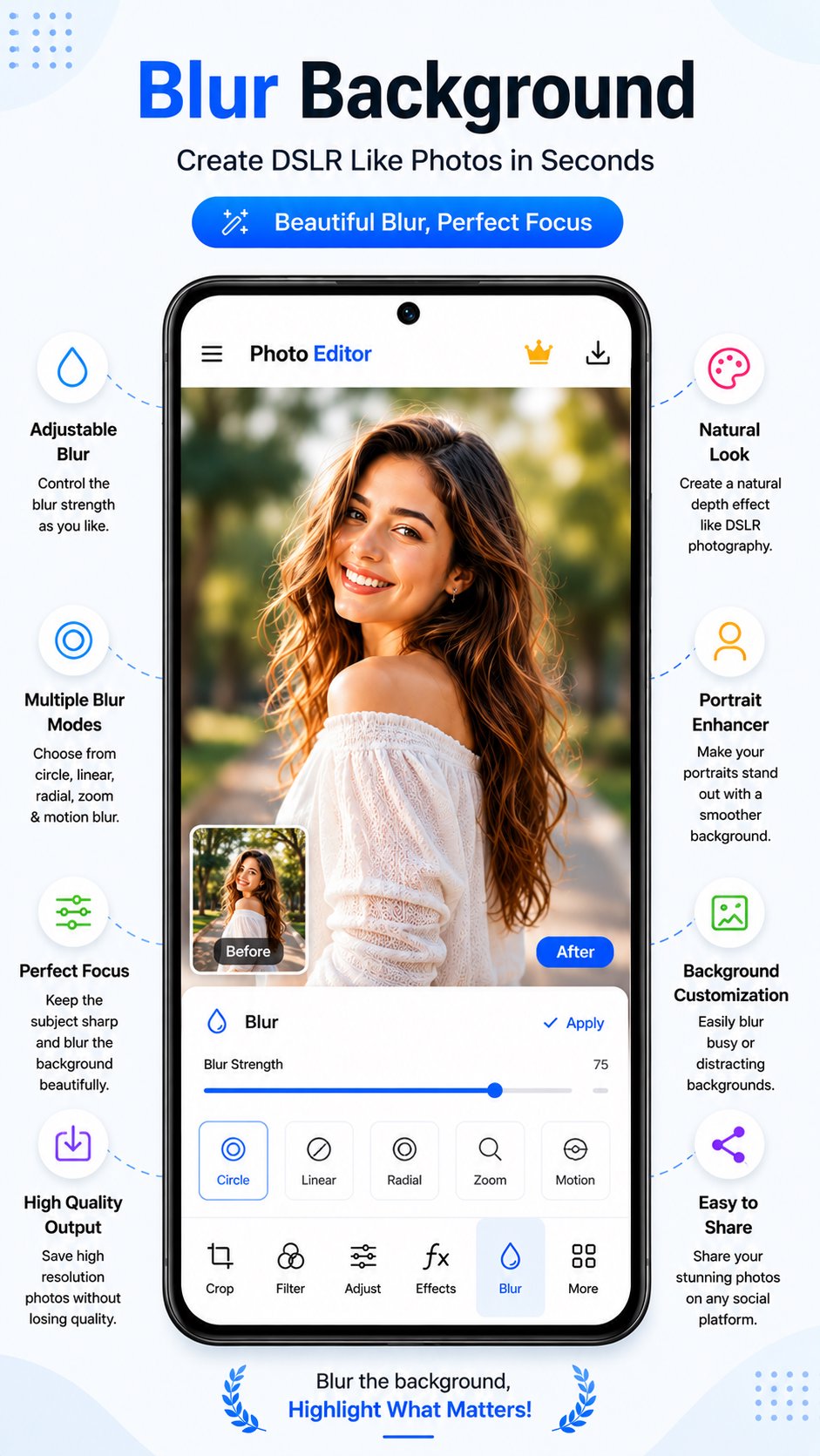
Powered by smart AI detection, you can cut out backgrounds with single-tap precision, erase unwanted objects, blur portrait backgrounds like a DSLR camera, apply 100+ stunning filters, and create eye-catching photo collages in seconds.
Whether you need product cutouts, transparent PNGs, aesthetic Instagram posts, or social media stories, this app gives you studio-quality editing tools right at your fingertips. No professional editing skills required!
✨ KEY AI & EDITING FEATURES ✨
🪄 AI Background Remover & Cutout
One-Tap Instant AI Cutout: Automatically detect, separate, and erase backgrounds with high accuracy.
Manual Refine & Touch-Up Brush: Smoothly restore or erase specific details with adjustable brush precision.
Edge Smoothing: Get ultra-clean, natural outlines around hair, clothing, and intricate objects.
Save Transparent PNGs: Export cutouts instantly for e-commerce products, logos, stickers, and thumbnails.
🖼️ Photo Collage Maker & Grid Editor
100+ Grid Layouts: Choose from a wide variety of photo collage templates designed for every occasion.
Custom Spacing & Rounded Corners: Adjust border thickness and corner radii for modern layouts.
Pre-Set Social Ratios: Ready-to-use aspect ratios for Instagram (1:1, 4:5), TikTok/Stories (9:16), Facebook (16:9), and YouTube (3:4).
Stylized Borders & Backgrounds: Personalize your collage with solid colors, blur backgrounds, and custom patterns.
💧 DSLR Blur Background (Bokeh Effect)
Multiple AI Blur Modes: Choose between Circle, Linear, Radial, Zoom, and Motion blur effects.
Adjustable Focus & Intensity: Keep your main subject razor-sharp while softening distracting backgrounds.
Natural Portrait Enhancer: Create depth-of-field shots that rival professional DSLR cameras.
🎨 100+ Filters & Stylish Photo Effects
Trending Presets: Vintage, B&W, Natural, Bright, Moody, Cinematic, Film, Vivid, and Soft filters.
One-Tap AI Enhancement: Instantly improve lighting, tone, contrast, and color balance in a single touch.
Real-Time Live Preview: Easily compare Before / After edits side by side before saving.
🖌️ Draw, Paint & Doodle Canvas
Freehand Drawing: Sketch, paint, or write over photos using your finger or a stylus.
Brush Customization: Control brush size, stroke opacity, and line styles effortlessly.
Shapes & Stickers: Decorate pictures with hearts, crowns, shapes, and trendy sticker packs.
Full Layer & Eraser Support: Erase mistakes smoothly with reliable Undo and Redo controls.
🛠️ Pro Fine-Tuning & Adjustment Tools
Crop & Frame: Precision crop, flip, and rotate tools for perfect composition.
Light & Color Controls: Tune brightness, contrast, saturation, shadows, highlights, and warmth.
Creative Text Styles: Add text with custom fonts, colors, stroke outlines, and background shadows.
High-Resolution HD Export: Save high-quality photos with zero compression or quality loss.
Instant Social Sharing: Share directly to Instagram, WhatsApp, TikTok, Facebook, Snapchat, and more!
🌟 Why Choose This AI Photo Editor?
All-In-One Power: No need to download separate apps for background erasing, collages, and portrait blur.
Fast & Ultra-Lightweight: Clean design optimized for smooth processing and quick photo saves.
Clean & Watermark-Free: Save high-res images in crisp HD quality ready for publication.
Download AI Photo Editor: BG Remover today and create stunning photos in seconds!
Preview

Tags
PhotographyInformation
Developer
Solution Photo Apps
Latest Version
1.0.8
Last Updated
2026-10-03
Category
Photography
Available on
Google Play
Show More
How to play AI Photo Editor: BG Remover with GameLoop on PC
1. Download GameLoop from the official website, then run the exe file to install GameLoop
2. Open GameLoop and search for “AI Photo Editor: BG Remover” , find AI Photo Editor: BG Remover in the search results and click “Install”
3. Enjoy playing AI Photo Editor: BG Remover on GameLoop
Minimum requirements
OS
Windows 8.1 64-bit or Windows 10 64-bit
GPU
GTX 1050
CPU
i3-8300
Memory
8GB RAM
Storage
1GB available space
Recommended requirements
OS
Windows 8.1 64-bit or Windows 10 64-bit
GPU
GTX 1050
CPU
i3-9320
Memory
16GB RAM
Storage
1GB available space