Çanakkale AR PC
Ali'nin Tasarım Fabrikası
Download Çanakkale AR on PC With GameLoop Emulator
Çanakkale AR on PC
Çanakkale AR, coming from the developer Ali'nin Tasarım Fabrikası, is running on Android systerm in the past.
Now, You can play Çanakkale AR on PC with GameLoop smoothly.
Download it in the GameLoop library or search results. No more eyeing the battery or frustrating calls at the wrong time any more.
Just enjoy Çanakkale AR PC on the large screen for free!
Çanakkale AR Introduction
Are you ready to visit Çanakkale with Pırıl?
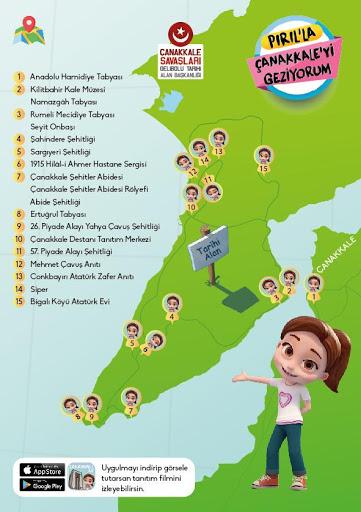
With the Çanakkale AR application, hold the camera opened in the application to the visuals placed in important areas in Çanakkale and listen to the story with Pırıl. Take photos and videos and share them with your friends.
Anatolian Hamidiye Bastion,
Kilitbahir Castle Museum,
- Namazgah Bastion,
- Rumeli Mecidiye Bastion,
- Seyit Corporal,
- Şahindere Martyrdom,
Sargıyeri Martyrdom,
- 1915 Hilâl-i Ahmer Hospital Exhibition,
- Çanakkale Martyrs Monument,
- Çanakkale Martyrs Monument Relief,
- Monument Martyrdom,
- Ertuğrul Bastion,
- 26th Infantry Regiment Yahya Sergeant Martyrdom,
- Çanakkale Epic Promotion Center,
- 57th Infantry Regiment Martyrdom,
- Mehmet Sergeant Monument,
- Conkbayırı Atatürk Victory Monument,
- Trench,
- Bigalı Village Atatürk House,
Let Pırıl guide you to Çanakkale Historical Site!
Preview

Tags
EducationInformation
Developer
Ali'nin Tasarım Fabrikası
Latest Version
1.28
Last Updated
2023-10-11
Category
Education
Available on
Google Play
Show More
How to play Çanakkale AR with GameLoop on PC
1. Download GameLoop from the official website, then run the exe file to install GameLoop
2. Open GameLoop and search for “Çanakkale AR” , find Çanakkale AR in the search results and click “Install”
3. Enjoy playing Çanakkale AR on GameLoop
Minimum requirements
OS
Windows 8.1 64-bit or Windows 10 64-bit
GPU
GTX 1050
CPU
i3-8300
Memory
8GB RAM
Storage
1GB available space
Recommended requirements
OS
Windows 8.1 64-bit or Windows 10 64-bit
GPU
GTX 1050
CPU
i3-9320
Memory
16GB RAM
Storage
1GB available space