
Whats Tools - Status Saver,Direct Chat & 10+ tools PC
Indomitech Apps
Download Whats Tools - Status Saver,Direct Chat & 10+ tools on PC With GameLoop Emulator
Whats Tools - Status Saver,Direct Chat & 10+ tools on PC
Whats Tools - Status Saver,Direct Chat & 10+ tools, coming from the developer Indomitech Apps, is running on Android systerm in the past.
Now, You can play Whats Tools - Status Saver,Direct Chat & 10+ tools on PC with GameLoop smoothly.
Download it in the GameLoop library or search results. No more eyeing the battery or frustrating calls at the wrong time any more.
Just enjoy Whats Tools - Status Saver,Direct Chat & 10+ tools PC on the large screen for free!
Whats Tools - Status Saver,Direct Chat & 10+ tools Introduction
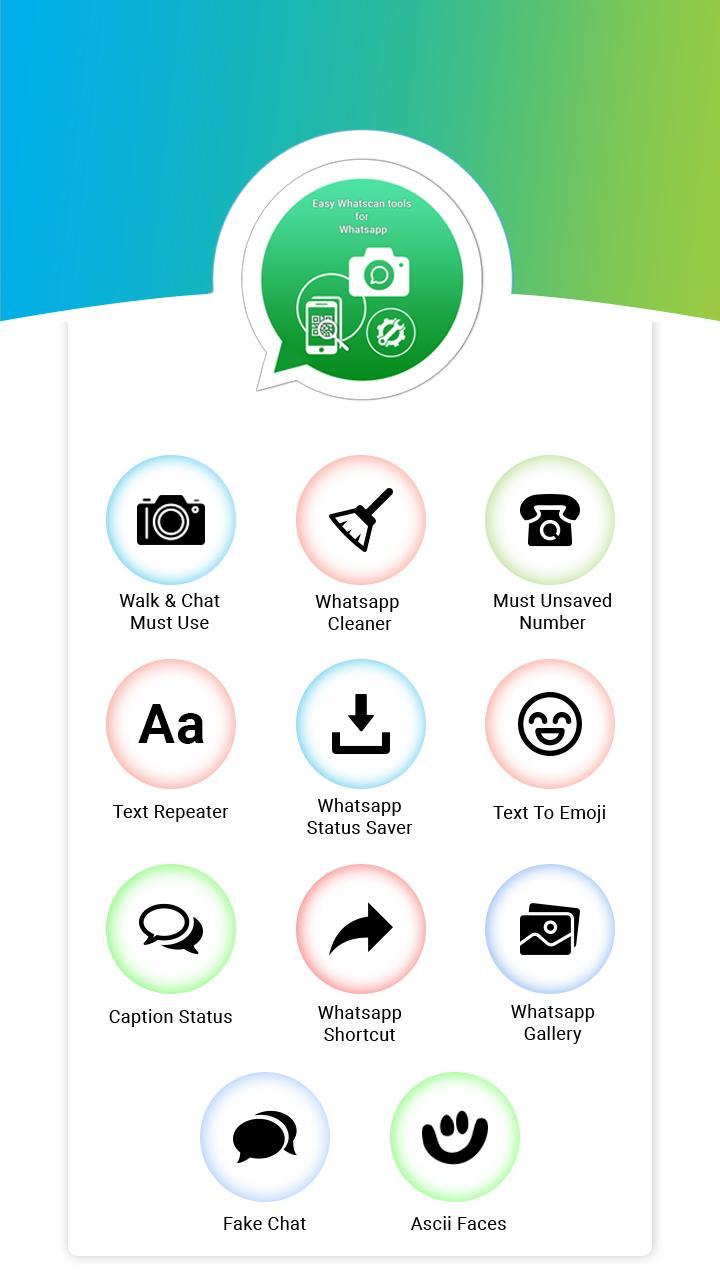
Features Of application
1. Whats Web:
Would you like to open two accounts in the same device or same account in multiple devices then this app for you? Now you can use the same account in multiple devices.
2.Unsaved Numbers
With this feature, you can send a message to any unsaved number on whatscan or you can find weather number is present on WhatsApp or not.
3.Ascii Faces
This feature enables you to send ASCII faces to your friends it will work with those mobiles who don't have whatscan emojis.
4.Text Repeater
Text repeater allows you to write any sentence or word and repeat it how many times you want in just one click and you can send it to WhatsApp Facebook directly.
5.Caption Status
Whatscan facebook status with categories like sad status, cool status, attitude status etc..
6.Text to Emoji
This feature allows you to write any message name into your chosen emoji.. Isn't it cool? In just one click you can copy and share on social media.
7.Whatsapp status Saver
With this feature, you can save your friend's status on WhatsApp and repost it.
8.Whatsapp Shortcuts
This feature enables you to open whatz app by shaking the phone. Speak open WhatsApp command to open WhatsApp instantly.
Speak and open WhatsApp.
9.Whatsapp Gallery
You can manage all the media of whatz app like photos videos documents from one place only.
Disclaimer: This app is not affiliated with any other app. This app is made by us and please mail us for any queries and complaints.
Preview
Information
Developer
Indomitech Apps
Latest Version
1.6
Last Updated
2020-04-11
Category
Tools
Available on
Google Play
Show More
How to play Whats Tools - Status Saver,Direct Chat & 10+ tools with GameLoop on PC
1. Download GameLoop from the official website, then run the exe file to install GameLoop
2. Open GameLoop and search for “Whats Tools - Status Saver,Direct Chat & 10+ tools” , find Whats Tools - Status Saver,Direct Chat & 10+ tools in the search results and click “Install”
3. Enjoy playing Whats Tools - Status Saver,Direct Chat & 10+ tools on GameLoop
Minimum requirements
OS
Windows 8.1 64-bit or Windows 10 64-bit
GPU
GTX 1050
CPU
i3-8300
Memory
8GB RAM
Storage
1GB available space
Recommended requirements
OS
Windows 8.1 64-bit or Windows 10 64-bit
GPU
GTX 1050
CPU
i3-9320
Memory
16GB RAM
Storage
1GB available space