
ConvertPad - Unit Converter PC
MathPad
Download ConvertPad - Unit Converter on PC With GameLoop Emulator
ConvertPad - Unit Converter on PC
ConvertPad - Unit Converter, coming from the developer MathPad, is running on Android systerm in the past.
Now, You can play ConvertPad - Unit Converter on PC with GameLoop smoothly.
Download it in the GameLoop library or search results. No more eyeing the battery or frustrating calls at the wrong time any more.
Just enjoy ConvertPad - Unit Converter PC on the large screen for free!
ConvertPad - Unit Converter Introduction
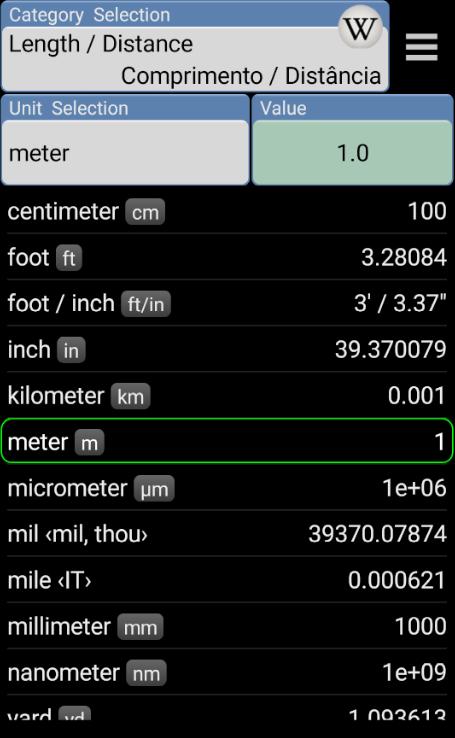
ConvertPad is the most powerful and fully featured Unit converter, Currency converter and Calculator. It's a simple but the most powerful unit converter. ConvertPad is intuitive and easy to use. Features fast, real time currency and unit conversion in a clean interface.
Features;
* Universal Unit converter and Calculator
. Real-time Conversion and Calculator
. Unit Comparison Table
. Direct Arithmetic Calculation
. Country-Specific Units
. Wikipedia Search for additional Unit information
* Currency conversions
. Option for selecting favorite exchange rate
. Support 160+ Currencies
* Multiple languages support
. Supports 25 languages.
. Supports 2 preferences as primary & secondary languages.
* Customizing feature for Favorite Units
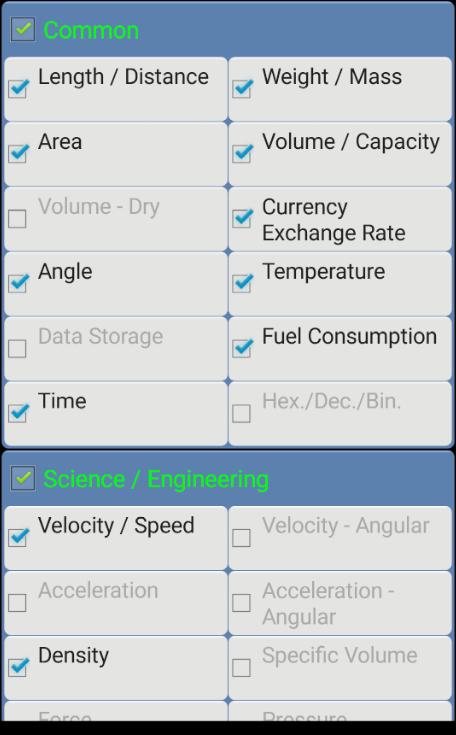
. Favorite Categories and Units
. Various Sorting option
* User-defined Categories and Units
. User-defined units in built-in categories
. User's own categories and units
. Formula(functional form) support for user-defined units.
* Various Setting option
. Various Color Themes
. Backup/Restore User-defined Units on SD Card
* Steam tables
. Thermodynamic Steam tables
NOTE;
** Permission for "Internet access" and "R/W access on external storage" are for Update Currency and Backup user-defined units on SD Card respectively.
** Please leave your comments on market. it will ENCOURAGE the developer to continue his effort.
Older version:
v 2.7
Voice Searching
Text(Keyword) Searching
Reported translation errors fixed.
v 2.6
New languages(Hindi, Romanian) added.
Various translation errors fixed.
App Loading speed improved.
Minor bug fixed.
v 2.5
* New features
New language(Hebrew) added.
Searching Icon(Wikipedia) changed.
Separate Input for Stone/Pound added.
v 2.4
Separate Input for Feet/Inches & Pounds/Ounces.
Tablet size support.
UI for Calculator improved.
v 2.3
Wiki Searching for Unit information
Circle/Sphere unit
User interface on Setting & Favorites options
v. 2.2
Currency rate update (after the format changed from one of the providers).
Number/period input issue on User-defined units
User interface on Calculator
Memorizing cursor location on each category
(Conversion Table)
Dec/Bin/Hex
Shoe/Clothing/Ring Size
dBm/Volts/Watts
v. 2.1
* Option for various Color themes
* Formula type(functional-form) input for user-defined units.(ex: 2*x+5)
* Reference unit option for user-defined units.
* Text size optimization for various devices.
* Memorizing feature on Calculator (Click on input field)
* ASME Steam tables (Thermodynamics)
* New language(Turkish)
* Minor bugs fixed.
Preview
Tags
ToolsInformation
Developer
MathPad
Latest Version
3.2.22
Last Updated
2024-01-11
Category
Tools
Available on
Google Play
Show More
How to play ConvertPad - Unit Converter with GameLoop on PC
1. Download GameLoop from the official website, then run the exe file to install GameLoop
2. Open GameLoop and search for “ConvertPad - Unit Converter” , find ConvertPad - Unit Converter in the search results and click “Install”
3. Enjoy playing ConvertPad - Unit Converter on GameLoop
Minimum requirements
OS
Windows 8.1 64-bit or Windows 10 64-bit
GPU
GTX 1050
CPU
i3-8300
Memory
8GB RAM
Storage
1GB available space
Recommended requirements
OS
Windows 8.1 64-bit or Windows 10 64-bit
GPU
GTX 1050
CPU
i3-9320
Memory
16GB RAM
Storage
1GB available space