Network/WIFI Info & Sim Query PC
Dilip Master Apps
Download Network/WIFI Info & Sim Query on PC With GameLoop Emulator
Network/WIFI Info & Sim Query on PC
Network/WIFI Info & Sim Query, coming from the developer Dilip Master Apps, is running on Android systerm in the past.
Now, You can play Network/WIFI Info & Sim Query on PC with GameLoop smoothly.
Download it in the GameLoop library or search results. No more eyeing the battery or frustrating calls at the wrong time any more.
Just enjoy Network/WIFI Info & Sim Query PC on the large screen for free!
Network/WIFI Info & Sim Query Introduction
Network & Wi-Fi Information and SIM Query is a comprehensive tool designed to give you in-depth insights into mobile network and Wi-Fi connections. Whether you're troubleshooting connectivity issues, optimizing network performance, or simply curious about your mobile data & Wi-Fi details, this app provides all the essential information at your fingertips.
Key Features:
Network Info:
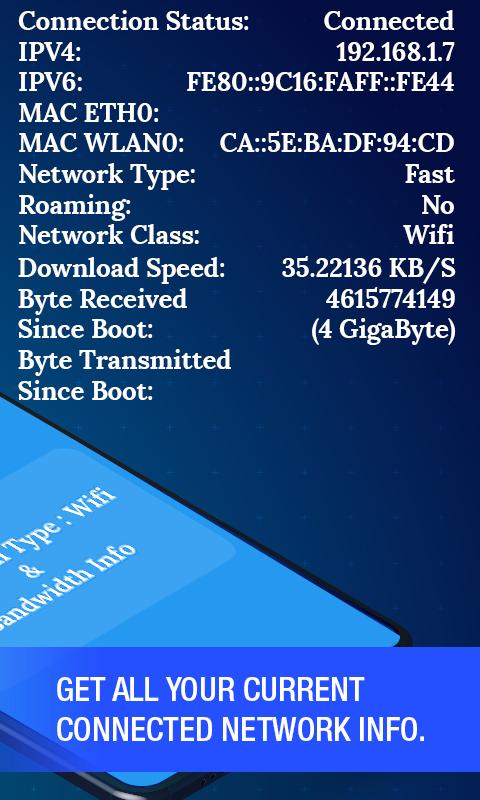
* Connection Status: Real-time status of your mobile network connection.
* IPV4 & IPV6 Details: View your device's IP address (both IPV4 and IPV6).
* MAC Address Details: Displays the unique MAC address for your network
interface.
* Network Type Status: Identifies the type of network you are connected to
(3G, 4G, 5G, LTE, etc.).
* Roaming Status: Check if your device is currently roaming on a different
network.
* 4G/5G/VoLTE Status: Displays whether your device supports & is using 4G,
5G, or Voice over LTE.
* Bandwidth Info: Monitors your mobile data speeds with real-time download
speed and the total amount of data received and transmitted since boot.
Wi-Fi Info:
* Scan Available Wi-Fi Connections: Automatically scans for nearby Wi-Fi
networks and displays detailed information on each network.
* MAC Address: Each Wi-Fi network's unique identifier.
* Bandwidth: Displays the supported bandwidth (speed) of each Wi-Fi
network.
* MHz Details: Shows the frequency band (e.g., 2.4GHz or 5GHz) used by the
Wi-Fi network.
* BSSID: Shows the BSSID (Basic Service Set Identifier) for connected Wi-Fi
networks.
* Link Speed: Displays the current link speed of the Wi-Fi connection.
* WiFi RSSI: Measures the signal strength (Received Signal Strength
Indicator) for Wi-Fi connections.
SIM Info:
* Network Operator Code: Displays the unique code for your mobile operator.
* Network Operator Name: Shows the name of the mobile network operator .
* SIM Technology Type: Indicates whether your SIM uses GSM or CDMA
technology.
* SIM Operator Code: The operator-specific code for your SIM card.
* Phone Number of SIM: Displays the phone number associated with your
SIM card.
* Dual SIM Support: Whether your device supports a dual SIM configuration
or not.
* IMEI Number: Displays the International Mobile Equipment Identity (IMEI)
number for each SIM in your device.
Why Choose Network & WiFi Info & SIM Query?
* Comprehensive: Provides all the essential network and Wi-Fi information in
one place.
* User-Friendly: Simple interface with easy-to-understand metrics.
* Real-Time Data: Continuously updates data to give you accurate and up-to-
date information.
* Troubleshooting: Helps you troubleshoot network issues by providing vital
details about your mobile and Wi-Fi connections.
Download now to get complete details about your mobile and Wi-Fi connections!
Note: Some features may require additional permissions to function properly, such as access to your location and phone status.
Preview

Tags
ToolsInformation
Developer
Dilip Master Apps
Latest Version
1.10
Last Updated
2024-09-18
Category
Tools
Available on
Google Play
Show More
How to play Network/WIFI Info & Sim Query with GameLoop on PC
1. Download GameLoop from the official website, then run the exe file to install GameLoop
2. Open GameLoop and search for “Network/WIFI Info & Sim Query” , find Network/WIFI Info & Sim Query in the search results and click “Install”
3. Enjoy playing Network/WIFI Info & Sim Query on GameLoop
Minimum requirements
OS
Windows 8.1 64-bit or Windows 10 64-bit
GPU
GTX 1050
CPU
i3-8300
Memory
8GB RAM
Storage
1GB available space
Recommended requirements
OS
Windows 8.1 64-bit or Windows 10 64-bit
GPU
GTX 1050
CPU
i3-9320
Memory
16GB RAM
Storage
1GB available space