AirPro: AirPod Tracker & Find PC
Evotap
Download AirPro: AirPod Tracker & Find on PC With GameLoop Emulator
AirPro: AirPod Tracker & Find on PC
AirPro: AirPod Tracker & Find, coming from the developer Evotap, is running on Android systerm in the past.
Now, You can play AirPro: AirPod Tracker & Find on PC with GameLoop smoothly.
Download it in the GameLoop library or search results. No more eyeing the battery or frustrating calls at the wrong time any more.
Just enjoy AirPro: AirPod Tracker & Find PC on the large screen for free!
AirPro: AirPod Tracker & Find Introduction
🌟 AirPro: Airpod Tracker & Find – Your Ultimate AirPods Companion on Android!
Maximize your AirPods experience on Android with AirPro: Airpod Tracker & Find! Seamlessly connect, track, and manage your AirPods with this top-rated app. Whether you’re using AirPods Pro, AirPods Max, or AirPods 4, our app delivers effortless functionality with features like find my AirPods, AirPods battery monitoring, and custom AirPods widgets.
Wide Compatibility:
Works flawlessly with AirPods 2nd Gen, AirPods 3rd Gen, AirPods Pro 2nd Gen, AirPods Max, AirPods 4th Gen, and AirPods 4th Gen with ANC.
🚀 Key Features
✅ Find My AirPods – Locate lost AirPods instantly with one tap using our powerful AirPods tracker.
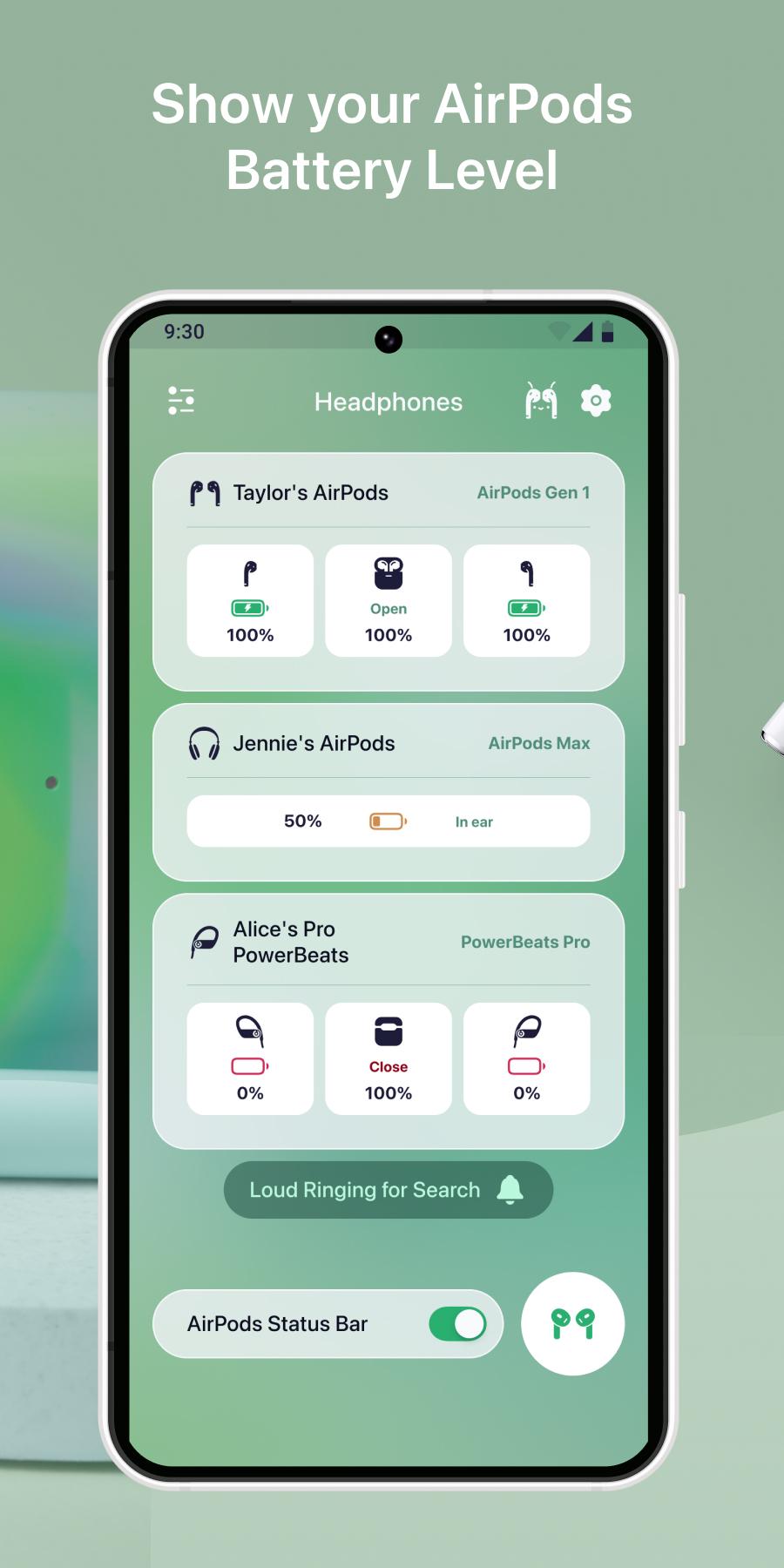
✅ AirPods Battery Monitor – Track battery levels for your AirPods and charging case in real-time.
✅ AirPods Widgets – Choose from stunning, custom-designed AirPods widgets for quick access to stats.
✅ AirPods Connect – Pair your AirPods effortlessly with your Android device.
✅ AirPods Tracker – Pinpoint the exact location of your AirPods with precision.
✅ Advanced Features – Enjoy auto play/pause, ear detection, charge status, microphone info, and pop-up notifications when opening the AirPods case.
Why Choose AirPro: Airpod Tracker & Find?
1️⃣ Struggling to use AirPods on Android? AirPro bridges the gap.
2️⃣ Tired of losing your AirPods? Our AirPods finder has you covered.
3️⃣ Need to check AirPods battery? Get real-time updates.
4️⃣ Love customization? Add stylish AirPods widgets to your home screen.
How to Use AirPro: Airpod Tracker & Find?
1️⃣ Install AirPro: Airpod Tracker & Find on your Android device.
2️⃣ Pair your AirPods via Bluetooth and open the app.
3️⃣ Allow permissions to access AirPods data for tracking and battery monitoring.
4️⃣ Explore find my AirPods, widgets, and more!
Perfect for Android users with AirPods Pro, AirPods Max, or any AirPods model, this app enhances your listening experience with seamless connectivity and smart tracking.
⚠️ Before You Start
🌐 Ensure Bluetooth is enabled and your AirPods are paired.
🛜 A stable internet connection may be required for AirPods tracker features.
Note: This app is a third-party tool for AirPods on Android and supports reporting functions only. For hardware issues, contact Apple support.
🔹 Download AirPro: Airpod Tracker & Find Now to enjoy find my AirPods, real-time AirPods battery stats, and stunning AirPods widgets! Elevate your AirPods experience on Android today!
📩 Questions or Feedback? Leave a review or contact us at support@evotap.net. Your input helps us improve!
🔗 Terms of Use: https://evotap.net/terms-of-use/
Preview

Tags
ToolsInformation
Developer
Evotap
Latest Version
5.1
Last Updated
2025-08-09
Category
Tools
Available on
Google Play
Show More
How to play AirPro: AirPod Tracker & Find with GameLoop on PC
1. Download GameLoop from the official website, then run the exe file to install GameLoop
2. Open GameLoop and search for “AirPro: AirPod Tracker & Find” , find AirPro: AirPod Tracker & Find in the search results and click “Install”
3. Enjoy playing AirPro: AirPod Tracker & Find on GameLoop
Minimum requirements
OS
Windows 8.1 64-bit or Windows 10 64-bit
GPU
GTX 1050
CPU
i3-8300
Memory
8GB RAM
Storage
1GB available space
Recommended requirements
OS
Windows 8.1 64-bit or Windows 10 64-bit
GPU
GTX 1050
CPU
i3-9320
Memory
16GB RAM
Storage
1GB available space