Global
  • Global
  • México
  • 中國台灣
  • India
  • Indonesia
  • Türkiye
  • Việt Nam
  • ประเทศไทย
  • Brasil
  • Perú
  • Colombia
  • Argentina
  • Россия
  • السعودية
  • مصر
  • پاکستان
  • Malaysia
  • 日本
  • 中国香港
  • Philippines
Download
SimpleRockets 2

SimpleRockets 2

89 Positive / 1425 Ratings | Version: 1.0.0

Jundroo, LLC

Price Comparison
  • United States
    $19.99$19.99
    Go to shop
  • Argentina
    $4$4
    Go to shop
  • Turkey
    $6.83$6.83
    Go to shop

Download SimpleRockets 2 on PC With GameLoop Emulator


SimpleRockets 2, is a popular steam game developed by SimpleRockets 2. You can download SimpleRockets 2 and top steam games with GameLoop to play on PC. Click the 'Get' button then you could get the latest best deals at GameDeal.

Get SimpleRockets 2 steam game

SimpleRockets 2, is a popular steam game developed by SimpleRockets 2. You can download SimpleRockets 2 and top steam games with GameLoop to play on PC. Click the 'Get' button then you could get the latest best deals at GameDeal.

SimpleRockets 2 Features

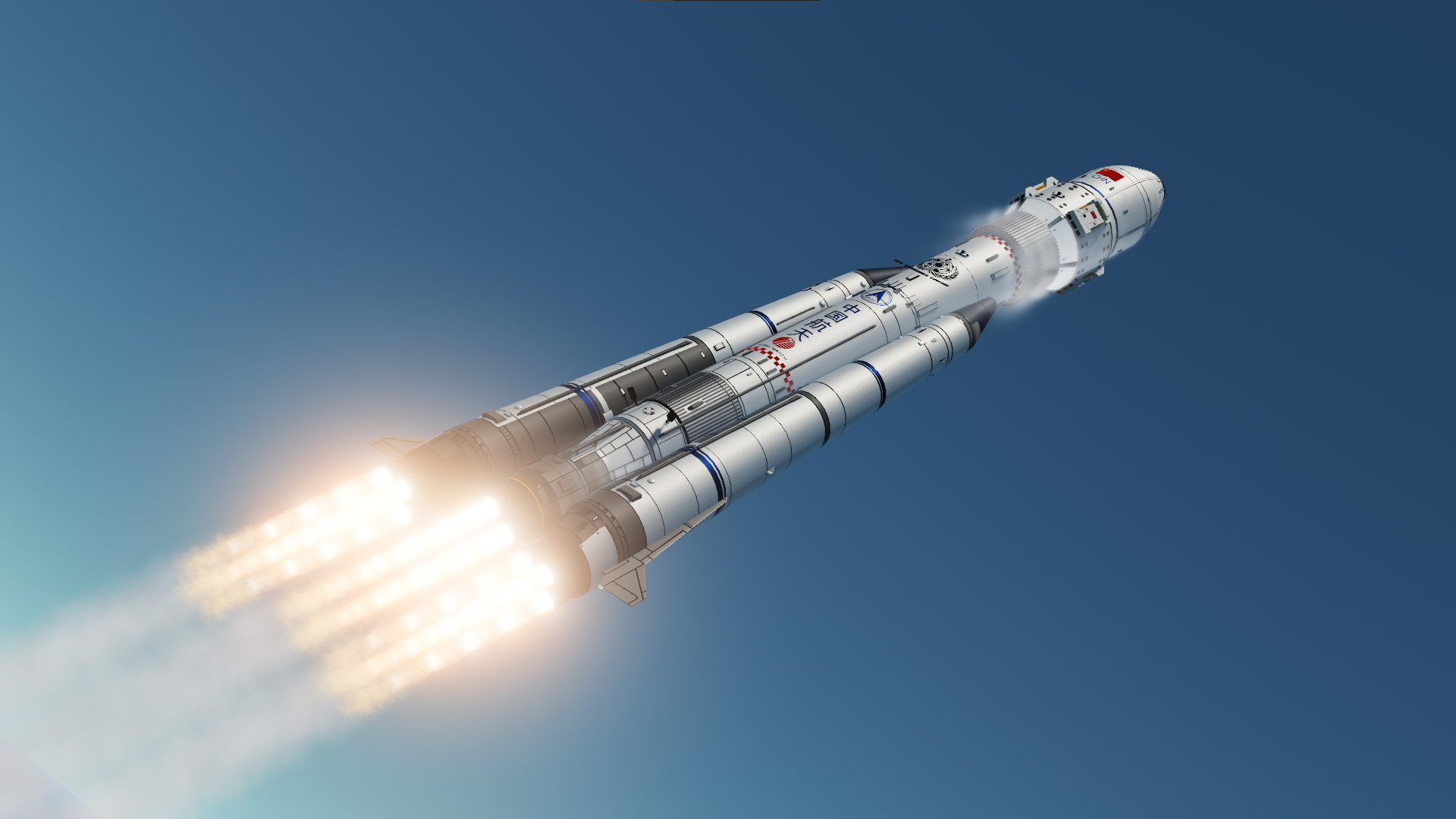
SimpleRockets 2 is a fully 3D space sim that lets you build rockets, airplanes, rovers, or anything you can imagine and explore highly detailed 3D planets. Sharing is a core concept in SR2 and it has built-in capability to easily share crafts, saved games, and even planets with the community. With SimpleRockets 2, it is easy to get started, but advanced players can dig into technical details if they are interested in the math behind rocket engines and orbital mechanics. Included are 17 different challenges to put your creations to the test. This is actual rocket science! Join us as we enter Early Access and continue adding new features, such as a Campaign Mode.

We want to make sure we are building a game that players will love, so if you have suggestions for the game, we want to hear them. Those who followed our work on SimplePlanes know that we are highly responsive to player feedback. We are taking this a step further with SR2 and have set up a Roadmap page to open up our development process and be as transparent as possible.

Build crafts by snapping parts together. Choose from the pre-built engines, such as the Mage, which is a powerful kerosene-fueled engine. Or choose the very weak, but highly efficient Ion Engine. Or you can dig deeper into the complexity of rocket science and design your own rocket engines. Choose from the eight available engine types, seven nozzles, and six fuel types. From there you can change engine size, nozzle length, throat radius, and chamber pressure, which allows for endless combinations of engines.

Use interstages to split your craft into multiple stages and piece together modular fairings to protect your precious cargo. Launch multiple crafts into orbit. You can dock with your existing crafts to build space stations, moon bases, refueling stations, and more. Take photos of your journey across the solar system with the built-in Photo Library tool.

Stretch and shape fuel tanks, wings, cargo bays, fairings, and nose cones with easy-to-use tools that help you create exactly what you want. Resize solar panels, landing gear, pistons, jet engines, etc to fit your needs. Paint your craft custom colors and tweak their reflectiveness, emissiveness, and texture styles.

Rocket science is hard, so you might run into the occasional, rapid unscheduled disassembly (i.e. explosion). It happens to even the most experienced rocket surgeons. Might as well embrace it and take advantage of the opportunity to snag some spectacular photos.

Easily drag and drop code blocks to program your crafts to log telemetry, automate them, design your own touch screens, etc. With Vizzy, a programming language designed specifically for SimpleRockets 2, you can expand the capabilities of your crafts while learning programming, maths, physics, etc.

Using Planet Studio, an in-game design tool, you can make your own planets, stars, moons, and stellar systems, starting with a large set of templates and tools to easily make infinite unique procedural celestial bodies. For the more adventurous, Planet Studio has an advanced mode with many modifiers to add and tweak different noise layers, adjusting the terrain and the biomes, as well as a paintbrush tool to be able to achieve the most complex shapes.

Orbits are realistically simulated and support time-warp so you don't have to wait several months to reach another planet. The Map View makes it easy to see your orbits and plan future burns, which you can use to set up future encounters with other planets or satellites.

The flight model dynamically updates the drag and lift characteristics of your craft as it changes. Re-entry effects kick in when you're screaming through an atmosphere at hypersonic speeds. Be careful, because the excessive heat can cause those aforementioned rapid unplanned disassemblies.

Download from a huge collection of user-uploaded crafts, sandboxes, planets, and mods on our website. Upload your own crafts and sandboxes and share them with the community. Rise through the ranks from a white level builder to a gold level builder and beyond.

FEATURES

  • Fully 3D Rocket Designer that allows building anything from basic rockets to very complicated multi-stage rockets, airplanes, rovers, satellites, robotic mechs, etc.

  • Simple to get started, but advanced players can dig into the technical details if they are interested in the math behind rocket engines and orbital mechanics.

  • Design custom rocket engines and jet engines

  • Realistic rocket physics and orbital mechanics.

  • Program your rockets with Vizzy, a Visual Programming Language, to automate basic flight maneuvers.

  • Download community-made mods, planets, crafts, and sandboxes.

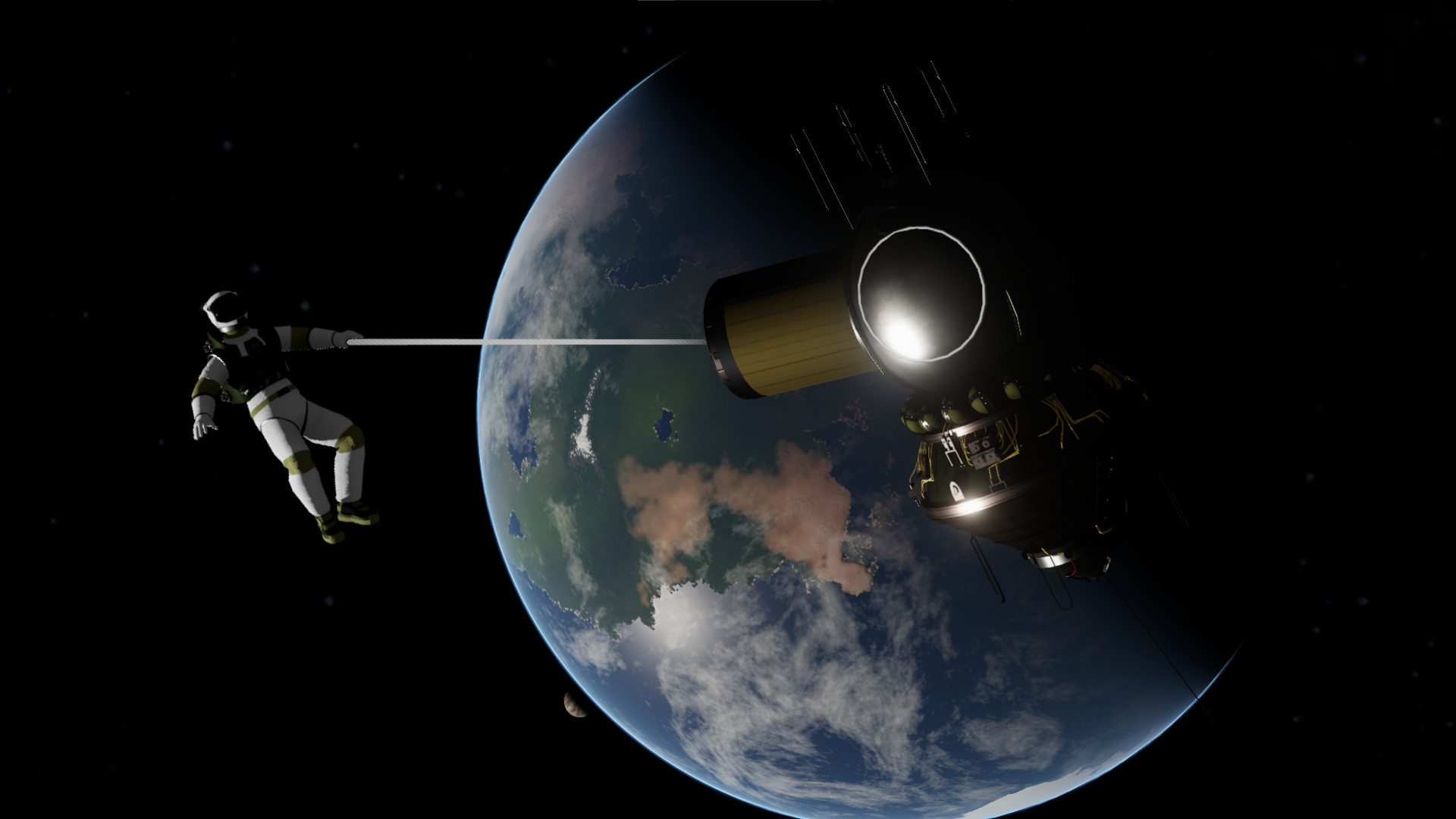
  • Includes full controllable astronauts, or space sailors, equipped with jetpacks and a grappling hook.

  • Over 30 parts, including fairings, retractable solar panels, procedural landing gear, RCS, gyro, etc.

  • Highly procedural parts that can be resized and reshaped into endless combinations, such as the resizable fuel tank and the cargo bay.

  • Map View to navigate the solar system that displays predicted orbits and encounters.

  • Fully 3D, rotating planets that support water and multiple biomes, such as desert, grasslands, tundra, etc.

  • Persistent sandbox that retains your previous launches.

  • Online community where players can upvote and comment on other players' content.

  • Several Build and Flight Challenges.

  • Parts support textures, reflections, and custom coloring.

  • Flight model dynamically updates drag and lift characteristics of your craft as it changes.

  • Re-entry effects including visual effects and part damage from heat.

  • The Nav Sphere makes it easy to control your rocket's heading.

  • The traditional Navball (FDAI) provides vital attitude information.

  • Custom Launch Locations allow launching from multiple places in the solar system.

  • Support for saving custom subassemblies.

  • Crafts can dock together in orbit and transfer fuel.

  • Built-in tutorials show you how to build a craft and how to achieve orbit.

  • Time-Warp allows fast-forwarding while in orbit.

  • Ion Engine supports burning during time-warp.

  • Supports transferring fuel between tanks and advanced fuel management such as fuel cross feeds, priority, etc.

  • Performance Analysis window makes it easy for advanced players to see how their craft's Delta-V, TWR, engine Isp, etc are changed as they build their rockets.

Show More

Download SimpleRockets 2 on PC With GameLoop Emulator

Get SimpleRockets 2 steam game

SimpleRockets 2, is a popular steam game developed by SimpleRockets 2. You can download SimpleRockets 2 and top steam games with GameLoop to play on PC. Click the 'Get' button then you could get the latest best deals at GameDeal.

SimpleRockets 2 Features

SimpleRockets 2 is a fully 3D space sim that lets you build rockets, airplanes, rovers, or anything you can imagine and explore highly detailed 3D planets. Sharing is a core concept in SR2 and it has built-in capability to easily share crafts, saved games, and even planets with the community. With SimpleRockets 2, it is easy to get started, but advanced players can dig into technical details if they are interested in the math behind rocket engines and orbital mechanics. Included are 17 different challenges to put your creations to the test. This is actual rocket science! Join us as we enter Early Access and continue adding new features, such as a Campaign Mode.

We want to make sure we are building a game that players will love, so if you have suggestions for the game, we want to hear them. Those who followed our work on SimplePlanes know that we are highly responsive to player feedback. We are taking this a step further with SR2 and have set up a Roadmap page to open up our development process and be as transparent as possible.

Build crafts by snapping parts together. Choose from the pre-built engines, such as the Mage, which is a powerful kerosene-fueled engine. Or choose the very weak, but highly efficient Ion Engine. Or you can dig deeper into the complexity of rocket science and design your own rocket engines. Choose from the eight available engine types, seven nozzles, and six fuel types. From there you can change engine size, nozzle length, throat radius, and chamber pressure, which allows for endless combinations of engines.

Use interstages to split your craft into multiple stages and piece together modular fairings to protect your precious cargo. Launch multiple crafts into orbit. You can dock with your existing crafts to build space stations, moon bases, refueling stations, and more. Take photos of your journey across the solar system with the built-in Photo Library tool.

Stretch and shape fuel tanks, wings, cargo bays, fairings, and nose cones with easy-to-use tools that help you create exactly what you want. Resize solar panels, landing gear, pistons, jet engines, etc to fit your needs. Paint your craft custom colors and tweak their reflectiveness, emissiveness, and texture styles.

Rocket science is hard, so you might run into the occasional, rapid unscheduled disassembly (i.e. explosion). It happens to even the most experienced rocket surgeons. Might as well embrace it and take advantage of the opportunity to snag some spectacular photos.

Easily drag and drop code blocks to program your crafts to log telemetry, automate them, design your own touch screens, etc. With Vizzy, a programming language designed specifically for SimpleRockets 2, you can expand the capabilities of your crafts while learning programming, maths, physics, etc.

Using Planet Studio, an in-game design tool, you can make your own planets, stars, moons, and stellar systems, starting with a large set of templates and tools to easily make infinite unique procedural celestial bodies. For the more adventurous, Planet Studio has an advanced mode with many modifiers to add and tweak different noise layers, adjusting the terrain and the biomes, as well as a paintbrush tool to be able to achieve the most complex shapes.

Orbits are realistically simulated and support time-warp so you don't have to wait several months to reach another planet. The Map View makes it easy to see your orbits and plan future burns, which you can use to set up future encounters with other planets or satellites.

The flight model dynamically updates the drag and lift characteristics of your craft as it changes. Re-entry effects kick in when you're screaming through an atmosphere at hypersonic speeds. Be careful, because the excessive heat can cause those aforementioned rapid unplanned disassemblies.

Download from a huge collection of user-uploaded crafts, sandboxes, planets, and mods on our website. Upload your own crafts and sandboxes and share them with the community. Rise through the ranks from a white level builder to a gold level builder and beyond.

FEATURES

  • Fully 3D Rocket Designer that allows building anything from basic rockets to very complicated multi-stage rockets, airplanes, rovers, satellites, robotic mechs, etc.

  • Simple to get started, but advanced players can dig into the technical details if they are interested in the math behind rocket engines and orbital mechanics.

  • Design custom rocket engines and jet engines

  • Realistic rocket physics and orbital mechanics.

  • Program your rockets with Vizzy, a Visual Programming Language, to automate basic flight maneuvers.

  • Download community-made mods, planets, crafts, and sandboxes.

  • Includes full controllable astronauts, or space sailors, equipped with jetpacks and a grappling hook.

  • Over 30 parts, including fairings, retractable solar panels, procedural landing gear, RCS, gyro, etc.

  • Highly procedural parts that can be resized and reshaped into endless combinations, such as the resizable fuel tank and the cargo bay.

  • Map View to navigate the solar system that displays predicted orbits and encounters.

  • Fully 3D, rotating planets that support water and multiple biomes, such as desert, grasslands, tundra, etc.

  • Persistent sandbox that retains your previous launches.

  • Online community where players can upvote and comment on other players' content.

  • Several Build and Flight Challenges.

  • Parts support textures, reflections, and custom coloring.

  • Flight model dynamically updates drag and lift characteristics of your craft as it changes.

  • Re-entry effects including visual effects and part damage from heat.

  • The Nav Sphere makes it easy to control your rocket's heading.

  • The traditional Navball (FDAI) provides vital attitude information.

  • Custom Launch Locations allow launching from multiple places in the solar system.

  • Support for saving custom subassemblies.

  • Crafts can dock together in orbit and transfer fuel.

  • Built-in tutorials show you how to build a craft and how to achieve orbit.

  • Time-Warp allows fast-forwarding while in orbit.

  • Ion Engine supports burning during time-warp.

  • Supports transferring fuel between tanks and advanced fuel management such as fuel cross feeds, priority, etc.

  • Performance Analysis window makes it easy for advanced players to see how their craft's Delta-V, TWR, engine Isp, etc are changed as they build their rockets.

Show More

Preview

  • gallery
  • gallery

Information

  • Developer

    Jundroo, LLC

  • Latest Version

    1.0.0

  • Last Updated

    2018-11-08

  • Category

    Steam-game

Show More

Reviews

  • gamedeal user

    Jun 28, 2021

    I would like to preface this by saying that I have played Kerbal Space Program (KSP) to almost 7000 hrs. I have done everything in KSP, modding, interstellar colonization using kilometer long starships complete with docked spaceplanes, everything. It must be noted that these are my impressions after only 240 hrs into Simple Rockets 2 (SR2). Bear with me, this will be a long, but comprehensive review and I will not be able to include all my thoughts into this review because of the character limit. Here is a TLDR: TLDR: Comparing unmodded KSP to SR2, I can without a doubt say that SR2 is in many respects an objectively superior game. Period. In almost all of its functions, Jundroo has excelled in implementing. SR2 is basically KSP2, minus the little green dudes, interstellar travel, and colonies. SR2 is extremely impressive and has HUGE potential in my eyes. I adore everything about this game and it's a shame that the community is so small, I believe the devs deserve much more. For $15, you won't regret it. CRAFT EDITOR: The craft editor is very innovative and much more in depth than KSP and is almost CAD like. You can make ANYTHING and MORE, which is done by providing the player with highly customizable parts. You get just about 50 of them, but they are the essentials and anything you can dream of you can probably make. You get a couple pre-built rocket engines and jet engines, but you can customize the engine cycle, nozzle geometry, nozzle length, chamber pressure and all this has actual performance impacts. You can create any fuselage or rocket body you can think of out of a simple cylindrical fuel tank. Lights and functional robotics are included, procedural wings and structural panels, cargo bays, customizable landing gear for air/space planes and landers, rover wheels, powerful RCS thrusters, pods, docking ports. FLIGHT: Simple Rockets 2 is a game with "rockets" in the title. However, Jundroo does not stop you there. I will compare SR2 to KSP’s aerodynamic model. Each is distinct, but I prefer SR2 over KSP. KSP's model totals up the drag of every single part on your craft, every high-part count craft you build will experience unreasonable amounts of drag no matter how you shape it which can be extremely frustrating at times. KSP has no concept of occlusion. If a part is occluded and not in the freestream, covered by a cargo bay or behind another part, the drag for the part is still applied. Sometimes it seems as though drag is non-existent in SR2. This is because, to my knowledge, SR2 understands occlusion. In other words, if you have an airplane, the part that is the nose of the craft will experience more drag than the rest of the fuselage. This goes the same for intakes, you can not just spam intakes wherever you want and expect them to get good airflow like you can in KSP. In SR2, You need to make sure that intakes are situated, not occluded, somewhere with good airflow which is not immediately blocked by other parts. Overall, SR2 is superior in this sense. The transition from KSP to SR2 was relatively easy, and the UI not a problem to learn. The UI is missing a couple things though. Apoapsis/periapsis, and ascending/descending node values are not easily viewable like they are in KSP. The maneuver planner is superior to KSP's, it functions smoother and faster. One gripe I have with this game is docking, it is unreasonably hard. This is because you have two flight control modes, attitudinal and translational. To dock, you need to be in translational mode, but you can not be in both modes at once. This leaves you in translational mode with no way to control your attitude, your orientation, so you end up constantly toggling between the two trying to get everything aligned. FINAL THOUGHTS: The SR2 community is very small, but there is a craft sharing functionality built into the game and a planet making studio. Modding support is very limited at the moment. KSP's modding community is huge compared to SR2, although SR2's player base has made a lot of cool content, and is a lot more skilled than KSP's. SR2's performance is PHENOMENAL. Compared to KSP, I can have an over 3000 part craft running on my screen at no less than 30 FPS, 300-400 part crafts running at around 60-70 FPS or more. If you tried a modded 3000 part craft on KSP, you wouldn't even get past the loading screen and if you could, a stock craft would rate at 8 FPS. On my modded KSP install I average 5-8 FPS. On SR2, 60-80 FPS.
  • gamedeal user

    Jan 9, 2023

    i have been playing the beta of career mode for juno new origins. this game is in an underdeveloped genre, so comparisons to kerbal space program are going to happen. so here are some of the differences i have seen, both good and bad. KSP career mode is clearly based on nasa. with public funding, loans, and doing actual science (mystery goo anyone) this game is more like an independent space program. you do contracts for money. your only source of money. and tech points are earned by reaching milestones such as max altitude/speed, crafts launched, and even how much money you save by recovering crafts. this game is simpler in that respect and i like that, though others may not. as for physics simulation i never got far enough along in KSP to give a fair comparison. the reason for that is the next point. controlability of crafts. i could never do much in KSP because, to me at least, properly controlling a rocket was nearly impossible. i would take a tutorial rocket and try a simple maneuver and end up sky writing. in juno new origins you start off the career mode with all the tech needed to keep rockets flying a stable course. drag the pitch and heading indicators where you want the rocket to point and it will follow them. assuming you have enough gyros/rcs/fins. then comes the programming aspect. you don't have to be a master programmer to use it. and you can use it to make repeatable launches that require no input. the tutorial orbiter you are given is just barely able to make it into orbit. and following the instructions it is easy to enter orbit. but once the instructions stop appearing how do you get to space next time? the simple answer is you put the instructions the game gave you into the program. now you can enter orbit the instant you click launch. and the repeatable nature of it means if you make a small change to your craft and test it with the same program you can compare the results directly and easily. and this feature is unlocked before the first rocket motor is.
  • gamedeal user

    Jan 22, 2023

    Juno: New Origins is a steal even at full price point and you owe it to yourself to buy this game if you any interest in games like KSP, where there is a focus on engineering, space flight and orbital mechanics, and just designing and building stuff in general. It improves on the original KSP formula in 4 important ways: 1) Interface: In my opinion the interface is much easier to use than KSP, and this goes for making simple or complex craft. It doesn't matter whether you're designing rockets, planes, or cars the designer stands head and shoulders above any other game in this genre. The game also gives you all the most important information at any given time and it's really good at helping you to take a scientific approach to building your rockets. This streamlined interface carries over into the flight simulation as well. Controlling your crafts is intuitive and again all the important information and display panels are easy to find and manage. 2) Accessibility: The tutorials are significantly better than KSP. What's nice is that the tutorials are integrated with the career mode, you don't have to do a ton of reading or tutorials before you can 'start playing the game'. You'll have specific missions coming up from time to time with tutorials integrated with them, but there's plenty of time in between to do your own thing. The game does a fantastic job of easing new players into its complexities. 3) Career mode: The addition of the career mode is what took this from a great space sim to the best space sim that I've played. Like KSP, it gates your progress through a combination of tech trees and funding which is great because it means at every stage of the game you'll have to be creative and figure out the best way to achieve a goal within the limits of your existing tech and budget. It improves on the KSP formula though by giving more mission types, specifically with regard to missions for other vehicles like planes and cars. These were present in KSP but never really implemented well whereas Juno gives milestones specifically aimed at things like land speed records etc. 4) Complexity: This is, hands down, the single biggest improvement over KSP. Even though the developers have managed to make this significantly more accessible compared to KSP, it's also deeper and more complex in every area that matters. The fact that you can design and customize every part means that not only is it easier to design crafts, it's also a lot more specific or granular. I love that engines can be edited down to fuel type, nozzle length etc. and it's this attention to detail that makes you feel like you're a real rocket scientist trying to squeeze every drop of efficiency out of your designs. TL:DR Juno: New Origins is an awesome game, buy it!
  • gamedeal user

    Feb 26, 2023

    Yea, so KSP 2 Early Access absolutely broke my back (I'am a camel) Basically, while KSP 2 is drowning in bugs and awful optimization, try out this game. Why? Let me become a salesman for a second. 1)It can run on a potato (even cheap android phones can run it no problemo). 2)It also has a publisher that I honestly trust more. Why? KSP 2 is published by Take Two (Private Division is a child company of Take Two), who are known greedy scumbags and it makes me shiver. Juno, on the other hand, is both developed and published by the good old Jundroo (it's just a small indie team!), who I know have years of experience from SimpleRockets 1 and SimplePlanes. I simply trust them more, even if they make updates at a turtle speed :3 3)Flexibility. Yea, all parts are procedural! Yea, crafts may not look as pretty as when they are done using pre-made assets. But. All parts are procedural! If you devote enough time, your crafts will look and perform brilliantly. 4)Built-in programming language. Of course I have to talk about Vizzy! Want to make an automated rocket?You can with Vizzy! Just snap some code blocks together and spend next 10 hours debugging your garbage code :3 5)It has mods! And community made crafts! And custom planets! And custom solar systems! So much custom stuff! ......though the community is not that big. This is why we need fresh blood. Join us. 6)Graphics??? They are good! But why are you playing a rocket building simulator for graphics? 7)50$ for barely working KSP 2??? ehehe, Juno is only 20$ I hope you will at least try this little gem. May take a bit of time to understand it, but it will be worth it! Was I a good salesman?
  • gamedeal user

    Nov 8, 2018

    Really enjoying this so far, glad I purchased this on Day 1 so that I can see the game grow and develop! Some of my personal recommendations for the devs (I'm just one unqualified voice out of many so please feel free to ignore me!). Also some of my suggestions may look very Kerbal-esque, but that's possibly to be expected for a review of a game in this genre. - Camera view while flying craft is a bit annoying - I want it to be sharp and snappy when rotating using the middle mouse button. Instead the camera continues to 'glide'. - Please consider building a proper navball in to the game. - Would love to be able to see an atmosphere thickness scale while flying. - Would prefer to see all my stages while flying, not just the next one. - A window containing all the flight data I need at a glance would be great. Apoapsis, Periapsis, etc etc. E.g. Mechjeb-esque. - I'd appreciate knowing what the different speed settings are (2x, 4x etc). That way when I get further into the game, if I have a 30 minute burn to make I know I can set it to 4x and return in 7 minutes etc). - The ability to stage solar panels etc would be great, and to highlight which ones I am activating when hovering over the relevant option in the activation window. - I tend to use middle mouse button to control camera rotation. It's a bit annoying when I accidently click on the pitch or yaw controls and it responds to MMB - I would prefer the option to turn this off and make pitch/yaw controllable by LMB or keyboard only. - Is it just me or is the default view of the rocket flipped? I would expect a 45deg (to the right, as I view the craft) to take me with the planet's rotation. Instead, it seems to fly against it. I lift off, point my craft to the right, but in map view I am flying to the left. Very possibly some of the above is too detailed for a game titled "Simple Rockets" if you are trying to keep it as simple/beginner friendly as possible. There's also every chance i've not given it enough time to explore and find the answer to some of these already built-in, as this is just a first glance review. I'll certainly keep this updated as I play. Features that have stood out to me so far: - I REALLY like the option to add input sliders. - I have to say I found your tutorials absolutely fantastic. They are everything I wish KSP had when I was first learning. Also "While we're waiting, I just want to say thanks for playing this game" made me smile! I recommend this game to all space genre fans! It already plays very well and has SO MUCH potential.
  • gamedeal user

    Feb 5, 2020

    It is clear that SimpleRockets is built upon a *far* better engine than genre-defining title, Kerbal Space Program. It runs smoothly, with significantly better visual effects and many Quality of Life features placing it a step above KSP. And yet, what *truly* made KSP such an excellent game was its charming presentation. That is something that SimpleRockets lacks. I'm not saying that SR needs Kerbals. But it needs *something* to give it character. Because while SimpleRockets is *technically* impressive, it is also rather soulless. For Veterans of KSP, I say this is well worth giving a try. But for player's new to the genre, you may find more engagement with the older title of KSP, despite its limitations.
  • gamedeal user

    Dec 23, 2018

    Definitely a great game, especially if you have over 1,000 hours on KSP like me. Currently it's a lot like KSP at the start but it has so much potential to be a real competitor to KSP.
  • gamedeal user

    Oct 19, 2022

    make rocket fly rocket realize you suck at rocket science rocket not fly download rocket from online realize using a different rocket doesnt make you know rocket science rocket crash repeat until rocket not crash
  • gamedeal user

    Feb 26, 2023

    There's a lot to like about Juno! The natural comparison is to Kerbal Space Program 1 & 2, but Juno has many solid features which will appeal to people who've already launched a few rockets. Cool features of Juno: - Fuel tanks and wings are fully parameterizable. - Engines can be customized! You can adjust nozzle length, throat diameter, and overall size. - There are lots of fuel types with realistic tradeoffs. - Rockets are fully scriptable from the beginning of career mode, using a well-designed Scratch-like language. - Unlike KSP 2, Juno will run on a metaphorical potato (if you're willing to sacrifice a lot of the graphics quality including heat effects). - The rocket editor is relatively straightforward to use. Limitations of Juno: - No silly astronauts making "Wheeeee!" faces, if you're into that sort of thing. - It feels somehow "drier" than KSP. - Career mode is... strange. I've had relatively little trouble earning money (by sticking with small rockets), but tech points are harder to earn. And the progression isn't always obvious. Sometimes you'll get contracts which would benefit greatly from tech you haven't unlocked. So I'm spending a lot of time figuring out how to do a lot with limited tech, and carefully rationing my tech points for when all my optimizations fail. Then I unlock the right tech and the next step is easy. If you're looking for a slightly drier, more customizable rocket simulator than KSP, Juno is excellent. But despite some genuinely helpful tutorial missions, I feel like Juno leaves the player to figure out more on their own. It is likely to appeal to people who feel like they've "outgrown" KSP. Gameplay feels more challenging in a realistic way, and so far, I'm spending much less time working around bugs and "rockets made out of springs."
  • gamedeal user

    Nov 9, 2018

    tl;dr: Fantastic. It's worth every penny even if you just put 2 hours into it. This game is just fantastic. Super fun to mess around with. Sure, the designer takes a bit of getting used to, but if you're coming over from SimplePlanes or KSP it won't take long to get used to. For being in such an early stage of early access, the game has an amazing amount of polish. All the planets are super detailed (there's even a SpaceX style landing barge hidden on the Earth analog!) and the rendering is really smooth. [h1] Pros: [/h1] [list] [*] Absurd amount of customisation, procedural parts stock, fully customisable paint [*] Super detailed planets [*] Great graphics for such low specs required [*] built-in craft sharing and sandbox sharing, great community website [*] Active, responsive devs who take suggestions. [/list] [h1] Cons: [/h1] [list] [*] [strike] Not much information is given about your rocket in the designer (yet). [/strike] Fixed in a recent update! [*] Part collisions can sometimes be wonky, but only in extreme scenarios. [/list] The sheer amount of customization you have stock is incredible, the possibilities really are endless. Plus, Jundroo's games have tended to be very easily moddable (everything's in XML), so the mods for this game are sure to be great. Their previous game, SimplePlanes, has a multiplayer mod, and a multiplayer mod for this game is already being made by a player! I highly reccomend this game to absoloutly anyone who has an interest in rockets. Edit: New bug fixes and features are solving many problems I initially had with the game. Making it even better!
Load More

FAQs

PC Games Cheaper On Gamedeal | Find The Best Deals of Games Here!

Finding the right place to get the best game deals can prove to be quite a hassle when comparing game prices on multiple sites. However, you can skip through all the trouble by letting Gamedeal handle the price comparisons and grab only the best deal prices for you!


We compare game prices on all the trusted storefronts and list game deals starting with the lowest price possible at the moment. Looking for something more specific? Search it on Gamedeal and find all the best deals and cd keys discount codes to make the most out of your bucks. 


Not sure what you looking for? Browse through our massive library of games from different genres to find epic deals for your favorite games from the biggest retailers in the market. Can’t afford the game you are looking for? Make sure to wishlist it and stay up-to-date with all the price changes in the future.


Say Bye to Hefty Game Deals!

Gamedeal is your one-stop shop to find all the best deals from your favorite retailers including Steam, Epic Games, Gamestop, and many more under one roof. Looking for games that cost you nothing? We have got you covered with our free games list that includes free PC and Playstation games.


We help you stay on top of the news with upcoming Steam sales and Gamestop promo codes to ensure you get the game of your choice at the lowest price possible. From old-school classics to modern AAA titles, there is something for everyone to play here.

More Similar Games

See All
Click To Install