
JaDE HR PC
Human Consulting Group
Download JaDE HR on PC With GameLoop Emulator
JaDE HR on PC
JaDE HR, coming from the developer Human Consulting Group, is running on Android systerm in the past.
Now, You can play JaDE HR on PC with GameLoop smoothly.
Download it in the GameLoop library or search results. No more eyeing the battery or frustrating calls at the wrong time any more.
Just enjoy JaDE HR PC on the large screen for free!
JaDE HR Introduction
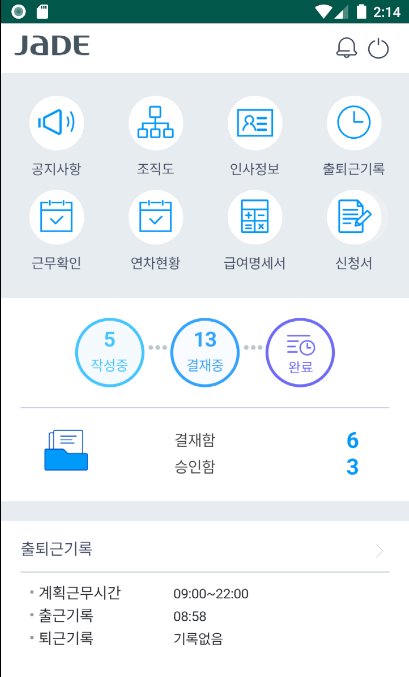
JaDE HR is an app that allows you to conveniently use the in-house JaDE HR system on your smartphone.
*Main functions
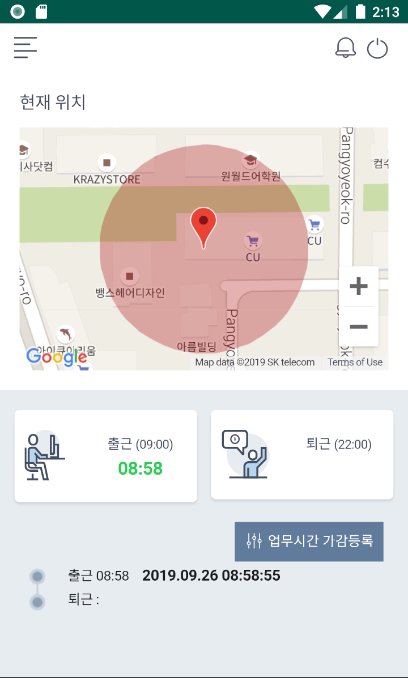
- Attendance management
You can record your commute using your smartphone's GSP information or WiFi information.
You can check working hours and overtime hours through work history inquiry.
In the annual leave status, you can check the annual leave accrual and usage details.
- Application function
You can apply and approve various applications, such as vacation requests and overtime work requests.
- Check organization, personnel and salary information
You can check organizational information and your personnel information, and search for employees.
You can check your pay stubs on your mobile phone.
- Provides PUSH function
You can receive notifications about the application, payment progress, and message reception through PUSH messages.
* To use the service, you must enter a separate service code when logging in for the first time.
[Optional access rights]
- Storage space: Required to upload attachments using the application function
- Camera: Required to upload photos taken as attachments using the application function
- Location access: Required to collect commute location when commuting with attendance function
- Notification: Required to receive notifications for attendance/personnel/application, etc.
* You can use the app even if you do not agree to the optional access rights.
* If you do not agree to the optional access rights, normal use of some functions of the service may be difficult.
Preview
Tags
ProductivityInformation
Developer
Human Consulting Group
Latest Version
1.19
Last Updated
2025-08-10
Category
Productivity
Available on
Google Play
Show More
How to play JaDE HR with GameLoop on PC
1. Download GameLoop from the official website, then run the exe file to install GameLoop
2. Open GameLoop and search for “JaDE HR” , find JaDE HR in the search results and click “Install”
3. Enjoy playing JaDE HR on GameLoop
Minimum requirements
OS
Windows 8.1 64-bit or Windows 10 64-bit
GPU
GTX 1050
CPU
i3-8300
Memory
8GB RAM
Storage
1GB available space
Recommended requirements
OS
Windows 8.1 64-bit or Windows 10 64-bit
GPU
GTX 1050
CPU
i3-9320
Memory
16GB RAM
Storage
1GB available space