
DEWALT® Site Manager PC
Stanley Black & Decker Inc
Download DEWALT® Site Manager on PC With GameLoop Emulator
DEWALT® Site Manager on PC
DEWALT® Site Manager, coming from the developer Stanley Black & Decker Inc, is running on Android systerm in the past.
Now, You can play DEWALT® Site Manager on PC with GameLoop smoothly.
Download it in the GameLoop library or search results. No more eyeing the battery or frustrating calls at the wrong time any more.
Just enjoy DEWALT® Site Manager PC on the large screen for free!
DEWALT® Site Manager Introduction
MANAGE YOUR TOOLS. ANYWHERE™.
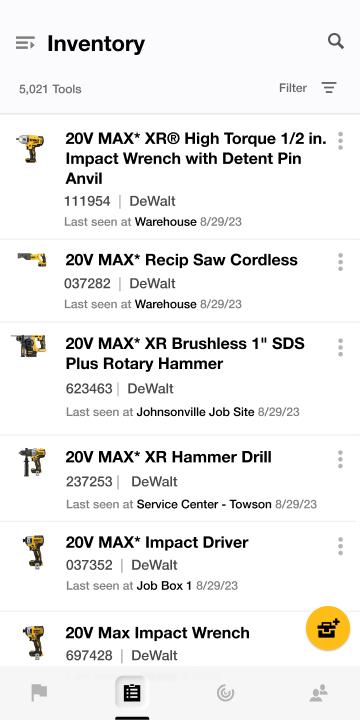
DEWALT® Tool Connect™ delivers powerful enterprise features for managing your inventory on the web and with a mobile device, whether you're at the warehouse or on the job site.
Multiple User Roles
As an Administrator, invite Managers and assign them to specific locations and inventory through the Tool Connect™ website
Pairing & Linking
Use the app to pair DEWALT® Tool Connect™ and Tool Connect+™ enabled Tools and Batteries to your account, OR link DEWALT® Tool Connect™ enabled DCE045 Tags and DCE042 Chips to your existing inventory.
Locations
Create and manage locations on the DEWALT® Tool Connect™ website for job sites, warehouses, job boxes, and more to keep inventory organized.
Importing
Import spreadsheets of locations, managers, and inventory on the Tool Connect™ website for seamless on-boarding of your existing assets.
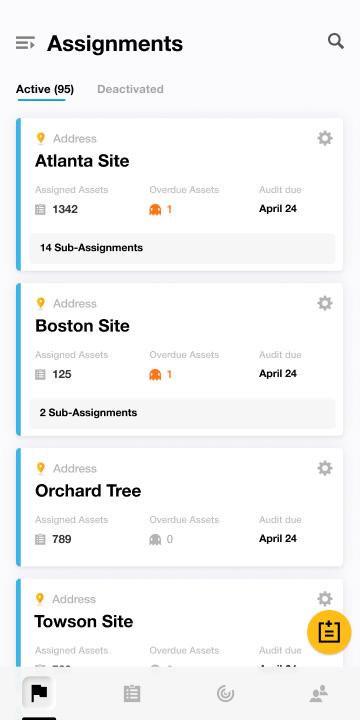
Assignments
Assign inventory to locations and managers on the DEWALT® Tool Connect™ website for greater visibility and accountability.
Audits
Enable daily, weekly, monthly, or yearly audit periods through the Tool Connect™ website and get notified of overdue tools via an emailed audit report.
Perform audits automatically using the app on your mobile device to scan for paired or linked Tool Connect™ enabled inventory.
Check off tools manually on your mobile device to audit unconnected inventory.
Works with DEWALT® Tool Connect™ and Tool Connect+™ enabled Tools, Tags, Batteries, and Connectors, bringing Bluetooth® connectivity to your inventory. Look for the Tool Connect™ logo.
Need tool control features? Check out DEWALT® Tool Connect™.
Preview
Tags
ProductivityInformation
Developer
Stanley Black & Decker Inc
Latest Version
3.4.2
Last Updated
2025-11-02
Category
Productivity
Available on
Google Play
Show More
How to play DEWALT® Site Manager with GameLoop on PC
1. Download GameLoop from the official website, then run the exe file to install GameLoop
2. Open GameLoop and search for “DEWALT® Site Manager” , find DEWALT® Site Manager in the search results and click “Install”
3. Enjoy playing DEWALT® Site Manager on GameLoop
Minimum requirements
OS
Windows 8.1 64-bit or Windows 10 64-bit
GPU
GTX 1050
CPU
i3-8300
Memory
8GB RAM
Storage
1GB available space
Recommended requirements
OS
Windows 8.1 64-bit or Windows 10 64-bit
GPU
GTX 1050
CPU
i3-9320
Memory
16GB RAM
Storage
1GB available space