
T2 Remote PC
Starkey Hearing Technologies
Download T2 Remote on PC With GameLoop Emulator
T2 Remote on PC
T2 Remote, coming from the developer Starkey Hearing Technologies, is running on Android systerm in the past.
Now, You can play T2 Remote on PC with GameLoop smoothly.
Download it in the GameLoop library or search results. No more eyeing the battery or frustrating calls at the wrong time any more.
Just enjoy T2 Remote PC on the large screen for free!
T2 Remote Introduction
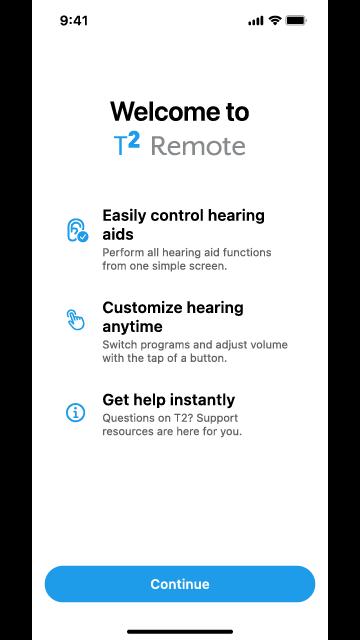
Controlling your hearing aids has never been easier with the T2 Remote app. This user-friendly app gives your mobile device the functionality of a remote control that allows you to conveniently operate your hearing aids from the palm of your hand.
HOW T2 REMOTE APP WORKS
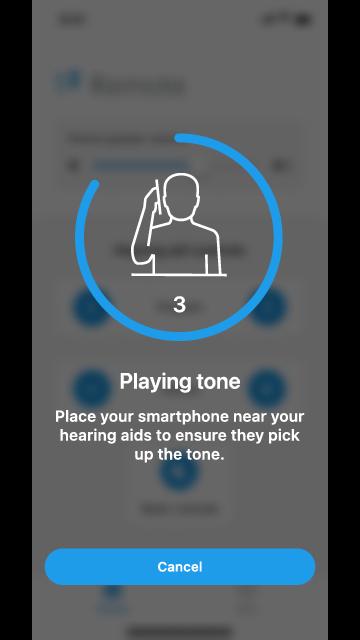
Simply make the hearing aid adjustment you want by tapping the Program, Volume, or Mute/Unmute buttons. Your mobile device will then play a tone. Hold your mobile device to your ear to ensure your hearing aids pick up the tone and then respond to it by making the adjustment. It’s that easy.
The T2 Remote app features the following benefits:
EASILY CONTROL HEARING AIDS
Increase, decrease or mute/unmute volume. Switch between programs. Adjust your phone speaker volume. All from one simple screen.
CUSTOMIZE HEARING ANYTIME
Convenient mobile device interface allows you to adjust your listening experience on the go.
GET HELP INSTANTLY
Questions about T2? Support resources are here for you, including easy-access to a searchable user guide and our Customer Support team.
Hearing aid ease and convenience awaits—check out T2 now.
Preview
Tags
LifestyleInformation
Developer
Starkey Hearing Technologies
Latest Version
4.0.0
Last Updated
2025-08-13
Category
Lifestyle
Available on
Google Play
Show More
How to play T2 Remote with GameLoop on PC
1. Download GameLoop from the official website, then run the exe file to install GameLoop
2. Open GameLoop and search for “T2 Remote” , find T2 Remote in the search results and click “Install”
3. Enjoy playing T2 Remote on GameLoop
Minimum requirements
OS
Windows 8.1 64-bit or Windows 10 64-bit
GPU
GTX 1050
CPU
i3-8300
Memory
8GB RAM
Storage
1GB available space
Recommended requirements
OS
Windows 8.1 64-bit or Windows 10 64-bit
GPU
GTX 1050
CPU
i3-9320
Memory
16GB RAM
Storage
1GB available space