
Pattern Keeper PC
Datadromeda AB
Download Pattern Keeper on PC With GameLoop Emulator
Pattern Keeper on PC
Pattern Keeper, coming from the developer Datadromeda AB, is running on Android systerm in the past.
Now, You can play Pattern Keeper on PC with GameLoop smoothly.
Download it in the GameLoop library or search results. No more eyeing the battery or frustrating calls at the wrong time any more.
Just enjoy Pattern Keeper PC on the large screen for free!
Pattern Keeper Introduction
With Pattern Keeper you can view and annotate PDF cross stitch charts. There is an initial, month-long, free trial period then there is a one time charge of around 9 USD to continue to use the app.
*DISCLAIMER-IMPORTANT*
The app is still in beta and works great with some charts but will not work with others. Backstitches and fractional stitches are not supported. Scans and images can be used but only with limited functionality.
The app is tested with charts from Paine Free Crafts, Tilton Crafts, Heaven and Earth Designs, Artecy, Charting Creations, Golden Kite, Cross Stitch 4 Everyone, Orenco Originals, Advanced Cross Stitch, and The Cross Stitch Studio. However, there is no guarantee that all charts from these vendors will work. I'm NOT affiliated with any of the listed designers and all questions about compatibility should be posed to me, not the designers.
*END DISCLAIMER*
View your chart as one continuous pattern. Easily stitch over page breaks.
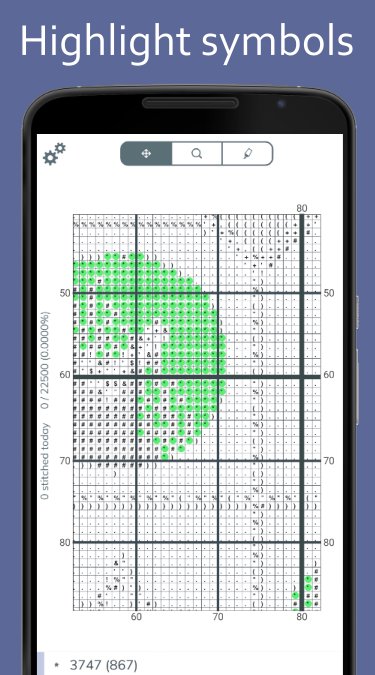
Highlight symbols to see where to stitch. When highlighting, the thread number of that symbol is shown. There is no need to flip back and forth between the chart and the legend.
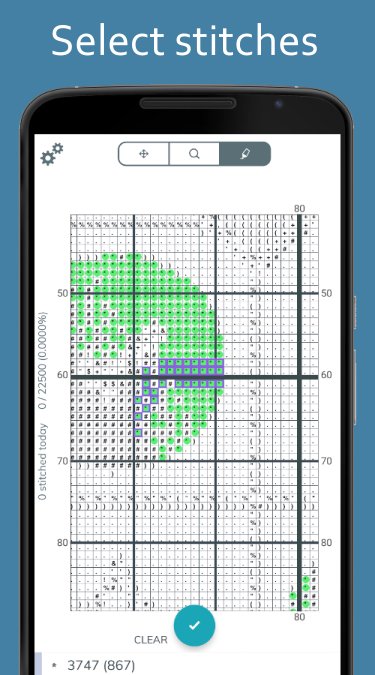
Mark finished stitches. Select easily by swiping horizontally, vertically, or even on the diagonal. It is also possible to mark an entire 10 by 10 square. If you import a chart that already has annotations in it, we try to import that as your current progress. Finished stitches are displayed in color, making it easy to navigate and compare with your stitching.
Mark where you parked your threads and in what corner of the square they are parked.
Keep motivated by tracking your progress. Get a tally of how many stitches you finished, today and in total, and see how many stitches are left for each thread.
Preview
Tags
LifestyleInformation
Developer
Datadromeda AB
Latest Version
1.0.0-beta12-minApi21
Last Updated
2025-12-04
Category
Lifestyle
Available on
Google Play
Show More
How to play Pattern Keeper with GameLoop on PC
1. Download GameLoop from the official website, then run the exe file to install GameLoop
2. Open GameLoop and search for “Pattern Keeper” , find Pattern Keeper in the search results and click “Install”
3. Enjoy playing Pattern Keeper on GameLoop
Minimum requirements
OS
Windows 8.1 64-bit or Windows 10 64-bit
GPU
GTX 1050
CPU
i3-8300
Memory
8GB RAM
Storage
1GB available space
Recommended requirements
OS
Windows 8.1 64-bit or Windows 10 64-bit
GPU
GTX 1050
CPU
i3-9320
Memory
16GB RAM
Storage
1GB available space