Step Tracker - Pedometer & Daily Walking Tracker PC
Health Group: Fitness, Eyes Protect, Drink Water.
Download Step Tracker - Pedometer & Daily Walking Tracker on PC With GameLoop Emulator
Step Tracker - Pedometer & Daily Walking Tracker on PC
Step Tracker - Pedometer & Daily Walking Tracker, coming from the developer Health Group: Fitness, Eyes Protect, Drink Water., is running on Android systerm in the past.
Now, You can play Step Tracker - Pedometer & Daily Walking Tracker on PC with GameLoop smoothly.
Download it in the GameLoop library or search results. No more eyeing the battery or frustrating calls at the wrong time any more.
Just enjoy Step Tracker - Pedometer & Daily Walking Tracker PC on the large screen for free!
Step Tracker - Pedometer & Daily Walking Tracker Introduction
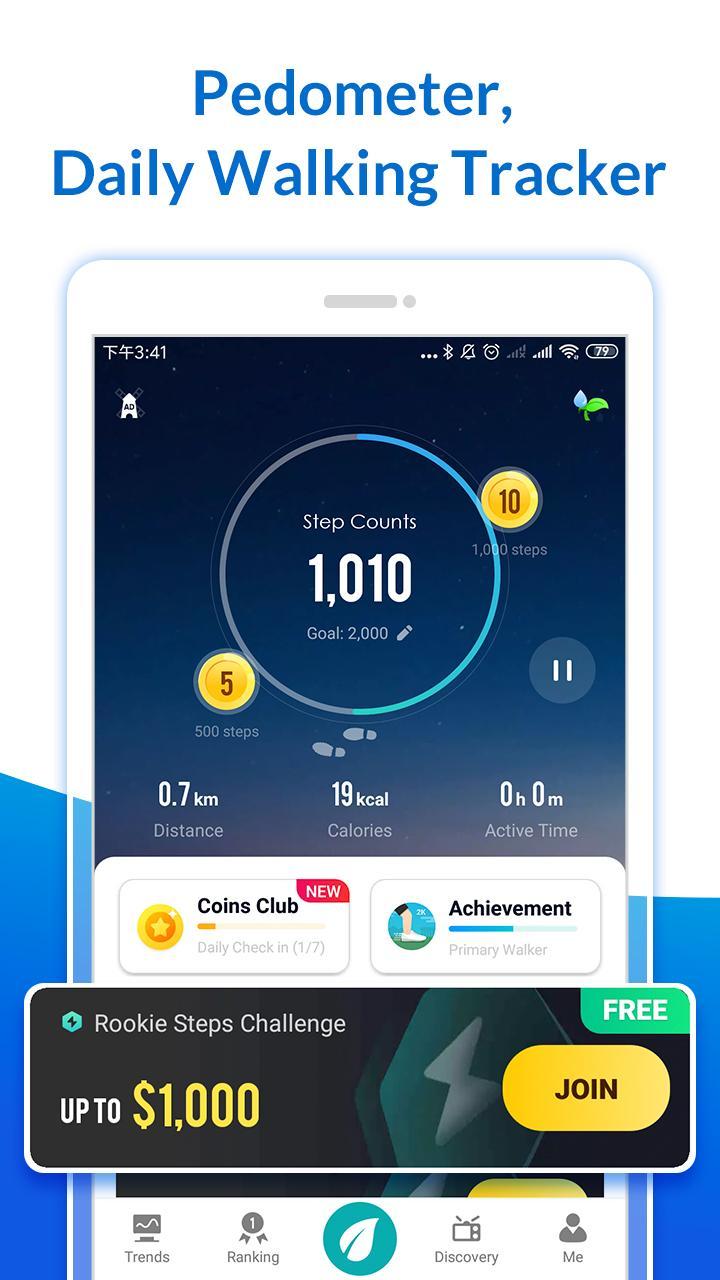
👣 This is an effective pedometer app to track your daily steps and health life. A health app to help you track distance you walking, steps counting. All the information will be visually displayed in graphs.😎
🌟Every step counts. Just enter our app and start your daily steps or activity plan, then it starts steps tracking automatically. It can auto-record your steps when your phone is with you, even your screen is locked or your phone isn’t in your hands. This step counter tracks your steps accurately, which helps you be more physically active. It can help you keep fit and get a more active life.
🔥Highlight Features for steps tracker:
⏰Real-time Step Counter
➤Record your fitness activity(number of steps, distance, weight, speed etc.)Built-in pedometer tracks your steps as you walk every day.
💐Walk & Raise Flower
➤ Remind you to water your flower every day. Flowers are your unique walking buddies in Step Tracker. Take your flower and grow healthy with it.
🏆Join Steps Challenge
➤Use 100 coins to sign up the challenge and you can earn more coins. Walk more and gain coins.
🏅Social Steps Ranking
➤Ranking daily steps, compete with your friends here, walk more and occupy your friends' cover on your pedometer. It is a free step counter that you can invite your friends to do exercise together.
💥Customized Fitness Plan
➤Set your personal goals for duration, distance, weight or interval training. Monitor your progress and adjust your schedule anytime, anywhere on your step counter.
📈Personal Health Report
➤Tracking habits and health. Customize your reporting time every day, get your daily steps and ranking reports on time automatically. Join us and get fit and active.
🎁Smart Notification Alerts
➤You can check your process in notification bar to confirm tracking your walk process always. Track your steps and activity. Make every step count.
🎨Colorful Themes
➤Multi colorful themes will be changed depends on time of the day. You can explore morning, day & night 3 different theme modes to enjoy your step counting experience with this step tracker.
💖Fashion Design
➤You will experience easy UI with Material Design, and our step tracker design will be improved by users’ opinions timely.
🏆Continuous Achievements System
➤Count your steps, track your activity and improve the accuracy of step counting to upgrade your level. Set goal, get achievement and level up.
🤔How to Effectively Use Step Tracker
➤ Adjust step counter sensitivity to set your own fitness plan base on your personal condition.
➤ Connect to Facebook and rank with your friends here. Establish friendly competitions through fit exercise to motivate each other.
➤ You can check your real-time steps by setting a fixed banner in your notification bar.
➤ Start, Pause and stop step counting more easily as you wish. Check your active time and access to the number of steps flexibly.
➤ Do fit exercise before walking. 2 minutes warm-up exercise helps you walk more safer. 2 minutes stretch exercise helps you walk safely.
👣 Pedometer-Start walking with step counting and activity tracking. Keep your Walking for training plan every day. Improve your physical fitness, strengthen heart rate and lung function, improve muscle strength through simple operations.This app can fit you to get active, and keep your health life.
Preview

Information
Developer
Health Group: Fitness, Eyes Protect, Drink Water.
Latest Version
2.0.2
Last Updated
2019-07-12
Category
Health-fitness
Available on
Google Play
Show More
How to play Step Tracker - Pedometer & Daily Walking Tracker with GameLoop on PC
1. Download GameLoop from the official website, then run the exe file to install GameLoop
2. Open GameLoop and search for “Step Tracker - Pedometer & Daily Walking Tracker” , find Step Tracker - Pedometer & Daily Walking Tracker in the search results and click “Install”
3. Enjoy playing Step Tracker - Pedometer & Daily Walking Tracker on GameLoop
Minimum requirements
OS
Windows 8.1 64-bit or Windows 10 64-bit
GPU
GTX 1050
CPU
i3-8300
Memory
8GB RAM
Storage
1GB available space
Recommended requirements
OS
Windows 8.1 64-bit or Windows 10 64-bit
GPU
GTX 1050
CPU
i3-9320
Memory
16GB RAM
Storage
1GB available space