
<英検公式>英検4級・5級スピーキングテスト PC
公益財団法人日本英語検定協会
Download <英検公式>英検4級・5級スピーキングテスト on PC With GameLoop Emulator
<英検公式>英検4級・5級スピーキングテスト on PC
<英検公式>英検4級・5級スピーキングテスト, coming from the developer 公益財団法人日本英語検定協会, is running on Android systerm in the past.
Now, You can play <英検公式>英検4級・5級スピーキングテスト on PC with GameLoop smoothly.
Download it in the GameLoop library or search results. No more eyeing the battery or frustrating calls at the wrong time any more.
Just enjoy <英検公式>英検4級・5級スピーキングテスト PC on the large screen for free!
<英検公式>英検4級・5級スピーキングテスト Introduction
[What is the Eiken 4th and 5th grade speaking test]
The Eiken Level 4 and Level 5 Speaking Test is an application for taking the official English Language Testing Association Level 4 and Level 5 Speaking Test. This is a speaking test that can be taken by all candidates who have applied for Eiken 4th or 5th grade.
【Major features】
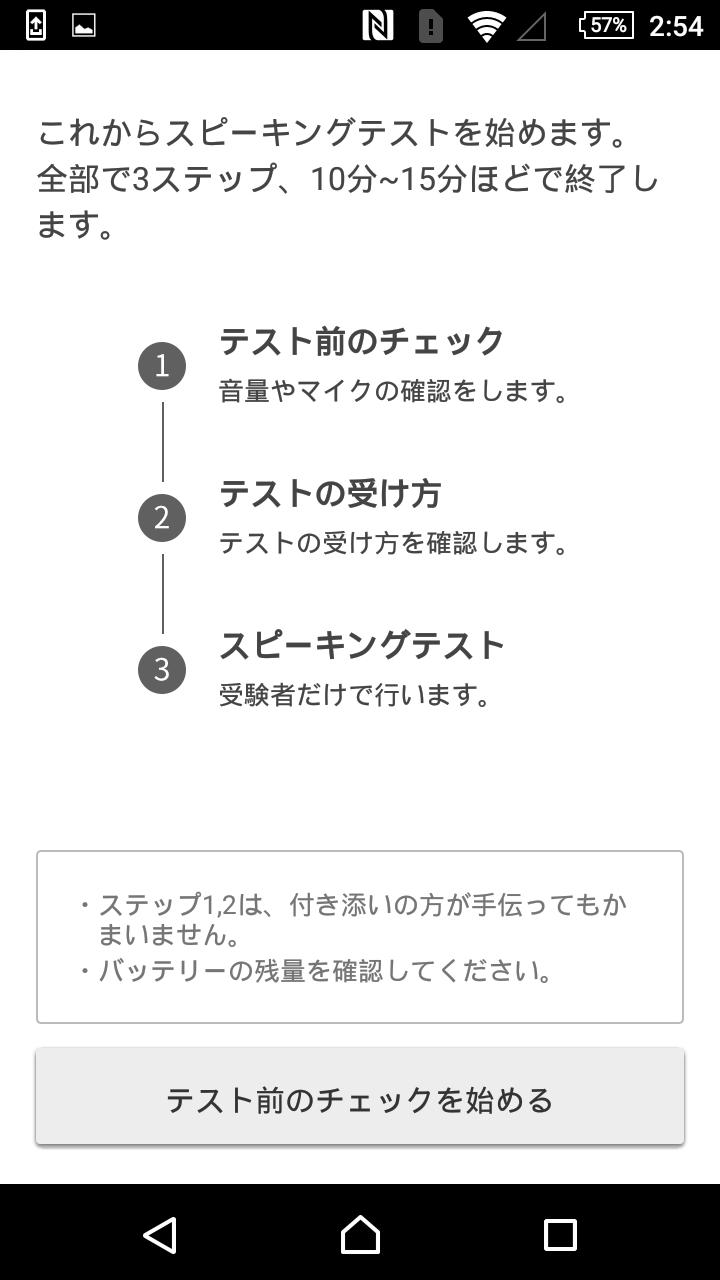
The speaking test is performed as follows.
・ Check before test
↓
・ How to take the test
↓
・ Speaking test
[Check before test]
Check the volume and operation of the microphone by checking before the test.
Adjust the volume of the sound that is played during the test, and check the microphone operation to test the sound and check that the sound was recorded without any problems.
* Your escort can help.
[How to take the test]
Next we will take the test.
In the test reception, explanations will be given on the questions to be taken in the speaking test and difficult English words. In addition, there are functions to actually experience such as silent reading and reading aloud, so that you can understand the contents before the actual speaking test.
* Your escort can help.
[Speaking test]
This is the actual speaking test. Follow the on-screen instructions of the interviewer and answer in English.
* This is done only by test takers.
[About validity period]
It is valid for one year from the test start date.
* Please note that you can take the exam only once during the validity period.
Preview

Tags
EducationInformation
Developer
公益財団法人日本英語検定協会
Latest Version
1.0.52
Last Updated
2025-08-28
Category
Education
Available on
Google Play
Show More
How to play <英検公式>英検4級・5級スピーキングテスト with GameLoop on PC
1. Download GameLoop from the official website, then run the exe file to install GameLoop
2. Open GameLoop and search for “<英検公式>英検4級・5級スピーキングテスト” , find <英検公式>英検4級・5級スピーキングテスト in the search results and click “Install”
3. Enjoy playing <英検公式>英検4級・5級スピーキングテスト on GameLoop
Minimum requirements
OS
Windows 8.1 64-bit or Windows 10 64-bit
GPU
GTX 1050
CPU
i3-8300
Memory
8GB RAM
Storage
1GB available space
Recommended requirements
OS
Windows 8.1 64-bit or Windows 10 64-bit
GPU
GTX 1050
CPU
i3-9320
Memory
16GB RAM
Storage
1GB available space