Việt Nam
  • Global
  • México
  • 中國台灣
  • India
  • Indonesia
  • Türkiye
  • Việt Nam
  • ประเทศไทย
  • Brasil
  • Perú
  • Colombia
  • Argentina
  • Россия
  • السعودية
  • مصر
  • پاکستان
  • Malaysia
  • 日本
  • 中国香港
  • Philippines
Tải xuống
Shapelab

Shapelab

84 Tích cực / 129 xếp hạng | Phiên bản: 1.0.0

Leopoly

  • Vietnam
    755458.94₫755458.94₫
    đi mua sắm
  • Argentina
    284863.78₫284863.78₫
    đi mua sắm
  • Turkey
    478778.75₫478778.75₫
    đi mua sắm

Tải xuống Shapelab trên PC với Trình giả lập GameLoop


Shapelab, là một trò chơi hơi phổ biến được phát triển bởi Leopoly. Bạn có thể tải xuống Shapelab và các trò chơi steam hàng đầu với GameLoop để chơi trên PC. Nhấp vào nút 'Nhận' sau đó bạn có thể nhận được các giao dịch tốt nhất mới nhất tại GameDeal.

Tải trò chơi Steam của Shapelab

Shapelab, là một trò chơi hơi phổ biến được phát triển bởi Leopoly. Bạn có thể tải xuống Shapelab và các trò chơi steam hàng đầu với GameLoop để chơi trên PC. Nhấp vào nút 'Nhận' sau đó bạn có thể nhận được các giao dịch tốt nhất mới nhất tại GameDeal.

Các tính năng của Shapelab

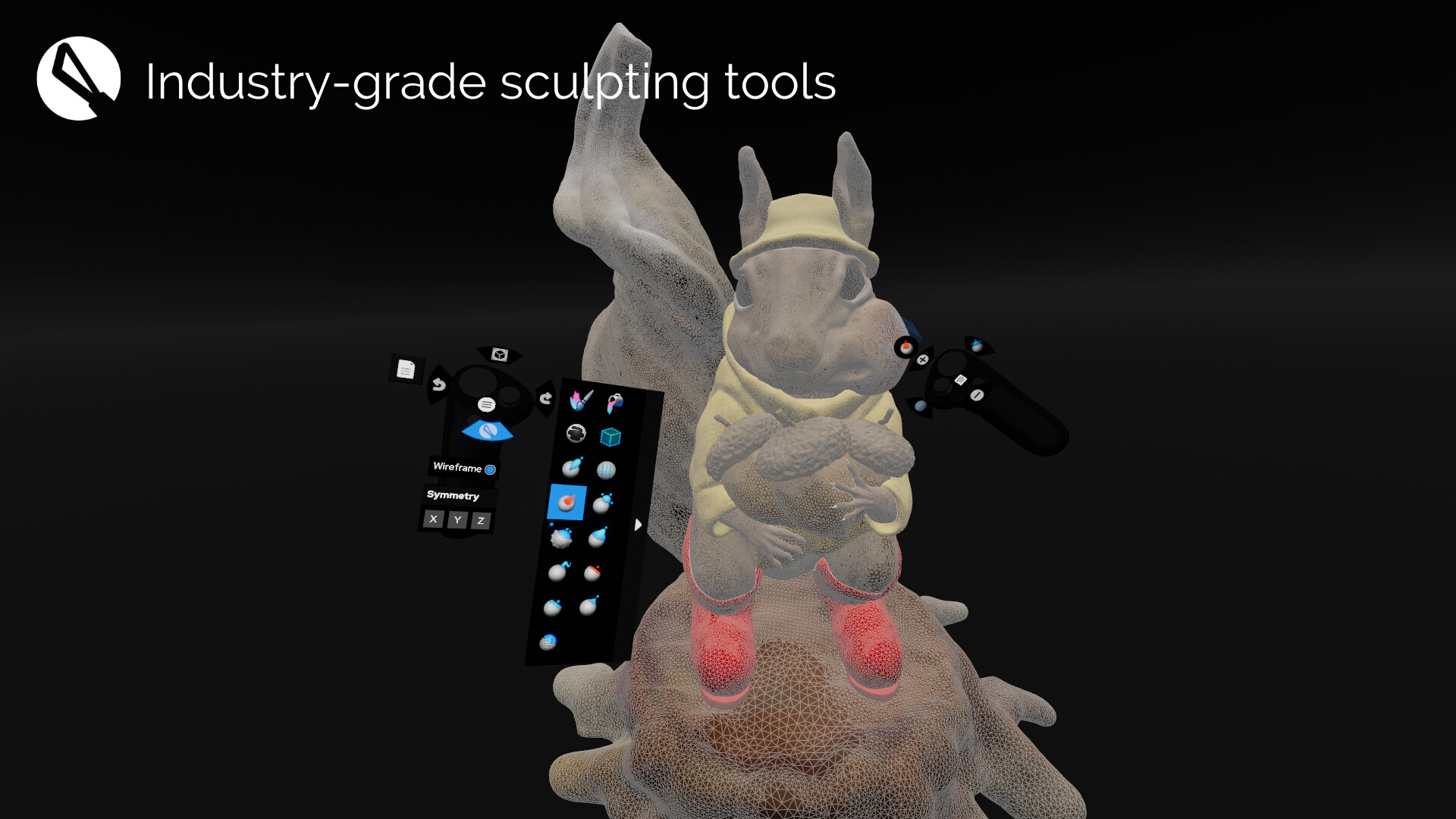
Shapelab is a highly efficient 3D sculpting application optimized for virtual reality devices. Shapelab takes advantage of VR technology to provide an immersive and intuitive interface that allows you to sculpt in 3D space, giving you a new level of control and creative freedom over your designs. With Shapelab, you can easily create organic shapes, from simple forms to complex designs. Visualize your creative ideas and print them in 3D or sculpt high-quality props, characters, and concepts for applications, games, and virtual worlds, as well as digital concept art and storyboards.

Using virtual reality for 3D modeling offers numerous advantages. It allows you to work with your creations in a more natural way as if they were physical objects right in front of you. This provides a level of immersion and depth that is simply not possible with traditional 2D modeling tools. Additionally, virtual reality modeling can increase productivity, as it allows you to work faster and more efficiently, even with greater precision in certain cases.

Shapelab’s usage of polygons instead of voxels makes it stand out in the creative VR tools market. Polygonal mesh modeling gives you the ability to sculpt stunning, well-detailed, and realistic 3D assets and allows users to import and edit large and complex 3D scans. With Shapelab's dynamic topology mode and support for industry-standard features, you can create detailed models with ease.

Join our community of artists and unleash your creativity with Shapelab today!

CORE FEATURES:

Sculpting Tools

Clay, Draw, Inflate, Surface Stamp, Smooth, Snakehook, Flatten, Trim, Pinch, Mask, Regularize, 3D Stamp

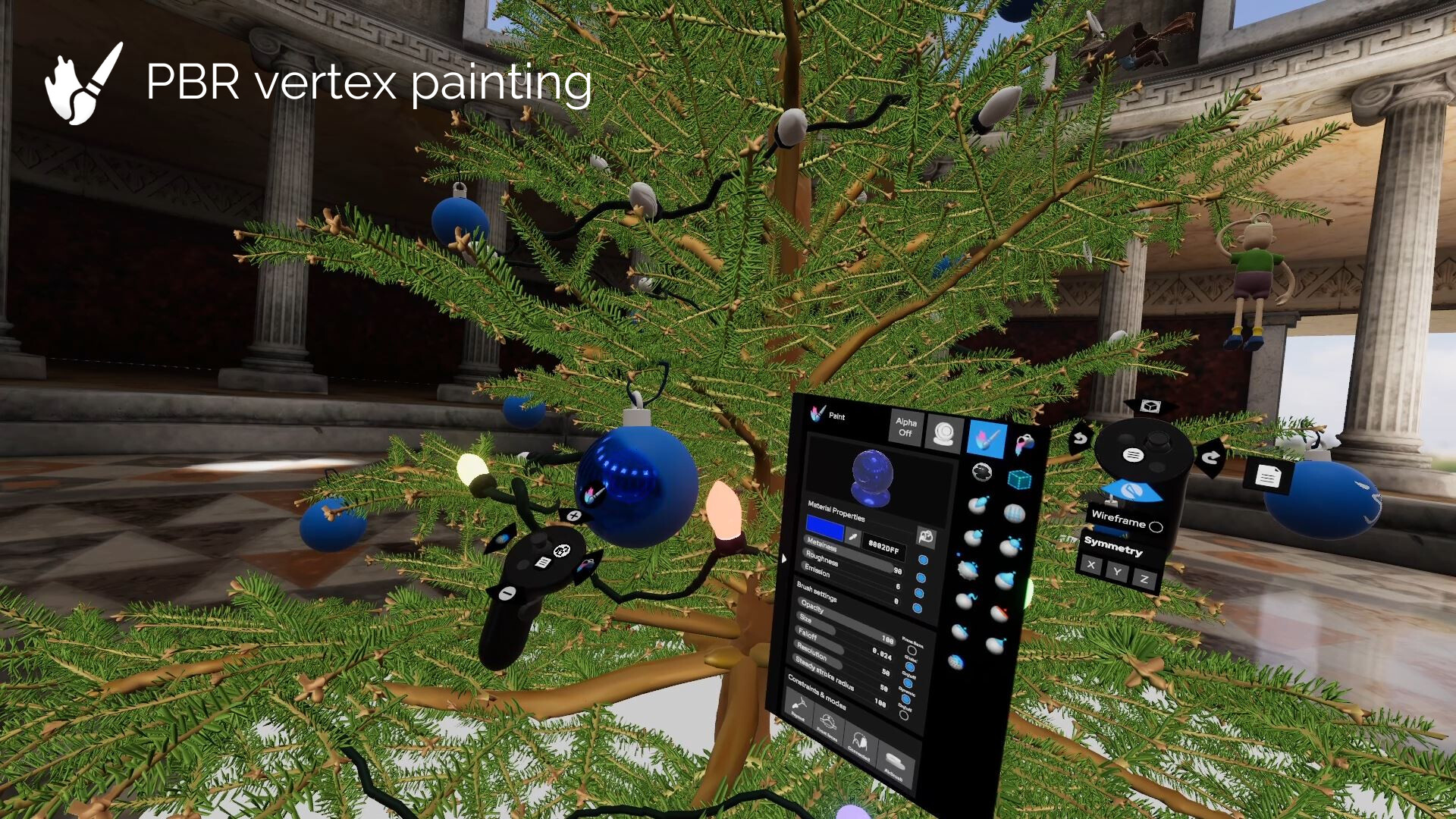
PBR Vertex Paint Features

Painting 4 different properties in total: Color, Roughness, Metalness, and Emission.

Optional dynamic topology sculpting

The feature allows for real-time tessellation of the mesh based on the level of detail needed locally. It also makes some brushes more usable and effective in creating certain shapes.

Texture export

Generate and export texture maps (normal maps, pbr properties, and colors) for your vertex-painted creations during the export process.

Global mesh manipulations and transforms

Voxel remesh, Mirror and weld, Subdivide, Decimate, Regularize, Merge vertices

Multi-object handling

- Import, Export, and manipulate objects separately

- Clone, Mirror, Merge, Subtract, Intersect, Join objects

Environments and materials

Numerous realistic materials and diverse environments to choose from

File support and Import/export

Import/export FBX, OBJ, STL, and GLB files

Cho xem nhiều hơn

Tải xuống Shapelab trên PC với Trình giả lập GameLoop

Tải trò chơi Steam của Shapelab

Shapelab, là một trò chơi hơi phổ biến được phát triển bởi Leopoly. Bạn có thể tải xuống Shapelab và các trò chơi steam hàng đầu với GameLoop để chơi trên PC. Nhấp vào nút 'Nhận' sau đó bạn có thể nhận được các giao dịch tốt nhất mới nhất tại GameDeal.

Các tính năng của Shapelab

Shapelab is a highly efficient 3D sculpting application optimized for virtual reality devices. Shapelab takes advantage of VR technology to provide an immersive and intuitive interface that allows you to sculpt in 3D space, giving you a new level of control and creative freedom over your designs. With Shapelab, you can easily create organic shapes, from simple forms to complex designs. Visualize your creative ideas and print them in 3D or sculpt high-quality props, characters, and concepts for applications, games, and virtual worlds, as well as digital concept art and storyboards.

Using virtual reality for 3D modeling offers numerous advantages. It allows you to work with your creations in a more natural way as if they were physical objects right in front of you. This provides a level of immersion and depth that is simply not possible with traditional 2D modeling tools. Additionally, virtual reality modeling can increase productivity, as it allows you to work faster and more efficiently, even with greater precision in certain cases.

Shapelab’s usage of polygons instead of voxels makes it stand out in the creative VR tools market. Polygonal mesh modeling gives you the ability to sculpt stunning, well-detailed, and realistic 3D assets and allows users to import and edit large and complex 3D scans. With Shapelab's dynamic topology mode and support for industry-standard features, you can create detailed models with ease.

Join our community of artists and unleash your creativity with Shapelab today!

CORE FEATURES:

Sculpting Tools

Clay, Draw, Inflate, Surface Stamp, Smooth, Snakehook, Flatten, Trim, Pinch, Mask, Regularize, 3D Stamp

PBR Vertex Paint Features

Painting 4 different properties in total: Color, Roughness, Metalness, and Emission.

Optional dynamic topology sculpting

The feature allows for real-time tessellation of the mesh based on the level of detail needed locally. It also makes some brushes more usable and effective in creating certain shapes.

Texture export

Generate and export texture maps (normal maps, pbr properties, and colors) for your vertex-painted creations during the export process.

Global mesh manipulations and transforms

Voxel remesh, Mirror and weld, Subdivide, Decimate, Regularize, Merge vertices

Multi-object handling

- Import, Export, and manipulate objects separately

- Clone, Mirror, Merge, Subtract, Intersect, Join objects

Environments and materials

Numerous realistic materials and diverse environments to choose from

File support and Import/export

Import/export FBX, OBJ, STL, and GLB files

Cho xem nhiều hơn

Xem trước

  • gallery
  • gallery

Thông tin

  • Nhà phát triển

    Leopoly

  • Phiên bản mới nhất

    1.0.0

  • Cập nhật mới nhất

    2017-03-23

  • Loại

    Steam-game

Cho xem nhiều hơn

Nhận xét

  • gamedeal user

    Oct 5, 2021

    TL;DR: The best polygon-based VR sculpting software out there. Having tried it, I would have easily paid double. 10/10, can't wait to see what the next updates bring. -------- I'm normally too lazy to write reviews, but I overcame that for SL. If you are a 3D artist, or an aspiring one like me, do NOT ignore this tool. I've tried pretty much everything that is out there in terms of VR creation tools; Adobe Medium, Gravity Sketch, Quill, OpenBrush, Kodon, and of course, ShapeLab. Currently I make use of a mix of Gravity Sketch, Medium, and now ShapeLab, on a daily basis. As a guy who is most comfortable in Blender, ShapeLab feels very familiar to me, almost like a subset of Blender's sculpting features, but in VR form, which is just unbeatable for letting your creativity run wild. The dynamic retopo that it does automatically for you is really great, as well as the regularize, decimate, and smooth functions that can be applied to the whole mesh. The ability to use one of the many provided materials is great for visualizing the final outcome. The newly added alpha support is a lot of fun; again, similar to using alphas in Blender. In terms of performance, I haven't seen any stability issues and my computer hasn't caught fire even when working with a high resolution mesh. I've pushed it quite high and had no issues, 500k - 1 million polys. I can't say the same for Medium, where as soon as I get into the higher voxel numbers, I start to feel like I'm watching a stop-motion movie. I'm running a Ryzen 3300X 4.2 GHz paired with an Nvidia 1650 Super, and it's been smooth as butter. I did have a crash when trying to import a multi-million + poly model made in Medium, but that is probably just asking too much, and I should have decimated when I exported from Medium. Speaking of Medium, obviously, its voxel modelling offers some advantages that polygon sculpting can't provide, namely the ability to disconnected material anywhere, and on the same layer. You can achieve something kind of similar now using ShapeLab's multiple objects and boolean operations. The boolean operations are still in the early stages. They've been working well for me so far. The brushes are all very sensible and useful. The trim brush has actually been better for me for flattening than the actual flatten brush, but both have their place. A note on the trim brush: don't neglect the "lock plane" option in the trim brush settings, it's very useful for hard surface type sculpts. I found that I can use the flatten brush to create a flat spot, and then using the trim brush with the "Dynamic" and "lock plane" settings enabled, I can extend that flat spot and create a perfect surface. Great for mechanical stuff or sharply angled planes. Even just with this tool combo, I've found ShapeLab so much easier to use for hard surface sculpting than Medium, since Medium really wasn't designed in the proper way for that. The masking is insanely useful and powerful, and is one of the things sorely lacking from Medium that is really a core feature of any sculpting tool. The ability to mirror on 1, 2, or 3 axes at the same time is really key and it's something missing from other software I've tried. Really appreciate that. The UI/UX is great in my opinion. I especially like the ease of using the left thumb stick to quickly switch between brush mode and object/layout mode. The undo/redo placed on the left/right stick axis makes it really easy to undo your mistakes, a feature I use probably 20 times per minute. The object mode tools are efficient to get to, and in particular the clone tool is so quick and user-friendly. The clone tool would be the perfect partner of the boolean operations, if only we could apply booleans to more than 2 objects at a time. I made a note about that below. --------- Some minor gripes and wants that I hope will be rectified in an update down the road: - The documentation and tutorials that are available are pretty skimpy, I'd like to have more of those to help me better take advantage of everything ShapeLab can do. But I think I read that the devs are working on that. The ShapeLab Youtube channel has a few nice videos where you can watch some pros work with the program, but they aren't voice narrated and are quite sped up so I found myself pausing a lot to zoom in and squint to find out what tool/setting they were using to achieve some effect. - I've noticed that the pinch/crease brush tool doesn't remember my setting for "To Point" or "To Line" when I change to a different tool and then come back. This is annoying because it also happens when I use the alt trigger to quickly smooth something out, and then I have to always remember to switch it back. - I wish I could select more than 2 objects for boolean operations. Ex. if I put down a bunch of primitives, it would be nice to be able to select them all and run a Union on them all at once, to make some quick base meshes to work from. This might be computationally really heavy, not sure, but it would be a nice-to-have. - Would be nice to be able to detach a specific menu box from the controller. Ex. in Gravity Sketch, when I know I will need to change settings around often, I can grab and drag out the brush settings panel and leave it floating off to the side so I can quickly change things. - Scrolling between tools by pressing left and right on the right thumb stick seems a bit misplaced to me. I think I've seen that in other programs, the up/down on the right stick controls brush size, as in SL, and left/right controls the falloff/inner radius of the brush. Or you might consider letting us switch back to the previous brush with left/right. My problem is that I can't remember the order of the brushes in the tool panel, and so I always end up switching to the wrong brush, haha. But it's a minor issue. - Down the road, the ability to define different face sets for masking would be really handy (it's something I use in Blender a lot). Again, a minor nice-to-have. - Some additional options for painting colors would be nice, like different color modes e.g. darken, multiply, dodge, screen, etc, would be nice. ---------- Over all, a really amazing tool that is currently unmatched in the VR world. I could really only see a couple of competitors down the road: Substance Modeler (Adobe's remake of Medium, currently in private beta), and possibly Kodon, which has amazing marketing videos, and which I also recently bought, but it's a constant crashfest and half the functions don't work yet. Thanks for your hard work, devs, you deserve more recognition for this software, hopefully as VR design becomes more and more mainstream, you'll all become millionaires and retire to private islands.
  • gamedeal user

    Jun 2, 2023

    The recent update is enforcing users to register an additional account outside of Steam. This change was implemented without proper prior announcement or communication. Users who have previously purchased the perpetual license on Steam should be able to continue using the software without any interruptions. It is worth noting that even Adobe's perpetual licenses for their Steam Edition software, such as Substance Painter and Substance Designer, do not require the registration of any additional accounts or the need to be logged in just to launch the application. As an owner of a perpetual license, I am currently unable to launch and continue using the Steam Edition of ShapeLab that I have purchased, unless I register an external account and remain connected to the internet. UPDATE: I believe I am one of many Legacy Users who have been abruptly denied access to the software. I am not inclined to contact the developer and provide them with my personal data solely for the purpose of accessing the previous version of the software, which I already had the access and right to use. Moreover, the request for convenient access to the previous version for all Legacy Users, without requiring each individual to separately contact the developer outside of Steam, has been completely disregarded by the developers.The transition from the legacy version to the one with a launcher and the overall interaction with the legacy users should be managed in a more professional manner.The act of compelling users to register an account outside of Steam in order to obtain access to the software for which they have made a payment before the change is in violation of the regulations stipulated by EU consumer law.
  • gamedeal user

    Jun 9, 2023

    This was an app I really did enjoy, but I can't support the mandatory addition of a separate launcher. The whole point of picking up software through Steam (for me at least) is minimizing the number of accounts, install pages, LAUNCHERS, etc. that I have to deal with. This is the sort of weird change I'd expect from a giant like Adobe with a captive audience.
  • gamedeal user

    Nov 2, 2021

    ShapeLab comapre to other VR sculpting tool like Medium or Kodon. From the marketing seem to be the worst but after real use experience ShapeLab do not have any fancy thing but turn out to be the best in usability. Medium is lack of surface sculpting tool which is hard to make an exact shape for detailing. Kodon is too unstable for real project. ShapeLab live inbetween - the surface sculpting is good so you can make any shape do you want but of course not as creative as Medium voxel but it just work and have most stand tools for digital sculpting. - performance is best of 3 and very stable. the tesselation tech in ShapeLab have better performance then ZBrush Sculptris Pro or Blender Dyntopo it can tesselate on object of 12 mil pocount very fast which is surprise.
  • gamedeal user

    Jun 4, 2023

    HELLLLLL NOOOO! go back to the previous version and get no future updates for a program I paid to use in full?. this is definitely sounding like a bigger and bigger legal issue with every post and reply I am seeing here. I want ALL the updates for a program I paid for under the terms and agreements of my initial purchase when I consented to those agreements. That's like ordering food and when it gets to the table they tell me I have to pay more because the chef made it so good they had to up charge me for the same item. this is literally so upsetting that this is the way you want to treat the people who helped you when you were literally nothing. like actually, you wouldn't even be talking about this without all of our support and money. I'm sure it will be some shady "SHAPELABS PRO" that will come out soon to leave all your initial supporters left with a half finished product that we would own fully. why you couldn't just grant users a continued service as supporting members of this community is beyond me. bad business practice for sure. The response from the team is even worse with a copy and paste method to a post we all read for sure then offering a previous version without any updates as punishment (cause that is not a fix at all) for not giving up our info and pretty much hinted that new paid products (cause if they were free they'd be updates) that we would have to purchase im sure. The fix is simple scrap the nonsense and get back to providing the service that was promised upon purchase. The Tool is 60 bucks like no you,re finishing this product fully then you can do your money hungry corporate tactics on your next project for people who are told upfront of what the plan for that is. clearly you want to move to have us give you money monthly for as long as we can stand it when we were promised a full finished product by the end of this EARLY ACCESS software. if this was a finished product I would get it because you get what you paid for off the bat. but we believed and trusted you to create a product that would help us in our careers without completely screwing us over before the finish line. At first I wanted a full refund but then I realized that would only harm me and hinder my work. Instead Ill stay here with the others until what we were originally promised is returned to us with the updates. i dint pay for early access unfinished garbage i paid for a professional tool by professional people while others get a better version because they didn't understand the next steps you would take after this move. Please dont respond with that like to the article like you did with everyone else. if you do people can get a clearer picture of your poor damage control instead of customer resolution options.
  • gamedeal user

    Jul 7, 2018

    Use design wise It has the potential to be amazing, but it crashes all the time. I've over the system requirments and it regularly gets stuck processing :( In the last hour I've had to restart it 4 times, hopefully the next update helps this.
  • gamedeal user

    Jun 2, 2023

    Toyed around with this in the past and I saw the potential, it was missing a few key features I was looking for and I had intended to come back when I felt it was worth putting time into. I've pretty much mastered Adobe Medium but I feel that on its own, Medium is pretty limited without the help of Blender or Nomad Sculpt so I thought I'd give Shapelab another chance... Well, I won't be giving it another chance and I wish I was still within the refund window. I'm not signing up for an account for an app I already purchased and have been able to use perfectly fine without one. It's got absolutely nothing to do with keeping users up to date with news or offering a better service because news about the software is available right on steam and they've periodically pushed out QoL updates and new features regardless. Signing up for an account is purely for tracking and marketing purposes because their update notes say users will receive emails about "offers" even though they've already purchased the software... so offers on what? I'm sticking with Medium and Blender, which are both completely free by the way.
  • gamedeal user

    May 31, 2023

    The dev implemented mandatory online DRM and telemetry. Update: Re: Dev's response I've been using your software with 0 internet connection for all that time. I bought it because I could use it that way. Then you say that the program which could function perfectly without internet connection before, now requires internet connection and referring to some "industry standards". I know what industry standards mean. Industry standards mean "zero respect for the userbase", mean "adobe". Those kind of standards, I don't need them. Show people who supported you from the beginning some respect please. At very least provide a completely offline version as a "beta branch". As for "can't support online and offline version at the same time", that is simply not true. You can easily hack it by adding the default account and setting "call home frequency" to once in 10000 years. If you wouldn't add it, it's not because you can't, but because you don't want to.
  • gamedeal user

    Jan 29, 2023

    This is definitely something you should try. If you have a VR headset like I do, and if you've always wanted to try working with 3D models. But you, like me (probably), are put off by the cluttered interface of today's 3D editors.
  • gamedeal user

    Jun 3, 2023

    most recent update requires the registration of an external account off of steam in order to use the software you need to make an account for a 60$USD game on an external website or else you can no longer use the product you paid for. it seems that Leopoly are just trying to turn away their entire playerbase with this honestly stupid decision, no matter the data collecting concerns.
Load More

Câu hỏi thường gặp

PC Games Cheaper On Gamedeal | Find The Best Deals of Games Here!

Finding the right place to get the best game deals can prove to be quite a hassle when comparing game prices on multiple sites. However, you can skip through all the trouble by letting Gamedeal handle the price comparisons and grab only the best deal prices for you!


We compare game prices on all the trusted storefronts and list game deals starting with the lowest price possible at the moment. Looking for something more specific? Search it on Gamedeal and find all the best deals and cd keys discount codes to make the most out of your bucks. 


Not sure what you looking for? Browse through our massive library of games from different genres to find epic deals for your favorite games from the biggest retailers in the market. Can’t afford the game you are looking for? Make sure to wishlist it and stay up-to-date with all the price changes in the future.


Say Bye to Hefty Game Deals!

Gamedeal is your one-stop shop to find all the best deals from your favorite retailers including Steam, Epic Games, Gamestop, and many more under one roof. Looking for games that cost you nothing? We have got you covered with our free games list that includes free PC and Playstation games.


We help you stay on top of the news with upcoming Steam sales and Gamestop promo codes to ensure you get the game of your choice at the lowest price possible. From old-school classics to modern AAA titles, there is something for everyone to play here.

Các trò chơi tương tự khác

Nhìn thấy tất cả
Bấm để cài đặt