Smart Settings 電腦版
Root Uninstaller
用GameLoop模拟器在電腦上玩Smart Settings
Smart Settings 電腦版
來自發行商 Root Uninstaller 的 Smart Settings 能夠在安卓系統上運行。
現在,您可以在電腦上使用 GameLoop 模擬器流暢地玩 Smart Settings。
在 GameLoop 遊戲庫或搜索結果中下載。 不需要再暢玩遊戲時盯著電池電量或被令人懊惱的來電打斷。
只需在電腦大屏幕上免費下載暢玩Smart Settings 電腦版!
Smart Settings 簡介
智能設置是一個工具,自動化和設備設置,優化環境意識和節電。
例如,當設備連接到會議室的無線上網,“會議”的文件將自動啟動,或者當你離開公司的WiFi,原來“室外”的文件。
如何智能環境工程
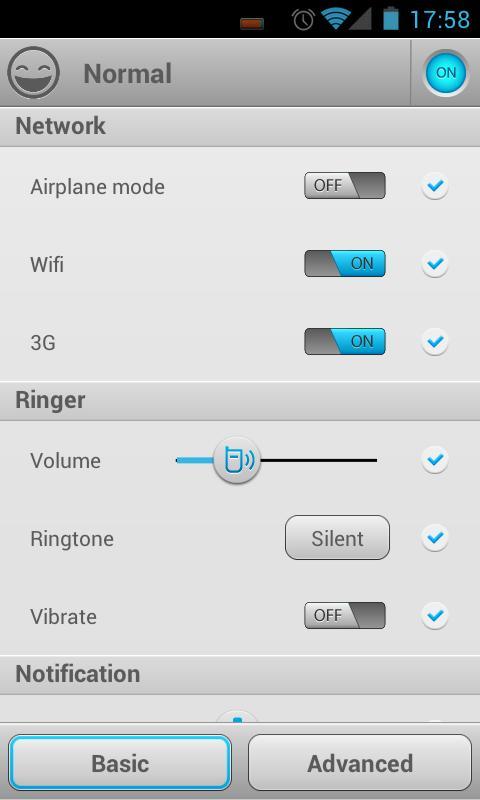
配置文件是一組設備的設置,包括:
☆網(飛行模式,無線,移動數據,全球定位系統),
☆林格氏液(音量,鈴聲,震動),
☆通知(音量,鈴聲,震動),
☆報警(音量,鈴聲),
☆顯示(亮度,壁紙)
☆同步,媒體,雙音多頻,語音通話,系統設置。
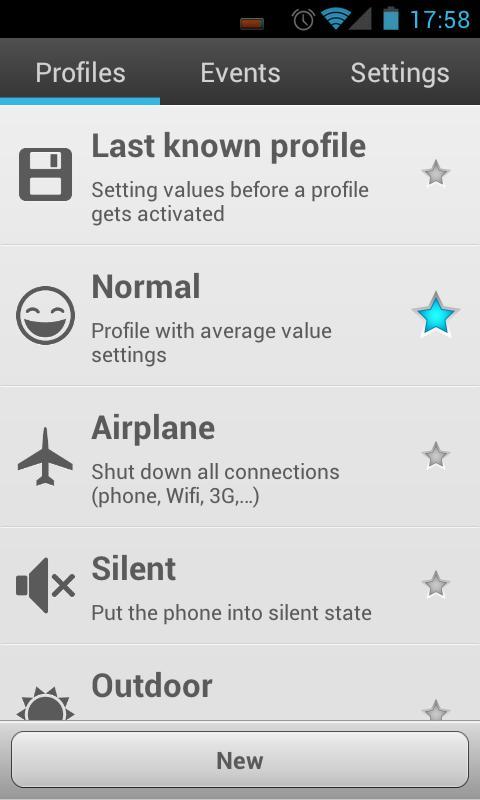
人們可以使用預定義的通用型材和自定義配置文件
☆正常,
☆無聲,
☆室外,
☆電池保護
☆最後已知的文件(特殊配置文件來恢復過去的設置)
☆自定義配置文件(多達你想要的)
配置文件可以激活手動或事件。
3種類型的事件:
☆電池:當電池下降到一定程度(最高優先級)
☆無線:WiFi網絡連接或斷開
☆時間:具體時間或重複(最低優先級)
在未來的版本將增加更多的事件。
配置文件激活:
☆自動事件可以映射到一個配置文件。當一個事件被觸發時,對應的文件將被激活。如果一個事件被觸發,而配置更高優先級的事件激活,它可能會被忽略。
☆手動:5種方法來手動激活一個配置文件:
- 通知欄:配置資料將被顯示在通知區域。
- 快速切換的畫面:一個新的快捷方式將顯示在您的應用程序的抽屜裡。你可以選擇在此屏幕上的配置文件。
- 切換“明星”配置文件選項卡上的圖標
- 創建主屏幕上的快捷方式
- 利用快速1Tap酒吧的應用程序。由於通知欄,但定制alot。
KW:電池保護,環境感知,ifttt,塔斯克,撥動
網址:http://rootuninstaller.com/smart-settings/
Facebook的:http://goo.gl/Brr99
*** english ***
Smart Settings is a tool to automate and optimize device settings, for both context-awareness and power saver.
For example, when the device connect to meeting room’s Wifi, the “Meeting” profile will be automatically activated, or when you leave your company’s Wifi, it turns to “Outdoor” profile.
How Smart Setting works
A profile is a group of device settings, including:
☆ Network (airplane mode, Wifi, mobile data, GPS),
☆ Ringer (volume, ringtone, vibrate),
☆ Notification (volume, ringtone, vibrate),
☆ Alarm (volume, ringtone),
☆ Display (brightness, wallpaper)
☆ Other settings (sync, media, DTMF, voice call, system).
One can use pre-defined common profiles and custom profiles
☆ Normal,
☆ Silent,
☆ Outdoor,
☆ Battery Saver
☆ Last known profile (special profile to restore last settings)
☆ Custom profiles (as many as you want)
A profile can be activated manually or by an event.
3 types of events:
☆ Battery: when battery drops to a certain level (highest priority)
☆ Wifi: connect or disconnect to a wifi network
☆ Time: specific time or repeatedly (lowest priority)
more events will be added in next versions.
Profile activation:
☆ Automatically: An event can be mapped to a profile. When an event is triggered, the mapped profile will be activated. If a event is triggered while a profile is activated by a higher priority event, it may be ignored.
☆ Manually: 5 ways to manually activate a profile:
- Notification bar: configure which profile will be displayed in the notification area.
- Quick switching screen: A new shortcut will be shown in your app drawer. You can select a profile in this screen.
- Toggle “star” icon on Profiles tab
- Create shortcut on home screen
- Using 1Tap Quick Bar app. As notification bar, but alot of customization.
kw: battery saver, context-aware, ifttt, tasker, toggle
Website: http://rootuninstaller.com/smart-settings/
Facebook: http://goo.gl/Brr99
預覽
訊息
開發商
Root Uninstaller
最新版本
1.41
更新時間
2013-03-15
類別
工具
同時可用
Google Play
更多
如何在電腦上用 GameLoop 玩 Smart Settings
1. 從官網下載GameLoop,然後運行exe文件安裝GameLoop
2. 打開GameLoop,搜索“Smart Settings”,在搜索結果中找到Smart Settings,點擊“安裝”
3. 享受在 GameLoop 上玩 Smart Settings 的樂趣
Minimum requirements
OS
Windows 8.1 64-bit or Windows 10 64-bit
GPU
GTX 1050
CPU
i3-8300
Memory
8GB RAM
Storage
1GB available space
Recommended requirements
OS
Windows 8.1 64-bit or Windows 10 64-bit
GPU
GTX 1050
CPU
i3-9320
Memory
16GB RAM
Storage
1GB available space