liteCam Game 5: 120 FPS Game Capture + Streamer
Rsupport Inc.
- United States$19.99$19.99去商店
- Turkey$1.11$1.11去商店
- Russia$4.29$4.29去商店
用GameLoop模拟器在電腦上玩liteCam Game 5: 120 FPS Game Capture + Streamer
liteCam Game 5: 120 FPS Game Capture + Streamer,是由Rsupport Inc.開發的一款時下流行的steam遊戲。 您可以使用 GameLoop 下載liteCam Game 5: 120 FPS Game Capture + Streamer和熱門Steam遊戲以在電腦上玩。點擊“獲取”按鈕,您就可以在 GameDeal 獲得最新最優惠的價格。
獲取 liteCam Game 5: 120 FPS Game Capture + Streamer Steam 遊戲
liteCam Game 5: 120 FPS Game Capture + Streamer,是由Rsupport Inc.開發的一款時下流行的steam遊戲。 您可以使用 GameLoop 下載liteCam Game 5: 120 FPS Game Capture + Streamer和熱門Steam遊戲以在電腦上玩。點擊“獲取”按鈕,您就可以在 GameDeal 獲得最新最優惠的價格。
liteCam Game 5: 120 FPS Game Capture + Streamer 遊戲特點
Discover the Ultimate Game Recorder: liteCam Game - 120 FPS Game Capture & Stream!
‘liteCam Game: 120 FPS Game Capture’ is a next-gen game recorder and Live Streaming software for Steam users. ‘liteCam Game: 120FPS Game Capture’ has a minimal impact on actual game performance while recording at up to 120 FPS, plus you're now able to Live Stream directly to Twitch or Youtube! Record most DirectX 7, 8, 9, 10, 11 and OpenGL games such as League of Legends, World of Warcraft, Minecraft, Need for Speed, GTA , Grid 2 and many more with minimal lag.
liteCam Game Official Website: http://www.litecam.net/en/product/litecam-game/
Why 'liteCam Game: 120FPS Game Capture' is the best game recording software?
1. liteCam Game ensures that your recorded game video has a stunning HD vibrantly colored. By default, it captures your game footage at 120 FPS for the smoothest videos.
2. liteCam Game has designed an easy-to-use interface to record gameplay instantly. Plus, easily record your webcam video with live commentary, so there is no need to look for additional webcam recording software.
3. liteCam Game has no time limit on capturing your game play with a small HD file size.
4. Customize the recording options. liteCam Game allows you to import your preferred codec and use it to record your gameplay.
5. liteCam Game saves the recorded videos in AVI or MP4 file format.
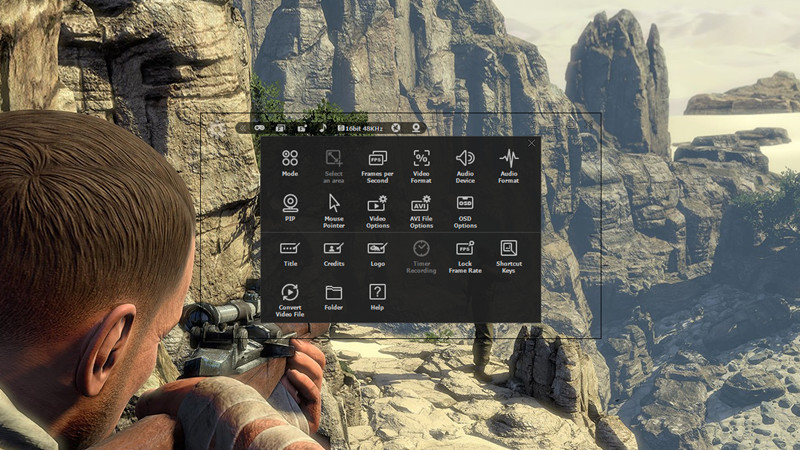
6. liteCam Game does not require the video editing software. Simply trim the part of your recorded videos in the preview mode and add video titles, ending credits and your pictures quickly.
Please note that ‘liteCam Game: 120 FPS Game Capture’ might drop frames when recording if your computer becomes overburdened or the game play limit FPS less than 120 FPS. Here is recommended hardware spec to improve performance:
CPU:
Intel Core i7 and above
Intel Core i5 4670 and above
Graphic card/Video card:
GetForce GTX 760 and above
Radeon R9 270X and above
For Windows 7 and above
Use SSD storage
Amazing Features from ‘liteCam Game: 120 FPS Game Capture & Stream’
Game Recording: Capture any game play with ‘liteCam Game: 120 FPS Game Capture’. It can Capture most DirectX 7, 8, 9, 10, 11 and OpenGL games
Video Recording: ‘liteCam Game: 120 FPS Game Capture’ can record any video on the user computer screen. Record videos from YouTube, Hulu, Vimeo, Daily Motion, and etc
Trimming: ‘liteCam Game: 120 FPS Game Capture’ is equipped with a simple trimming tool. User can trim any video they recorded.
Adding logos, credits, and title: No other recording software can let you add logos, credits, and title except 'liteCam Game: 120 FPS Game Capture'.
Converting Tools: ‘liteCam Game: 120 FPS Game Capture’ produces AVI video files. At the same time with 'liteCam Game: 120 FPS Game Capture' you can convert recorded videos to MP4 or WMV
Webcam --> PIP: ‘liteCam Game: 120 FPS Game Capture’ has a PIP function for users to show their active speech while capturing Game play or recording videos. This will surely build up the trust on your videos.
Upload to YouTube: ‘liteCam Game: 120 FPS Game Capture’ can directly upload recorded videos to YouTube.
Timer Recording: ‘liteCam Game: 120 FPS Game Capture’ can help you schedule your video recording. You can set 'liteCam Game: 120 FPS Game Capture' to record any video you want.
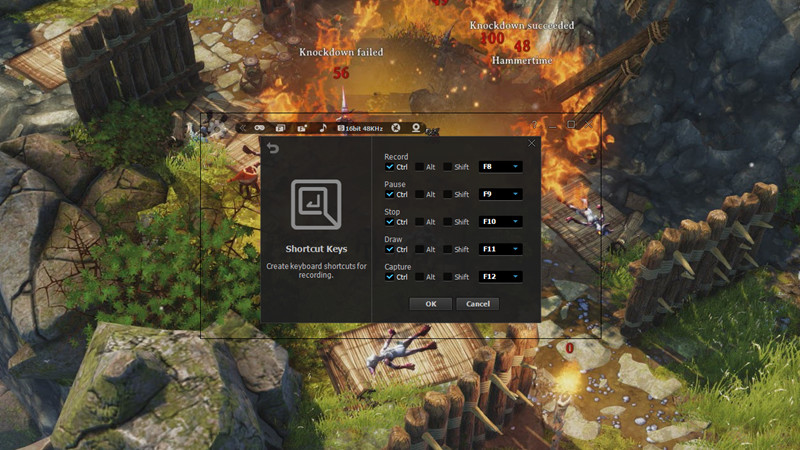
Hotkey Recording: ‘liteCam Game: 120 FPS Game Capture’ will let you use Hotkeys to help provide an easier and usually quicker method of navigating when recording Games.
Screen Capture: User can capture screenshots of videos and games and save them as PNG, BMP, or JPG files format
用GameLoop模拟器在電腦上玩liteCam Game 5: 120 FPS Game Capture + Streamer
獲取 liteCam Game 5: 120 FPS Game Capture + Streamer Steam 遊戲
liteCam Game 5: 120 FPS Game Capture + Streamer,是由Rsupport Inc.開發的一款時下流行的steam遊戲。 您可以使用 GameLoop 下載liteCam Game 5: 120 FPS Game Capture + Streamer和熱門Steam遊戲以在電腦上玩。點擊“獲取”按鈕,您就可以在 GameDeal 獲得最新最優惠的價格。
liteCam Game 5: 120 FPS Game Capture + Streamer 遊戲特點
Discover the Ultimate Game Recorder: liteCam Game - 120 FPS Game Capture & Stream!
‘liteCam Game: 120 FPS Game Capture’ is a next-gen game recorder and Live Streaming software for Steam users. ‘liteCam Game: 120FPS Game Capture’ has a minimal impact on actual game performance while recording at up to 120 FPS, plus you're now able to Live Stream directly to Twitch or Youtube! Record most DirectX 7, 8, 9, 10, 11 and OpenGL games such as League of Legends, World of Warcraft, Minecraft, Need for Speed, GTA , Grid 2 and many more with minimal lag.
liteCam Game Official Website: http://www.litecam.net/en/product/litecam-game/
Why 'liteCam Game: 120FPS Game Capture' is the best game recording software?
1. liteCam Game ensures that your recorded game video has a stunning HD vibrantly colored. By default, it captures your game footage at 120 FPS for the smoothest videos.
2. liteCam Game has designed an easy-to-use interface to record gameplay instantly. Plus, easily record your webcam video with live commentary, so there is no need to look for additional webcam recording software.
3. liteCam Game has no time limit on capturing your game play with a small HD file size.
4. Customize the recording options. liteCam Game allows you to import your preferred codec and use it to record your gameplay.
5. liteCam Game saves the recorded videos in AVI or MP4 file format.
6. liteCam Game does not require the video editing software. Simply trim the part of your recorded videos in the preview mode and add video titles, ending credits and your pictures quickly.
Please note that ‘liteCam Game: 120 FPS Game Capture’ might drop frames when recording if your computer becomes overburdened or the game play limit FPS less than 120 FPS. Here is recommended hardware spec to improve performance:
CPU:
Intel Core i7 and above
Intel Core i5 4670 and above
Graphic card/Video card:
GetForce GTX 760 and above
Radeon R9 270X and above
For Windows 7 and above
Use SSD storage
Amazing Features from ‘liteCam Game: 120 FPS Game Capture & Stream’
Game Recording: Capture any game play with ‘liteCam Game: 120 FPS Game Capture’. It can Capture most DirectX 7, 8, 9, 10, 11 and OpenGL games
Video Recording: ‘liteCam Game: 120 FPS Game Capture’ can record any video on the user computer screen. Record videos from YouTube, Hulu, Vimeo, Daily Motion, and etc
Trimming: ‘liteCam Game: 120 FPS Game Capture’ is equipped with a simple trimming tool. User can trim any video they recorded.
Adding logos, credits, and title: No other recording software can let you add logos, credits, and title except 'liteCam Game: 120 FPS Game Capture'.
Converting Tools: ‘liteCam Game: 120 FPS Game Capture’ produces AVI video files. At the same time with 'liteCam Game: 120 FPS Game Capture' you can convert recorded videos to MP4 or WMV
Webcam --> PIP: ‘liteCam Game: 120 FPS Game Capture’ has a PIP function for users to show their active speech while capturing Game play or recording videos. This will surely build up the trust on your videos.
Upload to YouTube: ‘liteCam Game: 120 FPS Game Capture’ can directly upload recorded videos to YouTube.
Timer Recording: ‘liteCam Game: 120 FPS Game Capture’ can help you schedule your video recording. You can set 'liteCam Game: 120 FPS Game Capture' to record any video you want.
Hotkey Recording: ‘liteCam Game: 120 FPS Game Capture’ will let you use Hotkeys to help provide an easier and usually quicker method of navigating when recording Games.
Screen Capture: User can capture screenshots of videos and games and save them as PNG, BMP, or JPG files format
預覽
訊息
開發商
Rsupport Inc.
最新版本
1.0.0
更新時間
2015-12-18
類別
Steam-game
更多
評論
- gamedeal user
Dec 24, 2015
- gamedeal user
Jun 29, 2016
- gamedeal user
Jan 1, 2016
- gamedeal user
Dec 22, 2015
常見問題
PC Games Cheaper On Gamedeal | Find The Best Deals of Games Here!
Finding the right place to get the best game deals can prove to be quite a hassle when comparing game prices on multiple sites. However, you can skip through all the trouble by letting Gamedeal handle the price comparisons and grab only the best deal prices for you!
We compare game prices on all the trusted storefronts and list game deals starting with the lowest price possible at the moment. Looking for something more specific? Search it on Gamedeal and find all the best deals and cd keys discount codes to make the most out of your bucks.
Not sure what you looking for? Browse through our massive library of games from different genres to find epic deals for your favorite games from the biggest retailers in the market. Can’t afford the game you are looking for? Make sure to wishlist it and stay up-to-date with all the price changes in the future.
Say Bye to Hefty Game Deals!
Gamedeal is your one-stop shop to find all the best deals from your favorite retailers including Steam, Epic Games, Gamestop, and many more under one roof. Looking for games that cost you nothing? We have got you covered with our free games list that includes free PC and Playstation games.
We help you stay on top of the news with upcoming Steam sales and Gamestop promo codes to ensure you get the game of your choice at the lowest price possible. From old-school classics to modern AAA titles, there is something for everyone to play here.