
Digital Signature Maker 電腦版
Erfouris Studio
用GameLoop模拟器在電腦上玩Digital Signature Maker
Digital Signature Maker 電腦版
來自發行商 Erfouris Studio 的 Digital Signature Maker 能夠在安卓系統上運行。
現在,您可以在電腦上使用 GameLoop 模擬器流暢地玩 Digital Signature Maker。
在 GameLoop 遊戲庫或搜索結果中下載。 不需要再暢玩遊戲時盯著電池電量或被令人懊惱的來電打斷。
只需在電腦大屏幕上免費下載暢玩Digital Signature Maker 電腦版!
Digital Signature Maker 簡介
✍️ 像專業人士一樣簽署文件
數位簽章產生器是一款終極離線優先數位簽章和 PDF 編輯器,專為追求安全性、速度和隱私的專業人士、自由工作者和企業用戶而設計。無需訂閱、無需雲端上傳、無需網路連線—您的敏感合約始終在您的裝置內。
無論您需要簽署合約、填寫稅務表格還是在發票上蓋章,數位簽章產生器都提供由尖端技術驅動的精美「液態玻璃」介面,讓您在幾秒鐘內完成任務。
🚀 主要功能
🔒 100% 離線且私密
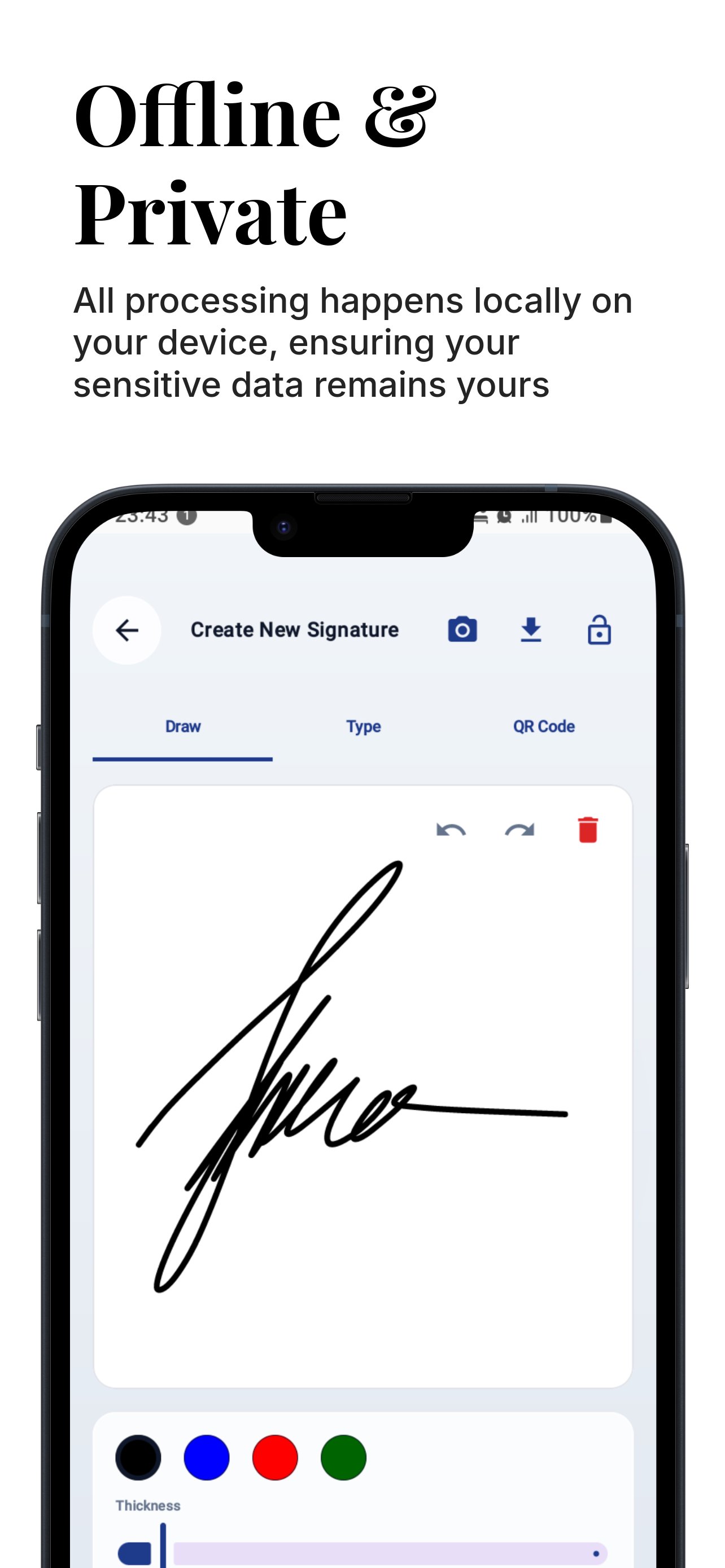
數位簽章產生器採用「隱私優先」架構。與其他電子簽名應用程式不同,我們不會將您的文件上傳到雲端。所有處理都在您的裝置本地進行,確保您的敏感資料始終屬於您。
• 無需雲端同步
• 完全無需網路連接
• 設計符合 GDPR 和 CCPA 標準
🛡️ 國防級安全
使用生物辨識認證保護您的數位身分。
• 生物辨識鎖定:使用指紋或面容 ID 保護您的簽名建立。
• PIN 碼保護:為不具備生物辨識功能的設備提供備用 PIN 碼安全保障。
• 加密二維碼:產生包含加密元資料的安全二維碼簽名,只有授權的掃描器才能驗證。
✍️ 三種專業簽名方式
使用我們強大的工具創建您的完美數位簽章:
繪製:使用我們流暢的壓感墨水引擎(貝塞爾曲線),體驗如同真實鋼筆般的書寫感受。
輸入:使用專屬字體將您的姓名轉換為專業的草書簽名。
掃描簽名:擁有您喜愛的墨水簽名?只需拍攝一張照片,我們的 AI 即可立即去除背景,創建透明的數位資產。
📄 強大的 PDF 編輯器
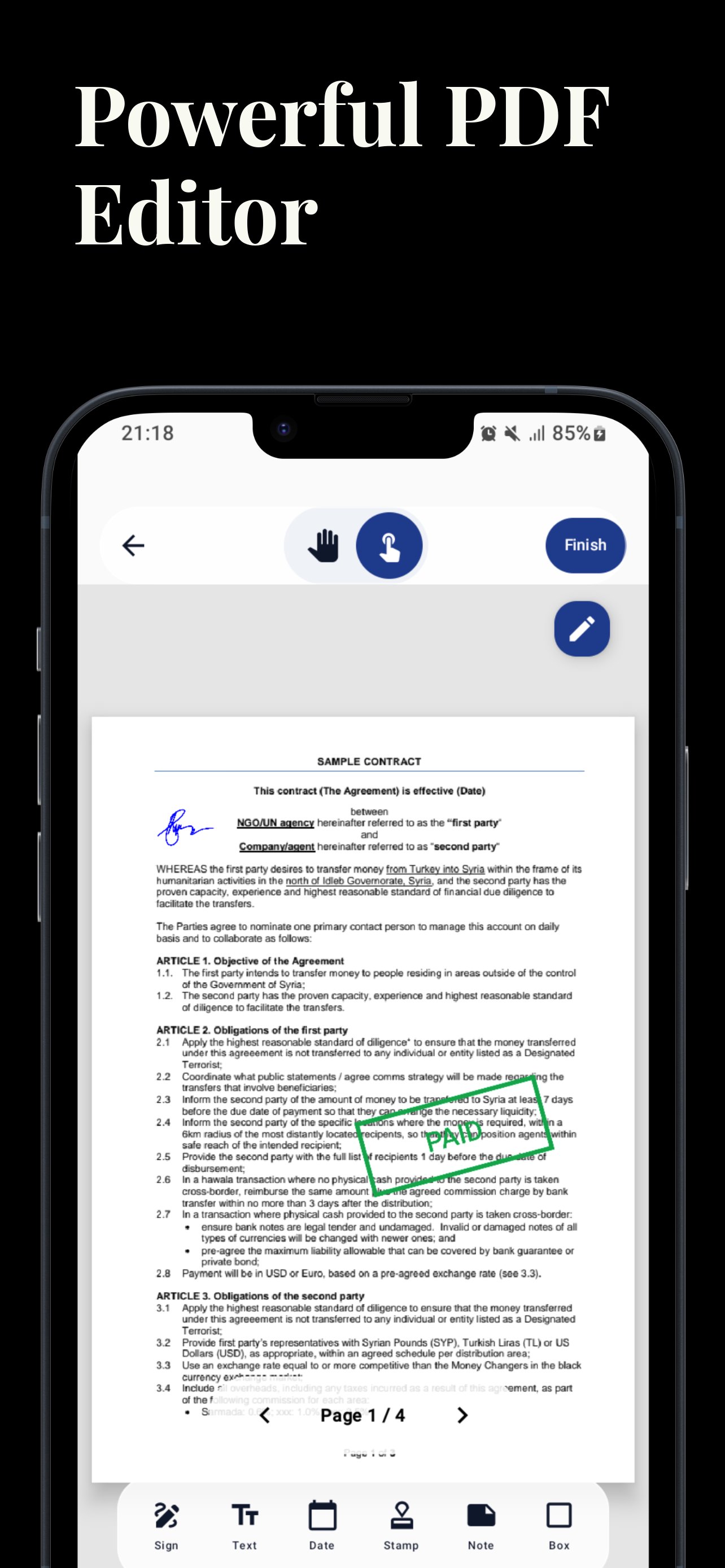
將您的手機變成行動辦公室。使用媲美桌面軟體的精準工具編輯 PDF 檔案。
• 拖放:輕鬆將簽名、文字和圖章放置在文件的任意位置。
• 精準滑桿:使用 X/Y/縮放滑桿進行像素精確定位-告別手指粗大遮擋視線的煩惱。
• 多頁支援:流暢瀏覽和簽署多頁合約。
• 縮放和平移:高效能渲染輕鬆處理大型藍圖和法律文件。
🛠️ 企業級工具集
內建企業用戶所需的一切:
• 數位圖章:將文件標記為「已核准」、「機密」、「草稿」、「緊急」等。
• 便條:加上黃色便籤進行評論和註解。
• 日期選擇器:一鍵插入目前日期或選擇自訂日期。
• 矩形工具:使用矩形框突出顯示關鍵條款或編輯部分內容。
✅ 法律效力與審計追蹤
確保您的文件在法庭上有效。數位簽章產生器會自動為每個已簽署的 PDF 檔案新增完成證明頁。
• 數位指紋:計算文件的 SHA-256 加密雜湊值。
• 防篡改:準確證明文件的簽名時間,並證明其自簽名以來未被篡改。
• 元資料:記錄時間戳記(UTC)、設備型號和驗證二維碼。
🌟 為什麼選擇這款應用?
• 現代使用者介面:體驗流暢的「液態玻璃」設計,讓工作更輕鬆、更方便。
• 深色模式:針對低光源環境最佳化的「夜間玻璃」模式,讓您在光線不足的情況下也能輕鬆簽名。
• 無需註冊:下載即可立即開始簽名。無需註冊,無需登入。
• 輕量:強大的 PDF 引擎,不會佔用您過多的儲存空間。
權限說明:
• 生物辨識:僅用於鎖定/解鎖簽名創建介面。
• 儲存:用於儲存您已簽署的 PDF 檔案並將簽名匯出到您的圖庫。
• 相機:僅用於「掃描簽名」功能,以擷取您的手寫簽名。
數位簽章產生器尊重您的隱私。我們不會追蹤您的文件內容或簽名資料。
預覽
標籤
效率提升工具訊息
開發商
Erfouris Studio
最新版本
3.19
更新時間
2025-12-09
類別
效率提升
同時可用
Google Play
更多
如何在電腦上用 GameLoop 玩 Digital Signature Maker
1. 從官網下載GameLoop,然後運行exe文件安裝GameLoop
2. 打開GameLoop,搜索“Digital Signature Maker”,在搜索結果中找到Digital Signature Maker,點擊“安裝”
3. 享受在 GameLoop 上玩 Digital Signature Maker 的樂趣
Minimum requirements
OS
Windows 8.1 64-bit or Windows 10 64-bit
GPU
GTX 1050
CPU
i3-8300
Memory
8GB RAM
Storage
1GB available space
Recommended requirements
OS
Windows 8.1 64-bit or Windows 10 64-bit
GPU
GTX 1050
CPU
i3-9320
Memory
16GB RAM
Storage
1GB available space