
Camera One: Wear, Galaxy Watch 電腦版
Shuisky
用GameLoop模拟器在電腦上玩Camera One: Wear, Galaxy Watch
Camera One: Wear, Galaxy Watch 電腦版
來自發行商 Shuisky 的 Camera One: Wear, Galaxy Watch 能夠在安卓系統上運行。
現在,您可以在電腦上使用 GameLoop 模擬器流暢地玩 Camera One: Wear, Galaxy Watch。
在 GameLoop 遊戲庫或搜索結果中下載。 不需要再暢玩遊戲時盯著電池電量或被令人懊惱的來電打斷。
只需在電腦大屏幕上免費下載暢玩Camera One: Wear, Galaxy Watch 電腦版!
Camera One: Wear, Galaxy Watch 簡介
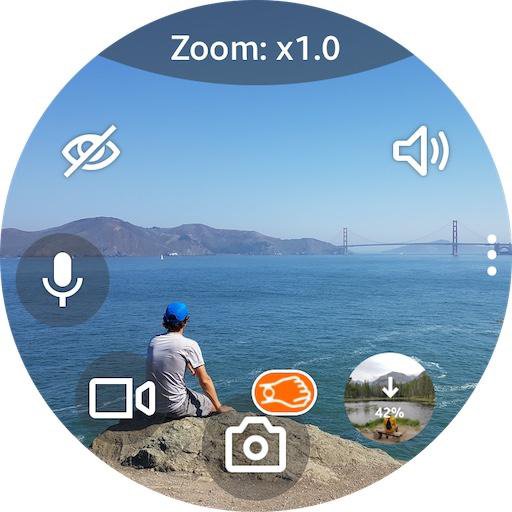
Camera One app allows controlling phone cameras through Galaxy Watch or Wear OS smartwatches.
Use cases:
• Selfie or Group photo
• View and record video
• Listen and record audio
• View hard-to-reach places
• Security system
• Baby Monitor
Features:
• Camera: Rear or Front (swipe up|down)
• Photo | Video sizes
• Take a Photo | Video by turning the wrist
• Listen to phone sound
• Audio | Sound | Voice recorder
• Zoom, Flash, Exposure, WB, Filters, HDR, ... (use bezel)
• Time-lapse video: x4, x8, x16, x32
• Timer: 2, 5, 10 secs
• Power saving mode
• Buttons layout styles
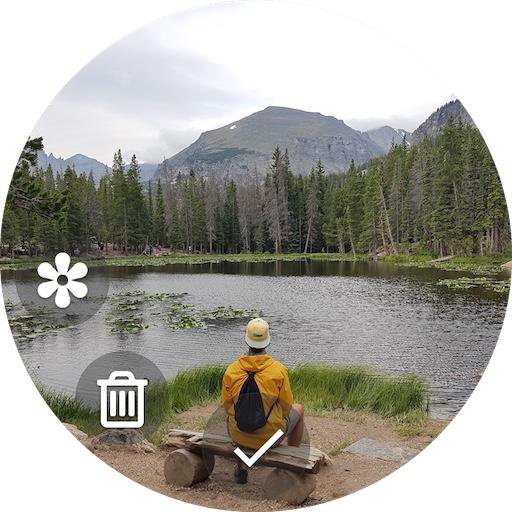
• Save copies of photos on the watch
• Save files on the SD card
Works even when the phone screen is off!
All settings are available on your smartwatch.
How to change Zoom, Flash, Exposure, WB, Filters, HDR:
Tap on the top of the screen where is written ‘Zoom: x1.0' to change the bezel mode: Zoom > Flash > Exposure > WB > Filter > ...
Then rotate the bezel to select the value.
For watches without bezel: swipe left | right (any screen area).
For flash: rotate the bezel to select the flash mode: auto | on | off | torch
Sound toggle:
If you don’t hear sound after turn on, go to smartwatch settings - Sound and vibration - Volume - Media (increase it)
Favorite button:
Long tap Sound toggle to switch: Self-Timer <-> Voice recorder (Audio recorder | Sound recorder)
Audio files are saved in: Phone storage \ Voice Recorder.
Taking Photo (video) by turning the wrist:
Turn On/Off - long tap on the photo (video) icon
Also works when the app running in the background
FAQ/Notes:
1. Swipe up or down to switch cameras.
2. High battery consumption?
• After you finish using the app so that it closes completely and no longer consumes battery and stops using the phone's camera, you should close the app using the "Back" button (bottom on the Galaxy Watch), not the "Home" one (top on Galaxy Watch) which will allow the app to continue running but in the background.
3. Connection issue?
• Tap "Settings / Permissions" inside the Camera One app on the phone and follow the instructions.
• Try to uninstall the Camera One app from your phone, install it again, and grant all the permissions the app asks you to. And you should allow everything, not just some of the requested ones, in order for the app to work correctly; and do not change the default app settings, until you check.
Try Premium version for free during the trial period and Buy it later (inside the 'Camera One' app on your phone) when you check out all the functionality and are completely satisfied. If you have any issues, email me at camera.shu@gmail.com and/or use Free version with limited functionality.
預覽
標籤
攝影效率提升桌遊訊息
開發商
Shuisky
最新版本
208
更新時間
2025-08-10
類別
攝影
同時可用
Google Play
更多
如何在電腦上用 GameLoop 玩 Camera One: Wear, Galaxy Watch
1. 從官網下載GameLoop,然後運行exe文件安裝GameLoop
2. 打開GameLoop,搜索“Camera One: Wear, Galaxy Watch”,在搜索結果中找到Camera One: Wear, Galaxy Watch,點擊“安裝”
3. 享受在 GameLoop 上玩 Camera One: Wear, Galaxy Watch 的樂趣
Minimum requirements
OS
Windows 8.1 64-bit or Windows 10 64-bit
GPU
GTX 1050
CPU
i3-8300
Memory
8GB RAM
Storage
1GB available space
Recommended requirements
OS
Windows 8.1 64-bit or Windows 10 64-bit
GPU
GTX 1050
CPU
i3-9320
Memory
16GB RAM
Storage
1GB available space