
Wi-Fi Manager for Wear OS PC
appfour
قم بتنزيل Wi-Fi Manager for Wear OS على جهاز الكمبيوتر باستخدام GameLoop Emulator
Wi-Fi Manager for Wear OS على الكمبيوتر الشخصي
Wi-Fi Manager for Wear OS ، القادم من المطور appfour ، يعمل على نظام Android في الماضي.
الآن ، يمكنك لعب Wi-Fi Manager for Wear OS على جهاز الكمبيوتر باستخدام GameLoop بسلاسة.
قم بتنزيله في مكتبة GameLoop أو في نتائج البحث. لا مزيد من الانتباه إلى البطارية أو المكالمات المحبطة في الوقت الخطأ بعد الآن.
ما عليك سوى الاستمتاع بجهاز Wi-Fi Manager for Wear OS على الشاشة الكبيرة مجانًا!
Wi-Fi Manager for Wear OS مقدمة
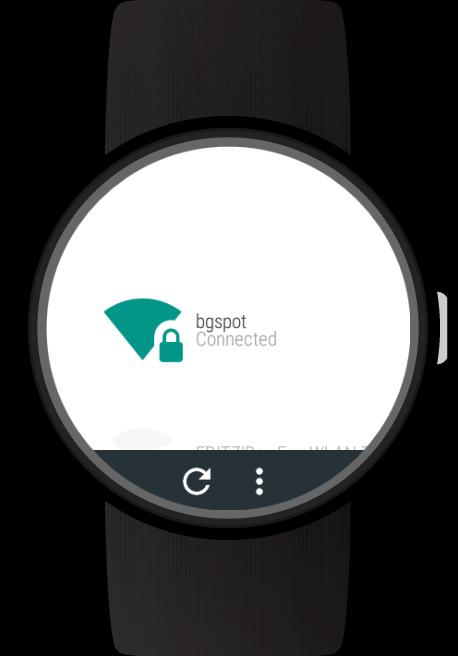
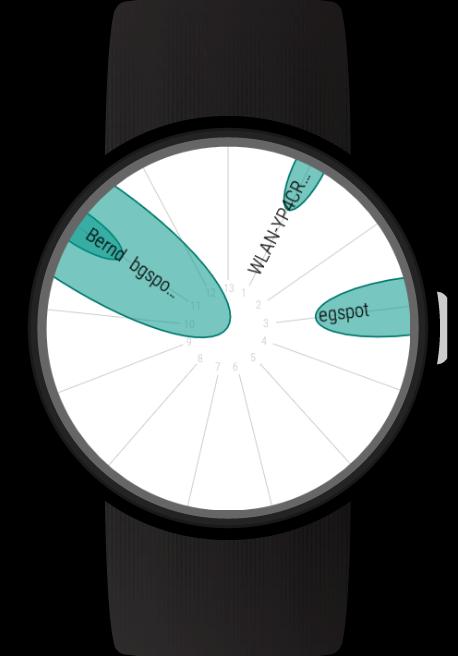
Add Wi-Fi connections and enter passwords directly on your Wear OS (Android Wear) smartwatch. View WiFi connection details. Use the Wi-Fi radar to get an overview of active networks. With the full version you can also sign in to public Wi-Fi hotspots and use static IP settings for Wi-Fi connections.
With this full featured Wi-Fi manager you will get the most out of your Android Wear smartwatch's Wi-Fi capabilities.
NOTE: All those features work without your phone. So if you left your phone at home and it is connected to the internet there, you can still connect your watch to a new Wi-Fi network allowing you to get notifications, use all apps on your watch, ...
Features:
- Scan for nearby Wi-Fi networks
- WiFi radar
- Connect to new networks
- Enter passwords directly on your Android Wear smartwatch without your phone
- Support for WPA, WEP and EAP security
- View connection details: Link speed, frequency, channel, IP address, signal level
- Forget network connections
- Connect to and disconnect networks
- Disable Wi-Fi
- Card with details for active Wi-Fi connection
- Card when sign in is required
Full version features:
- Sign in to public Wi-Fi hotspots which have a captive portal. Note: At this time this feature only works for Android Wear 1.x and you need the WIB app installed: https://play.google.com/store/apps/details?id=com.appfour.wearbrowser
- Specify static IP settings for networks
- Configurable cards and other settings
Supported smartwatches include all Wear OS (Android Wear) smartwatches with Wi-Fi support:
e.g.
- Sony SmartWatch 3
- Motorola Moto 360
- Fossil Q (Explorist, Marshal, Founder, Venture, Wander, ...)
- Ticwatch (E, S)
- Michael Kors (Bradshaw, Sophie, ...)
- Huawei Watch (2, Leo-BX9, Leo-DLXX, ...)
- LG Watch (Urbane, Sport, R, Style, …)
- ASUS ZenWatch (2, 3)
- TAG Heuer
...and many more
If your watch is not listed, please check if your Smartwatch runs Wear OS (former Android Wear).
Note: The square LG watch and Zenwatch 1 do not support WiFi and do not work with this app
معاينة
العلامات
أدواتمعلومة
مطور
appfour
احدث اصدار
1.0.210304
آخر تحديث
2021-03-04
فئة
أدوات
متاح على
Google Play
أظهر المزيد
كيف تلعب Wi-Fi Manager for Wear OS مع GameLoop على جهاز الكمبيوتر
1. قم بتنزيل GameLoop من الموقع الرسمي ، ثم قم بتشغيل ملف exe لتثبيت GameLoop.
2. افتح GameLoop وابحث عن "Wi-Fi Manager for Wear OS" ، وابحث عن Wi-Fi Manager for Wear OS في نتائج البحث وانقر على "تثبيت".
3. استمتع بلعب Wi-Fi Manager for Wear OS على GameLoop.
Minimum requirements
OS
Windows 8.1 64-bit or Windows 10 64-bit
GPU
GTX 1050
CPU
i3-8300
Memory
8GB RAM
Storage
1GB available space
Recommended requirements
OS
Windows 8.1 64-bit or Windows 10 64-bit
GPU
GTX 1050
CPU
i3-9320
Memory
16GB RAM
Storage
1GB available space