RF Signal Detector - Frequency para PC
Team IS lab
Descarga RF Signal Detector - Frequency en PC con GameLoop Emulator
RF Signal Detector - Frequency en PC
RF Signal Detector - Frequency, proveniente del desarrollador Team IS lab, se ejecuta en el sistema Android en el pasado.
Ahora, puedes jugar RF Signal Detector - Frequency en PC con GameLoop sin problemas.
Descárgalo en la biblioteca de GameLoop o en los resultados de búsqueda. No más mirar la batería o llamadas frustrantes en el momento equivocado nunca más.
Simplemente disfrute de RF Signal Detector - Frequency PC en la pantalla grande de forma gratuita!
RF Signal Detector - Frequency Introducción
RF signal is an electromagnetic wave that communications systems use to transport information through air from one point to another. RF signals have been in use for many years. They provide the means for carrying music to FM radios and video to televisions. Radio frequency is the oscillation rate of an alternating electric current or voltage or of a magnetic, electric or electromagnetic field or mechanical system in the frequency range from around 20 kHz to around.
Radio frequency
RF Wireless Technology. A radio frequency (RF) signal refers to a wireless electromagnetic signal used as a form of communication, if one is discussing wireless electronics. Radio waves are a form of electromagnetic radiation with identified radio frequencies that range from 3kHz to 300 GHz.
Bug detectors, though slightly more complex than camera detectors, are fairly simple to use. Since bugs transmit RF (radio frequency) signals, bug detectors hone in on those signals and indicate that there is a bug present, by lighting up, making a sound, or both. A radio frequency (RF) detector is a device used to detect the presence of RF waves either in a wireless or wired physical transmission medium. They are also known as RF power detectors or RF responding detectors and are available as devices or modules.
RF detector monitors or samples the output of an RF circuit and develops a dc output voltage proportional to the power at that point. RF detectors are used primarily to measure and control RF power in wireless systems. RF Signal Tracker you can monitor the RF and WiFi signal strength as seen by the device as well as WiFi hotspots, describe a cell site's zone of coverage, identify changes in technology and handover points, and save and playback that data. SSA Outdoor RF Signal Tracker and Site locations can be loaded into a database via a CSV file or by long-pressing the map on a location to manually insert the site to the database. This app is design for RF engineers to measure and log signal quality directly on their Android smartphones. SSA Indoor RF Signal Logger are used to track signal. download RF signal detector and monitor your mobile and WiFi signal strength.
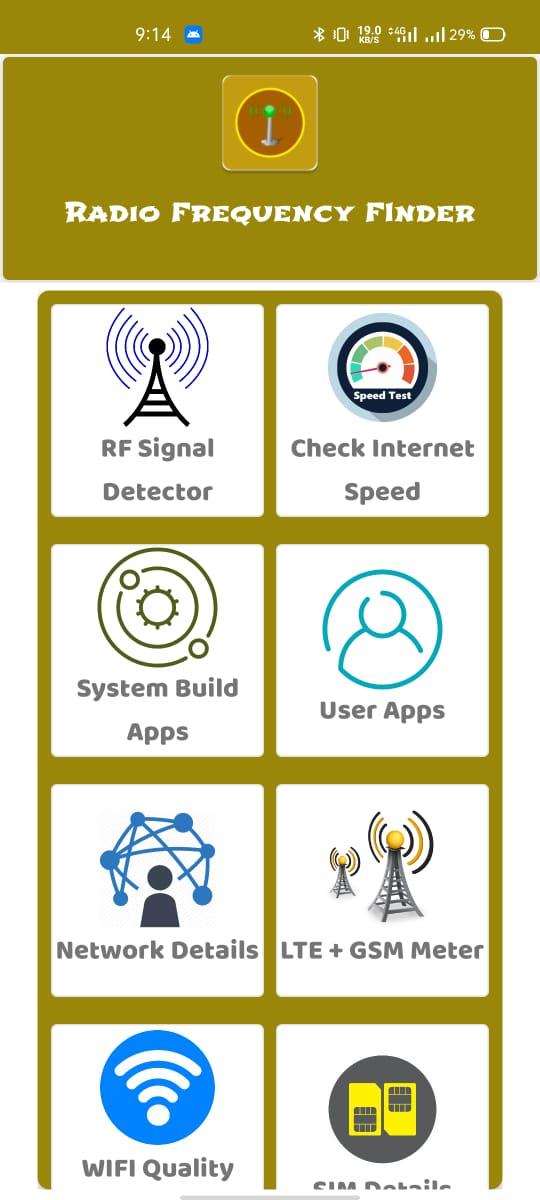
You can monitor the RF and WiFi signal strength as seen by the device as well as WiFi hotspots, describe a cell site's zone of coverage and check signals for currently connected cell state "RF Signal Detector" provides detailed information over the currently used network. Transmitter output power measurement is the primary application. RF Signal Detector has a simple tool that allows you to view your current WiFi connection signal strength. It is essential to know the RF output power because the application specifies it in most cases, and certain maximum values must not be exceeded according to Federal Communications Commission regulations. In many cases, the transmitter power is controlled automatically. As a result, the output power is measured and compared to a set point level in a feedback control circuit so power can be adjusted as required. in RF Signal Detector you have features like : Network operators Sim operator phone type, network type, network strength in dbm and ASU, data state, data activity, country code of the mobile phone and Device Id and other features.
Avance

Etiquetas
HerramientasInformación
Desarrollador
Team IS lab
La última versión
1.2
Última actualización
2021-05-12
Categoría
Herramientas
Disponible en
Google Play
Mostrar más
Cómo jugar RF Signal Detector - Frequency con GameLoop en PC
1. Descargue GameLoop desde el sitio web oficial, luego ejecute el archivo exe para instalar GameLoop.
2. Abra GameLoop y busque "RF Signal Detector - Frequency", busque RF Signal Detector - Frequency en los resultados de búsqueda y haga clic en "Instalar".
3. Disfruta jugando RF Signal Detector - Frequency en GameLoop.
Minimum requirements
OS
Windows 8.1 64-bit or Windows 10 64-bit
GPU
GTX 1050
CPU
i3-8300
Memory
8GB RAM
Storage
1GB available space
Recommended requirements
OS
Windows 8.1 64-bit or Windows 10 64-bit
GPU
GTX 1050
CPU
i3-9320
Memory
16GB RAM
Storage
1GB available space