Argentina
  • Global
  • México
  • 中國台灣
  • India
  • Indonesia
  • Türkiye
  • Việt Nam
  • ประเทศไทย
  • Brasil
  • Perú
  • Colombia
  • Argentina
  • Россия
  • السعودية
  • مصر
  • پاکستان
  • Malaysia
  • 日本
  • 中国香港
  • Philippines
Descargar
Easy Pose

Easy Pose

95 Positivo / 335 Calificaciones | Versión: 1.0.0

Madcat Games

Comparación de precios
  • Argentina
    ARS$663.79ARS$663.79
    Ir a la tienda
  • Turkey
    ARS$1145.55ARS$1145.55
    Ir a la tienda

Descarga Easy Pose en PC con GameLoop Emulator


Easy Pose, es un popular juego de Steam desarrollado por Madcat Games. Puede descargar Easy Pose y los mejores juegos de Steam con GameLoop para jugar en la PC. Haga clic en el botón 'Obtener' para obtener las últimas mejores ofertas en GameDeal.

Obtén Easy Pose juego de vapor

Easy Pose, es un popular juego de Steam desarrollado por Madcat Games. Puede descargar Easy Pose y los mejores juegos de Steam con GameLoop para jugar en la PC. Haga clic en el botón 'Obtener' para obtener las últimas mejores ofertas en GameDeal.

Easy Pose Funciones

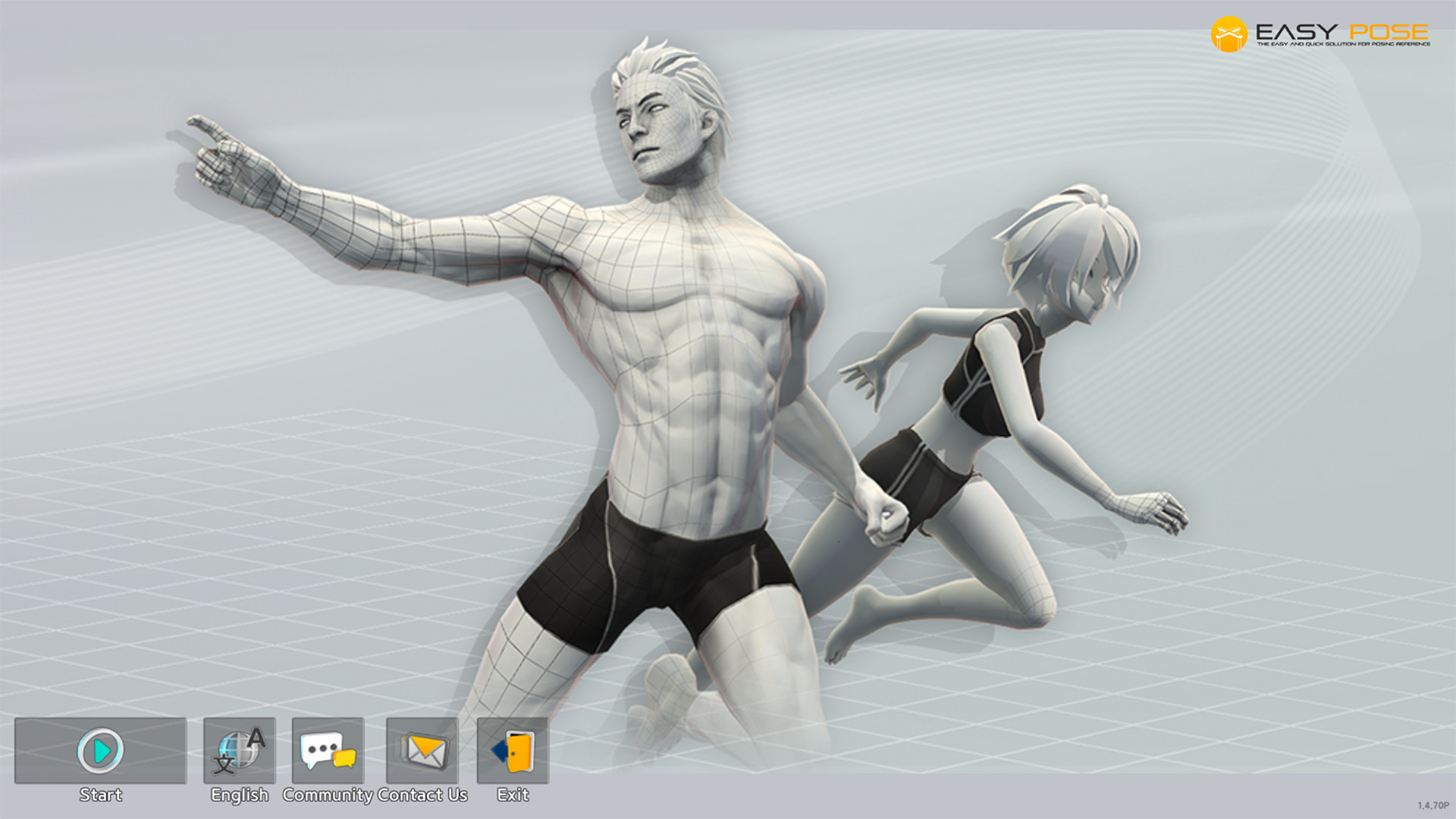
Easy Pose is a human body pose app designed for people who draw or are learning to draw.

Easy Pose is a human body pose app for people who draw or is learning to draw. Have you ever wanted a professional as well as a personalized model who would perform a variety of poses to make drawing animation, illustrations, and sketching easier? Easy Pose has been created to make such a wish come true. By manipulating the 3D model on the screen, you can create poses seen in everyday life, sports, martial arts, etc., and then examine them from the desired angle.

Recognized for its excellence in functionality, Easy Pose has displayed a total of 10 million downloads from Google Play and the Apple App Store and has been selected as a recommended app numerous times. The app also made it to the finals of the innovation section in Made with Unity 18" and achieved the top ranking in the trend section of the Steam software category.

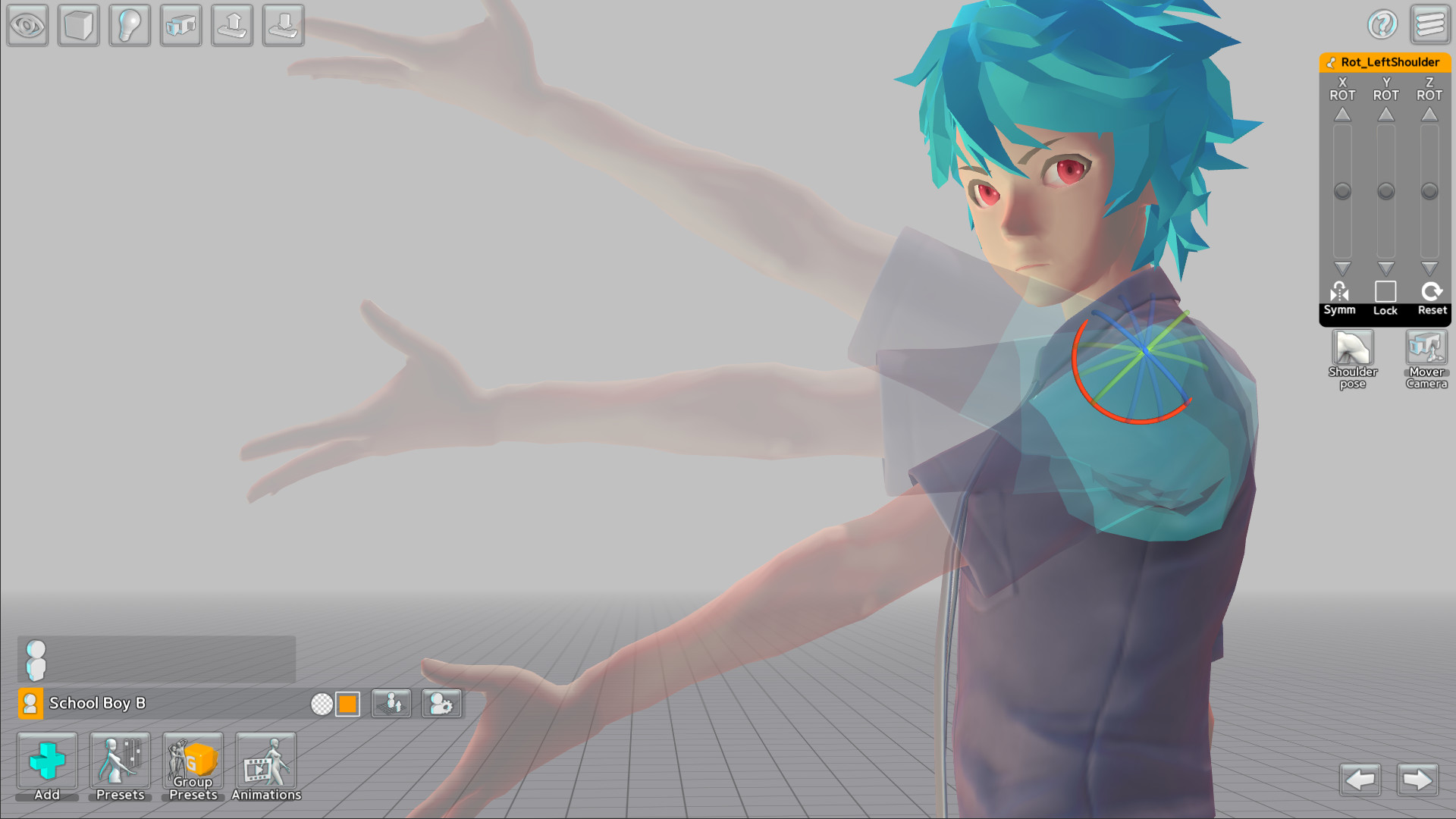
1. Easy Pose enables control over every human joint in a delicate and convenient way. Create poses in a manner that suits your taste by using the 3D gizmo and slide panel tools offered by the app. It is equipped with various functions that were not available in the existing pose apps, such as providing highlights on movable parts, initializing each joint, and utilizing symmetrical poses by taking advantage of the mirroring function.

2. Previous pose apps used wooden joint dolls or realistic eight-head ratio men and women, making it unsuitable for artists drawing animation, webtoon or game illustrations. Easy Pose is prepared with a variety of body types, ranging from four-head ratio cute men and women to six-head ratio men and women, men and women with a realistic body, and muscular men.

3. You can create numerous interesting scenes by placing multiple models onscreen at once. For example, you can produce scenes where many people are visible, such as a soccer player avoiding a tackle, a couple dancing while holding hands, and students studying in the classroom.

4. If you are experiencing difficulty making poses, take advantage of the poses provided by Easy Pose! Including frequently used poses, the app offers more than 1000 poses from various subjects such as sports, and these useful poses are constantly being updated. In addition, in order to improve the completeness of the pose, the app provides an editor that allows editing the preset poses of shoulders and hands as well as fingers

5. The app also provides a variety of small props, including figures, equipment, and teaching aids to create the desired scenarios and scenes. These are available in the props menu, and you can combine them to create backgrounds such as classrooms, study rooms, cities, and spaceships.

6. After selecting a model's hands, head, and feet, you can apply over 200 accessories, including hair, glasses, shoes, weapons and shields. These numerous props will make scenes you envisioned in a beautiful and gorgeous manner.

7. In addition to human models, Easy Pose offers a wide range of models, including dragons, horses, cars, motorcycles, bicycles, and dinosaurs. It will assist greatly in drawing on a variety of topics such as racing, medieval fantasy, military, sci-fi, and more.

8. Select a human model and then the animation menu to see various types of animations about daily life, dance, and sports, and you'll see animations with walking as well as flying motions when it features dragons, horses, and dinosaurs. In animations, it is possible to view intermediate motions that cannot be seen in static poses. Choose your desired intermediate action and go to the pose editing screen to make the pose easy to draw

9. Make use of an array of features that have been implemented to create cool scenes conveniently and with ease.

1) Strength and direction designation of direct light and back light.

2) Observe at various angles using camera.

3) Realistic shadow expression.

4) Adjustable angle of view. (Provides an exaggerated vanishing point like a panorama.)

5) Resource grouping.

6) Coloring.

7) Copy and change models.

8) Wire and box mode.

9) Auto save.

10) Save only the appearance of the model as a PNG file without background.

10. The Steam version of Easy Pose offers the following advantages over the mobile version.

1) The Easy Pose Steam version includes the mobile version of the Pro version and all DLCs released until Q1 2021.

2) The Steam version of Easy Pose gives the model a color nude. In the case of the mobile version, it is prohibited to provide color nudes of models on Google Play and the Apple App Store.

3) The Steam version of Easy Pose provides 130 sexual poses. Likewise, sexual poses are content that cannot be provided in the mobile version.

4) You can back up files saved in the Steam version of Easy Pose or transfer them to another computer. Currently, files are stored in a designated folder, but in the future, we plan to provide a function to store files in a desired folder.

5) In the future, we plan to use the workshop to support users to share pose data.

- Supported Languages - Supports Korean, English, Japanese, Russian, Spanish, Portuguese, Simplified Chinese, Traditional Chinese, Indonesian, Arabic, German, French, Finnish. We also plan to support other languages through updates if you ask.

- In order to make the most of Easy Pose, make sure to familiarize yourself with the manual.

- In case of running into words and sentences that need editing, please take a screenshot and email us with alternative words or sentences.

Mostrar más

Descarga Easy Pose en PC con GameLoop Emulator

Obtén Easy Pose juego de vapor

Easy Pose, es un popular juego de Steam desarrollado por Madcat Games. Puede descargar Easy Pose y los mejores juegos de Steam con GameLoop para jugar en la PC. Haga clic en el botón 'Obtener' para obtener las últimas mejores ofertas en GameDeal.

Easy Pose Funciones

Easy Pose is a human body pose app designed for people who draw or are learning to draw.

Easy Pose is a human body pose app for people who draw or is learning to draw. Have you ever wanted a professional as well as a personalized model who would perform a variety of poses to make drawing animation, illustrations, and sketching easier? Easy Pose has been created to make such a wish come true. By manipulating the 3D model on the screen, you can create poses seen in everyday life, sports, martial arts, etc., and then examine them from the desired angle.

Recognized for its excellence in functionality, Easy Pose has displayed a total of 10 million downloads from Google Play and the Apple App Store and has been selected as a recommended app numerous times. The app also made it to the finals of the innovation section in Made with Unity 18" and achieved the top ranking in the trend section of the Steam software category.

1. Easy Pose enables control over every human joint in a delicate and convenient way. Create poses in a manner that suits your taste by using the 3D gizmo and slide panel tools offered by the app. It is equipped with various functions that were not available in the existing pose apps, such as providing highlights on movable parts, initializing each joint, and utilizing symmetrical poses by taking advantage of the mirroring function.

2. Previous pose apps used wooden joint dolls or realistic eight-head ratio men and women, making it unsuitable for artists drawing animation, webtoon or game illustrations. Easy Pose is prepared with a variety of body types, ranging from four-head ratio cute men and women to six-head ratio men and women, men and women with a realistic body, and muscular men.

3. You can create numerous interesting scenes by placing multiple models onscreen at once. For example, you can produce scenes where many people are visible, such as a soccer player avoiding a tackle, a couple dancing while holding hands, and students studying in the classroom.

4. If you are experiencing difficulty making poses, take advantage of the poses provided by Easy Pose! Including frequently used poses, the app offers more than 1000 poses from various subjects such as sports, and these useful poses are constantly being updated. In addition, in order to improve the completeness of the pose, the app provides an editor that allows editing the preset poses of shoulders and hands as well as fingers

5. The app also provides a variety of small props, including figures, equipment, and teaching aids to create the desired scenarios and scenes. These are available in the props menu, and you can combine them to create backgrounds such as classrooms, study rooms, cities, and spaceships.

6. After selecting a model's hands, head, and feet, you can apply over 200 accessories, including hair, glasses, shoes, weapons and shields. These numerous props will make scenes you envisioned in a beautiful and gorgeous manner.

7. In addition to human models, Easy Pose offers a wide range of models, including dragons, horses, cars, motorcycles, bicycles, and dinosaurs. It will assist greatly in drawing on a variety of topics such as racing, medieval fantasy, military, sci-fi, and more.

8. Select a human model and then the animation menu to see various types of animations about daily life, dance, and sports, and you'll see animations with walking as well as flying motions when it features dragons, horses, and dinosaurs. In animations, it is possible to view intermediate motions that cannot be seen in static poses. Choose your desired intermediate action and go to the pose editing screen to make the pose easy to draw

9. Make use of an array of features that have been implemented to create cool scenes conveniently and with ease.

1) Strength and direction designation of direct light and back light.

2) Observe at various angles using camera.

3) Realistic shadow expression.

4) Adjustable angle of view. (Provides an exaggerated vanishing point like a panorama.)

5) Resource grouping.

6) Coloring.

7) Copy and change models.

8) Wire and box mode.

9) Auto save.

10) Save only the appearance of the model as a PNG file without background.

10. The Steam version of Easy Pose offers the following advantages over the mobile version.

1) The Easy Pose Steam version includes the mobile version of the Pro version and all DLCs released until Q1 2021.

2) The Steam version of Easy Pose gives the model a color nude. In the case of the mobile version, it is prohibited to provide color nudes of models on Google Play and the Apple App Store.

3) The Steam version of Easy Pose provides 130 sexual poses. Likewise, sexual poses are content that cannot be provided in the mobile version.

4) You can back up files saved in the Steam version of Easy Pose or transfer them to another computer. Currently, files are stored in a designated folder, but in the future, we plan to provide a function to store files in a desired folder.

5) In the future, we plan to use the workshop to support users to share pose data.

- Supported Languages - Supports Korean, English, Japanese, Russian, Spanish, Portuguese, Simplified Chinese, Traditional Chinese, Indonesian, Arabic, German, French, Finnish. We also plan to support other languages through updates if you ask.

- In order to make the most of Easy Pose, make sure to familiarize yourself with the manual.

- In case of running into words and sentences that need editing, please take a screenshot and email us with alternative words or sentences.

Mostrar más

Avance

  • gallery
  • gallery

Información

  • Desarrollador

    Madcat Games

  • La última versión

    1.0.0

  • Última actualización

    2020-06-04

  • Categoría

    Steam-game

Mostrar más

Reseñas

  • gamedeal user

    May 17, 2021

    i use this app to draw inappropriate things
  • gamedeal user

    Sep 19, 2021

    I can now draw NSFW!
  • gamedeal user

    Feb 5, 2022

    I am reviewing this software as an artist (obviously) and I paint people mainly and have always struggled with group compositions. Also I am fairly new but very interested in 3D programs such as Daz3D and Blender. But the learning curve for a newbie in 3D software can be daunting and steep. This makes it simpler if you need quick poses for setting up a scene to sketch. This program is very good for what it offers and it is still evolving. It has many group and single presets and you can create you own. It is by no means a substitute for continued study of anatomy and real life references but it does make you more conscious of how the body moves and creating group settings. The learning curve is easy for the most part but the manual it comes with needs work. They need to omit all the stuff made for the mobile version and create a more comprehensive, user friendly guide for just the PC version. But with some reading and trial and error I am now comfortable in the software with only a couple hours playing around in it. I do recommend this software for artists like myself who want to compose scenes to sketch from. It is not really a resource to build upon outside of just using it for reference. It saves png files that you can open in any program that supports them like Photoshop or Corel painter. Then either sketch over the png as a guide or draw with a grid or free-hand (whatever works for you). As I mentioned it does have lots of presets. Female and male models, group poses, fantasy poses and yes...even sexual poses :) It is another tool for the artist in our arsenal of tools and a good program for playing around with 3d models and groups. ✨
  • gamedeal user

    Jun 29, 2020

    Looks promising for a start and has many great features, but while I can get used to the somewhat clunky way of modifying poses via sliders, not being able to modify the character models themselves is such a major issue for me that I cannot recommend this software at this time. Having different body types to choose from is great, but will never replace the much more convenient possibility of adjusting character models as needed. At the moment Design Doll and CSP are both superior.
  • gamedeal user

    Aug 28, 2022

    really good software for anatomy studies! one gripe I have is I wish there were more animal options (felines, canines, birds)
  • gamedeal user

    Apr 17, 2023

    The easiest pose app to get into !

     The Easy Pose app is an application with simple and user-friendly features. Although it has the feature you need, it doesn't have much else to offer.

    Review :

      About   Description
    Functionality    As an artist, using a pose app isn't a sin. I know many "artists" would be angry about it, while they use Clip Studio Paint, which has a pose app that uses AI for its features. It's funny how they are against pose apps and hate AI, while their own apps use AI for the features they use. Their Double standards and ridiculous denials isn't. what? so proud buying drawing apps? how many follower do you have for ye art? I've met and talked to some successful mangaka and webtoon artists who use pose apps. Stop denying and acting like Hitler just to make yourself feel better and discourage others from learning to draw. You are not a true artist.  Sorry for getting carried away, but yeah, the Easy Pose app has fulfilled its purpose as a pose app, even though I know it's not as good as many other apps that cost almost 80 to 100 bucks. However, considering its price and functionality, it is a reliable app.  
    User Interface    It has a simple user interface that you may need to get used to, but not for long, thanks to the hover feature that shows what the buttons are for. Additionally, it has the easiest UI to understand, allowing you to pick a pose and model, as well as utilize features like rotating, symmetry, and object locking. Overall, it is an easy-to-use app. Of course, some trial and error may apply, but you can always ask people on the forum where most of the time, you'll get the answer you need.  
    Features    As for its features, they are straightforward. The Easy Pose app is a posing app with no fancy extras. It offers 13 humanoid models, 13 models with costumes, 3 special models, 8 animals (although some are actually dinosaurs), one horse model, 10 vehicles, and the last four special models are from Rival. As for basic objects such as chairs, tables, and weapons from medieval to modern guns, the app has many small objects. However, I prefer not to use them, as it's better to use a preset than add the object yourself.it also has FOV feature.  The app has a static model, which means you cannot change the body of the models, like muscle size or other things you may want to custom make. This might be disappointing, but it is good for people who want to learn poses. Thanks to its axis control, posing is easier. The app offers position, scale, and rotation controls, just like in standard 3D. Control is also easy to manage. Overall, this app is fantastic.  
    Support    Here's the issue with Easy Pose. the developer was slow and not very promising, mainly because they were trying to push updates for all platforms at the same time, including mobile and PC. This is a shame since mobile shouldn't be the priority. The second issue comes from the developer themselves. I have to say this to the developer. while I understand that you may struggle with mental health issues like depression, everyone has mental issues and depression at some point in their life. People pay for your apps, including myself. I love your apps and would support you for any new features you offer, but if you stop updating your app, people will stop buying it. So, it's time to get up and update your app!  
    PC Port   Tested OS Windows 10 Pro | 64 Bit, Version 22H2. Hardware CPU AMD Ryzen 7 5700G GPU NVIDIA GeForce RTX 3050 8GB RAM 16 GB DDR4 Performance  Run well.   • 60 FPS.   • Run on SSD.   • HD resolution.   • CPU | 45°C - 50°C   • GPU | 44°C - 48°C Note: Temp & usage depends on your room temperature & running background apps. MSI Afterburner ✓ Supported App Optimization Optimize.  
    Accessibility   Visual ✗ Contras ✗ Brightness ✗ UI Option   ✗ UI Scale   ✗ Dark UI ✗ Colorblind mode   ✗ Deuteranopia   ✗ Protanopia   ✗ Tritanopia   ✗ Custom ✗ Advanced graphic setting Motor/Body disability ✗ Control type   ✓ Simple   ✗ Complex ✓ Binding custom control  
    Bug    • I noticed that the mobile app feature still exists in this PC version, but if you press the Pro Upgrade version, it freezes your app.  • Developers who think mental breakdowns and depression are an excuse to not support their own app.  • Doesn't had new update for long time.  
    DLC/In-App    Thank God it doesn't offer DLC like poses, objects, and 3D import, which this app doesn't have.  
    Extra   Region Price ✗ Overprice ✗ Buy it on Sale! Community Health ✗ Toxic ✓ Moderator/Developer Problem  
    Oppinion    The developers should learn and understand that hard work produces results. They have already done an amazing job, but there aren't many features yet.  
    Recommended?    For the price and the features it offers, yeah, it's a working app, so YES!  
    Ads & other    Donate  
    Review Version 6 © ᴹˢᴿ. ᴮʸ ᴿᵉⁿˢ ᴬᵍᵃᵗʰᵃ. ᴵ ʷᵃˢ ⁿᵒᵗ ᶜᵒᵐᵖᵉⁿˢᵃᵗᵉᵈ ᶦⁿ ᵃⁿʸ ʷᵃʸ. ᴾˡᵉᵃˢᵉ ᵛᵒᵗᵉ ᶦᵗ ᵘᵖ ᵒʳ ᵍᶦᵛᵉ ᶦᵗ ᵃⁿ ᵃʷᵃʳᵈ ᶦᶠ ʸᵒᵘ ˡᶦᵏᵉ ᵐʸ ʳᵉᵛᶦᵉʷ. ᴵᶠ ⁿᵒᵗ, ᶠᵉᵉˡ ᶠʳᵉᵉ ᵗᵒ ᵛᵒᵗᵉ ᶦᵗ ᵈᵒʷⁿ ᵃⁿᵈ ᵉˣᵖˡᵃᶦⁿ ʷʰʸ. ᴵᶠ ʸᵒᵘ'ᵈ ˡᶦᵏᵉ ᵗᵒ ˢᵉᵉ ᵐᵒʳᵉ ᵒᶠ ᵐʸ ʳᵉᵛᶦᵉʷˢ, ᶜʰᵉᶜᵏ ᶦᵗ ᵒᵘᵗ ʰᵉʳᵉ.

    Follow MSR Curator For more

  • gamedeal user

    Jan 10, 2023

    Been with couple of software like this. But never really found one living up to its own name like Easy Pose here. Easy to use, Easy to adjust, Alot of quality of life model and features. Whole heartily recommended if you are looking for a Ref model to use on drawing. Ps. If you are looking for a certain "poses" This software does providing you with alot of them, Just need to look into the "Group Preset"
  • gamedeal user

    Jul 2, 2021

    Short version: Great software; the biggest strength is its extensive library of poses. However, the amount of time it takes to position models meant I reverted to the free tool I was using before. I draw manga and need to be able to create shot after shot very swiftly as a positioning guide without adding great detail to the models. Pros: - Huge number of poses to choose from. This is easily the biggest strength of the software and probably the one reason I would return to Easy Pose over free tools. - The props are also extremely helpful - There are many other aspects done well that you would expect from the type of software. - Price would be a bargain if I were going to use this frequently, but I don't at the moment - see below. Points to improve (with many apologies if any of these features do actually exist and I just couldn't find them!) - Efficiency of posing models. In the free tool (Magic Poser) you can just drag their limbs into place. In Easy Pose, having to rotate each part of each limb individually was extremely slow, and I couldn't work at a decent pace. This is the number one biggest reason I can't adopt Easy Pose for all my modelling. Perhaps with practice it gets faster, but it seemed very tedious. Is it possible to have a click-and-drag option for the limbs? - The menus were very small (on a PC screen) and it was hard to see the difference between the options (e.g. poses, props) without clicking on them and trying each of them out. Either a bigger menu or a descriptive label when you hover would make it easier to browse. - Range of characters is quite small. Clothes are almost pointless, since there are only a couple of set outfits per character. It would also be good to see a wider range of hairstyles. - Although props are astonishingly extensive in certain categories, it would be really helpful to have more everyday props - common objects such as streetlamps, cats, furniture etc. - I couldn't scale individual characters. Bizarrely, it can be done by making them part of a group, scaling the group and then ungrouping them, meaning that with a bit of faffing about you can make your characters any size you want, but it would be much easier to scale them without having to group them first. - While selecting preset poses, you can't rotate the screen to see what the posed character looks like from different angles. This means you have to close the menu, have a look and then open the menu and sift back to where you were. Being able to rotate the screen while the menu is open would be hugely helpful. - If you have an individual character, you can set it in a pose. If you have two, you can't group them and put them in a group pose. You have to create the group, then alter the base characters it gives you. Would it be possible to place two existing characters in a pose from the group pose menu? Other - I briefly looked at the animation feature, but this is a tool I would never use. I'm sure there are other people out there who know how to use it, but I wonder what percentage of users would be interested in this feature versus the static posing. Anyway, for me it definitely isn't on the priority list for the developers' attention. Overall I would really like to be able to use only one tool for drawing, and it would be good if that tool could be Easy Pose. I would just need the models to be more quickly positionable than they are with the current limb-rotation mechanism. Thanks in advance to the developers for their work.
  • gamedeal user

    Apr 27, 2023

    Singular best posing software on Steam, with maybe Manga Ka to match. I used six posing softwares outside DAZ studio: Ease Pose, Artpose Pro, Easy Sketch, JustSketchMe, Manga Ka and DesignDoll. Let me explain the differences: DesignDoll has the best...well, doll designing. You make your own sketch doll yourself, adjusting almost everything to create THE model you want. But that's it. You adjust the doll, the camera, the lighting and that's about the bottom of the tool box. You don't add anything else and the control's rather complicated. Artpose Pro is DesignDoll, minus most designing options. In their place you have some small objects to add to a scene and some pre-set poses. Easy Pose is Artpose pro with better control and more doll options, tho you still can't 'customise' your doll as much as in DesignDoll. I said it has better control as it allows you adjust each joint through dials, which, in my opinion, is objectively superior than dragging joints of a 3D doll on a 2D display screen. It's intuitive, easy to use, and it gets things done. You can also add some small objects and all the other common functions like adjusting lights and camera, etc are there too. JustSketchMe is Easy Pose but built in for browsers, and free, mostly. You do need the paid version to unlock the more advanced functions. Easy Sketch is a posing software combined with a drawing one, which means it is not as good as the other posing ones on posing, and don't really offer enough options when drawing, obviously. Manga Ka is the one to rule them all, so rejoice! The little problem is that it has the control system of DesignDoll, and costs nearly 100 bucks with all DLCs included. So it's not that good if you like to have 100 more bucks, which you may, if you can't afford to spend 100 bucks on a posing software. So, yeah, my recommendation, pending your economic situation, is: use the free version of JustSketchMe, or buy Easy Pose, or buy the pro version of DesignDoll/Manga Ka.
  • gamedeal user

    Apr 14, 2022

    This Fixed My Marriage.
Load More

preguntas frecuentes

PC Games Cheaper On Gamedeal | Find The Best Deals of Games Here!

Finding the right place to get the best game deals can prove to be quite a hassle when comparing game prices on multiple sites. However, you can skip through all the trouble by letting Gamedeal handle the price comparisons and grab only the best deal prices for you!


We compare game prices on all the trusted storefronts and list game deals starting with the lowest price possible at the moment. Looking for something more specific? Search it on Gamedeal and find all the best deals and cd keys discount codes to make the most out of your bucks. 


Not sure what you looking for? Browse through our massive library of games from different genres to find epic deals for your favorite games from the biggest retailers in the market. Can’t afford the game you are looking for? Make sure to wishlist it and stay up-to-date with all the price changes in the future.


Say Bye to Hefty Game Deals!

Gamedeal is your one-stop shop to find all the best deals from your favorite retailers including Steam, Epic Games, Gamestop, and many more under one roof. Looking for games that cost you nothing? We have got you covered with our free games list that includes free PC and Playstation games.


We help you stay on top of the news with upcoming Steam sales and Gamestop promo codes to ensure you get the game of your choice at the lowest price possible. From old-school classics to modern AAA titles, there is something for everyone to play here.

Más juegos similares

Ver todo
Haga clic para instalar