Türkiye
  • Global
  • México
  • 中國台灣
  • India
  • Indonesia
  • Türkiye
  • Việt Nam
  • ประเทศไทย
  • Brasil
  • Perú
  • Colombia
  • Argentina
  • Россия
  • السعودية
  • مصر
  • پاکستان
  • Malaysia
  • 日本
  • 中国香港
  • Philippines
İndirmek
openCanvas 7

openCanvas 7

72 Pozitif / 153 Derecelendirmeler | Sürüm: 1.0.0

PGN Inc

Fiyat karşılaştırması
  • Turkey
    ₺320.98₺320.98
    Dükkana git
  • Argentina
    ₺128.15₺128.15
    Dükkana git

openCanvas 7'i GameLoop Emulator ile PC'ye indirin


openCanvas 7, PGN Inc tarafından geliştirilen popüler bir buhar oyunudur. PC'de oynamak için GameLoop ile openCanvas 7 ve en iyi buhar oyunlarını indirebilirsiniz. Al' düğmesini tıkladığınızda GameDeal'deki en son en iyi fırsatları alabilirsiniz.

openCanvas 7 Steam oyununu edinin

openCanvas 7, PGN Inc tarafından geliştirilen popüler bir buhar oyunudur. PC'de oynamak için GameLoop ile openCanvas 7 ve en iyi buhar oyunlarını indirebilirsiniz. Al' düğmesini tıkladığınızda GameDeal'deki en son en iyi fırsatları alabilirsiniz.

openCanvas 7 Özellikler

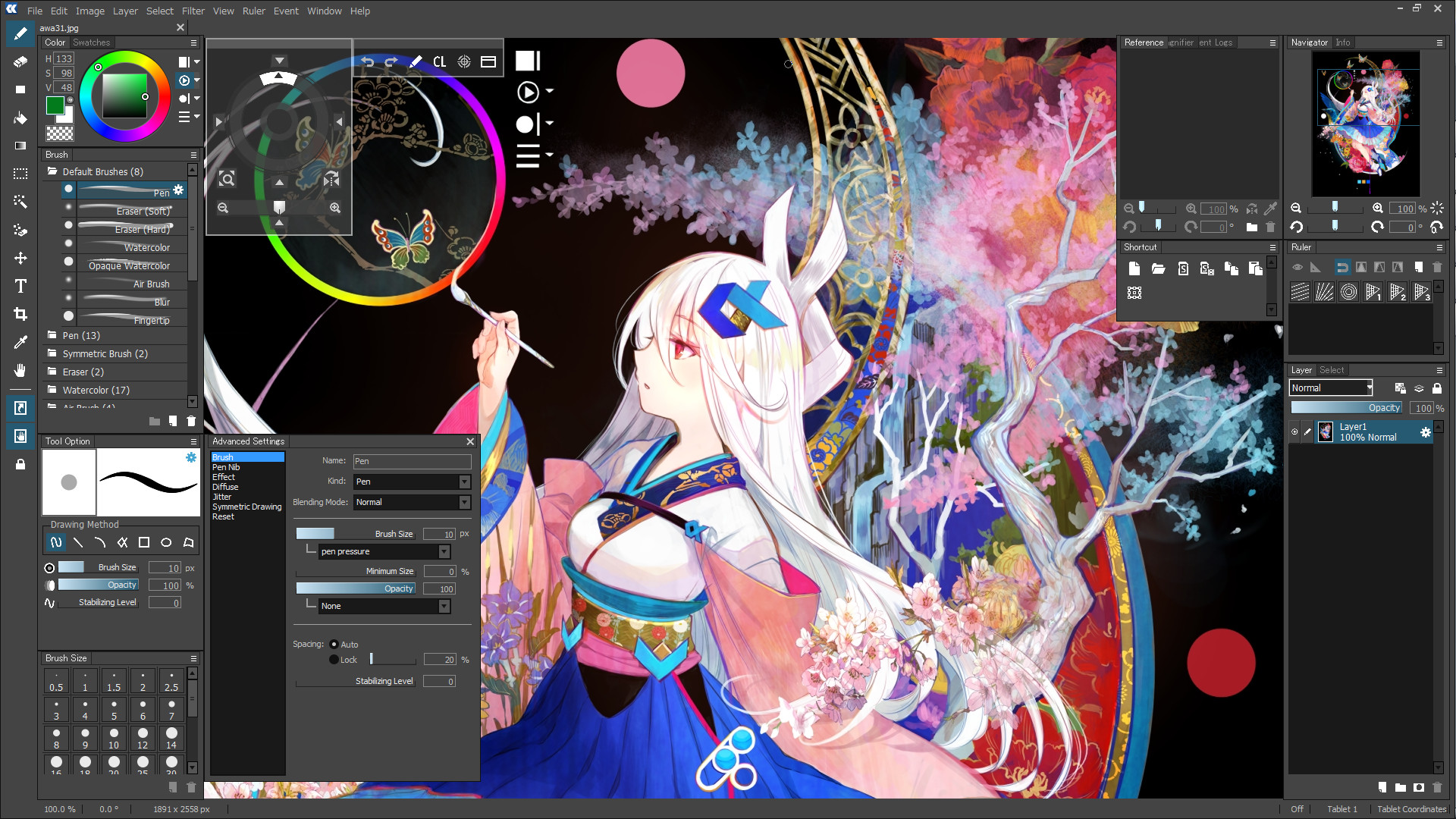
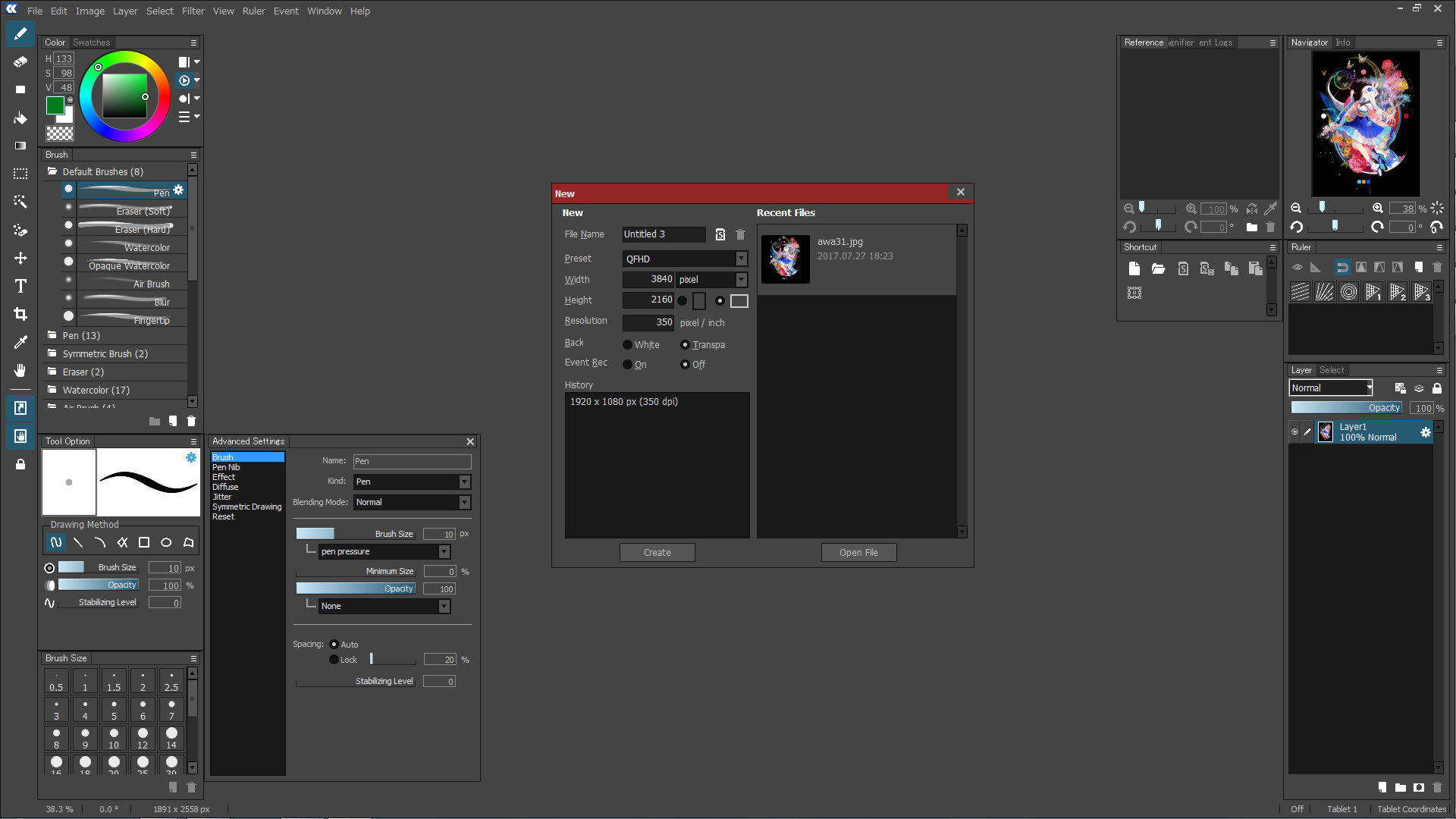
openCanvas is a painting software dedicated to Windows Operating System, that is suitable to beginners to advanced users.

Equipped with analog-like brush strokes and functional yet user-friendly interface, openCanvas has the higher basic performance and the unique "Event" function that enables to record and replay the drawing procedure.

Various functions and excellent performance of openCanvas strongly support visualizing your creativity.

Enjoy creating an illustration with openCanvas!

Why don't you open a new "Canvas" on your desktop?

Function

  • Brushes enabling the various expressions

    openCanvas brush option offers pencil, pen, watercolor, air brush, and more that enables to create various unique expressions.

    openCanvas7 is equipped with the refurbished, improved brush engine that enables even more various expressions.

  • Extensive Brush Preset

    There are more than 150 types of default brush preset.

    A brush can be customized freely so that you can create and save your own brush.

  • New Brush Engine

    The drawing engine has been improved and it now supports multiple threading.

    This made the drawing performance substantially improved. And it enables to support a pen tablet tilt/ rotation and to set up the further detailed parameter setting.

    Even further expressions is available.

    Below functions are available with the new brush engine:

    • Pen Tablet Tilt and Rotation (*for the supported devices only)

    • Scatter Drawing

    • Roller Drawing

    • Symmetrical Drawing

  • Layer Mode

    22 types of Layer Mode let you express an unlimited possibility, such as by adjusting brightness, altering contrast, changing color tone, and more. Layer Mode except few options has compatibility to Adobe Photoshop.(※)

    ※Please note that it is the Layer Mode compatibility, but the display result is not guaranteed.

  • Filter

    openCanvas has 40 types of filter. Filter lets you adjust colors, apply texture, and more.

  • Ruler

    Perspective ruler helps you to create a three-dimensional illustration and to draw a precise building. There are one-point, two-point, and three-point perspective rulers. Parallel, radial, concentric circle rulers are not only convenient for creating effect lines but also useful for drawing background objects.

  • Event Function

    Have you ever wondered, "How has the illustration been created?"

    The greatest feature of GraphicEditor openCanvas is the Event function that enables you to record/replay the drawing procedure. By using this function, it shows the drawing procedure, that you have never been able to watch, via openCanvas software or the PGN community website.

    You can learn drawing techniques, brush setting, filter usage, and many more from advanced users.

    GraphicEditor openCanvas is not just the drawing software but also lets you enjoy and learn illustration techniques.

  • Compatible to PSD format

    openCanvas supports saving as the PSD(Photoshop) format. You can open the openCanvas file in other software such as Adobe Photoshop, SAI, CLIP STUDIO PAINT, etc. while keeping most of layer information and layer modes. (※)

    ※Please note that there might be a slight difference in the display result in other software due to the difference of composition algorithm.

  • TabletPC Function Support

    Pen pressure (*1) and multi-touch gesture (*2) are available in TabletPC.

    It will make you feel like drawing on paper and let you control canvas intuitively.

    ※1 Only with the pen pressure supported device.

    ※2 Only with the multi-touch supported device.

UI

  • Refurbished User Interface Design

    The theme color and icons has been refurbished, and which offers the user-friendly User Interface design.

  • Supporting High DPI Display

    High-definition display offers a wider canvas and fine texts/ icons.

  • Grabber Control

    openCanvas' unique Hand tool lets you move, rotate, scale, flip vertical easily. Hand is available by pressing the space key. You can also temporarily switch to Hand while using the brush tool.

    It is located within the canvas, and which enables users to touch it easily.

    Background is translucent so that it will not disrupt your drawing progress.

  • Shortcut Control

    Frequently used tools are consolidated.

    You can resize the control however you like, vertically and horizontally.

    Background is translucent so that it will not disrupt your drawing progress.

Daha fazla göster

openCanvas 7'i GameLoop Emulator ile PC'ye indirin

openCanvas 7 Steam oyununu edinin

openCanvas 7, PGN Inc tarafından geliştirilen popüler bir buhar oyunudur. PC'de oynamak için GameLoop ile openCanvas 7 ve en iyi buhar oyunlarını indirebilirsiniz. Al' düğmesini tıkladığınızda GameDeal'deki en son en iyi fırsatları alabilirsiniz.

openCanvas 7 Özellikler

openCanvas is a painting software dedicated to Windows Operating System, that is suitable to beginners to advanced users.

Equipped with analog-like brush strokes and functional yet user-friendly interface, openCanvas has the higher basic performance and the unique "Event" function that enables to record and replay the drawing procedure.

Various functions and excellent performance of openCanvas strongly support visualizing your creativity.

Enjoy creating an illustration with openCanvas!

Why don't you open a new "Canvas" on your desktop?

Function

  • Brushes enabling the various expressions

    openCanvas brush option offers pencil, pen, watercolor, air brush, and more that enables to create various unique expressions.

    openCanvas7 is equipped with the refurbished, improved brush engine that enables even more various expressions.

  • Extensive Brush Preset

    There are more than 150 types of default brush preset.

    A brush can be customized freely so that you can create and save your own brush.

  • New Brush Engine

    The drawing engine has been improved and it now supports multiple threading.

    This made the drawing performance substantially improved. And it enables to support a pen tablet tilt/ rotation and to set up the further detailed parameter setting.

    Even further expressions is available.

    Below functions are available with the new brush engine:

    • Pen Tablet Tilt and Rotation (*for the supported devices only)

    • Scatter Drawing

    • Roller Drawing

    • Symmetrical Drawing

  • Layer Mode

    22 types of Layer Mode let you express an unlimited possibility, such as by adjusting brightness, altering contrast, changing color tone, and more. Layer Mode except few options has compatibility to Adobe Photoshop.(※)

    ※Please note that it is the Layer Mode compatibility, but the display result is not guaranteed.

  • Filter

    openCanvas has 40 types of filter. Filter lets you adjust colors, apply texture, and more.

  • Ruler

    Perspective ruler helps you to create a three-dimensional illustration and to draw a precise building. There are one-point, two-point, and three-point perspective rulers. Parallel, radial, concentric circle rulers are not only convenient for creating effect lines but also useful for drawing background objects.

  • Event Function

    Have you ever wondered, "How has the illustration been created?"

    The greatest feature of GraphicEditor openCanvas is the Event function that enables you to record/replay the drawing procedure. By using this function, it shows the drawing procedure, that you have never been able to watch, via openCanvas software or the PGN community website.

    You can learn drawing techniques, brush setting, filter usage, and many more from advanced users.

    GraphicEditor openCanvas is not just the drawing software but also lets you enjoy and learn illustration techniques.

  • Compatible to PSD format

    openCanvas supports saving as the PSD(Photoshop) format. You can open the openCanvas file in other software such as Adobe Photoshop, SAI, CLIP STUDIO PAINT, etc. while keeping most of layer information and layer modes. (※)

    ※Please note that there might be a slight difference in the display result in other software due to the difference of composition algorithm.

  • TabletPC Function Support

    Pen pressure (*1) and multi-touch gesture (*2) are available in TabletPC.

    It will make you feel like drawing on paper and let you control canvas intuitively.

    ※1 Only with the pen pressure supported device.

    ※2 Only with the multi-touch supported device.

UI

  • Refurbished User Interface Design

    The theme color and icons has been refurbished, and which offers the user-friendly User Interface design.

  • Supporting High DPI Display

    High-definition display offers a wider canvas and fine texts/ icons.

  • Grabber Control

    openCanvas' unique Hand tool lets you move, rotate, scale, flip vertical easily. Hand is available by pressing the space key. You can also temporarily switch to Hand while using the brush tool.

    It is located within the canvas, and which enables users to touch it easily.

    Background is translucent so that it will not disrupt your drawing progress.

  • Shortcut Control

    Frequently used tools are consolidated.

    You can resize the control however you like, vertically and horizontally.

    Background is translucent so that it will not disrupt your drawing progress.

Daha fazla göster

Ön izleme

  • gallery
  • gallery

Bilgi

  • geliştirici

    PGN Inc

  • En Son Sürüm

    1.0.0

  • Son güncelleme

    2017-09-20

  • Kategori

    Steam-game

Daha fazla göster

İncelemeler

  • gamedeal user

    Aug 3, 2018

    [h1] As a webcomic artist and illustrator, it's perfect for me. However...[/h1] ...it does come with significant downsides which I will discuss further in my points below. I'm going to try to be as informative as possible so if you want to make a purchasing decision for OpenCanvas 7, this is the review for you. Please note that I'll be making comparisons to [u]Clip Studio Paint[/u], [u]Paint Tool SAI[/u] and [u]Photoshop[/u]. [i](If you're reading this from the store page's review section, click "See Full Review" to read it in its intended format or [url=https://bethaniaarts.com/2018/08/opencanvas-7-review-a-superior-paint-tool-sai/]click here to read the review in its entirety on my website.[/url])[/i] [b]UPDATE (13/08/2021) [/b] I wrote a new article on my website regarding OpenCanvas 7: [url=https://bethaniaarts.com/2021/08/i-give-up-im-ditching-opencanvas-7-for-clip-studio-paint/]I Give Up. I’m Ditching OpenCanvas 7 For Clip Studio Paint.[/url] --------------------- [b]The Good:[/b] [list] [*]Lightweight at 60mb. It loads very fast compared to the likes of Photoshop which takes forever. [*]Black theme is easy on the eyes, especially in the dark if you're a night owl artist. It's pretty customizable too, allowing you to re-arrange the windows however you like. [url=https://steamcommunity.com/sharedfiles/filedetails/?id=1446961634]I recommend checking my guide to setting up your own personal workspace if needed.[/url] [*]Simple UI that's quite easy to understand. Since the program is similar to Paint Tool SAI, it makes learning to use it less painless than something with a completely unfamilair UI. [*]Reference window is something I didn't even know I needed until now. It's a seperate window which can load up any image you like so you don't have to minimise the program all the time, or have it side-by-side to see it. [*]Tons of tools to use. It may not be in the same league as Clip Studio Paint, but it definitely stacks up well against the competition. [*]It does lack some features but it has good photo editing capabilities that almost makes having Photoshop redundant. [*]With the Event feature, you can recreate how your drawing came to be from start to finish. Especially useful if you're an artist who makes speed-draw videos. [*]The touch features work for my Wacom Bamboo Create, unlike when I was using Paint Tool SAI. [*]The Hand tool is a godsend! It's super useful and makes digital drawing a snap. [*] I dare you to mention another art program that has a 120 day trial period. That is [b][u]four freaking months[/u][/b]. It puts Clip Studio Paint's 30 day trial to shame. That is very generous and it gives people enough time to save until they can afford to buy it. [*]It's the best illustration art software that is currently only available on Steam, which gives it an advantage over those who aren't, such as Clip Studio Paint. This means that OpenCanvas comes with the perks of being a steam user. That includes: steam trading cards (and whatever goodies come with crafting them), logging your time spent in the software without replying on additional software, moving your purchase from computer to computer with ease, etc. [/list] [b]Problems:[/b] [list] [*]Resource heavy when doing certain tasks. The blur tool uses an [u]unacceptable[/u] amount of processing power and it's very noticable on mid-range CPUs. Playing an event also uses some resources, but not as much. However the developers mentioned they'll address this with future updates. [*]Sometimes it will become non-responsive due to tasks that require significant processing power like saving large files. [*]An "Allow Game Launch" steam message pops up whenever you try to open a file directly from file explorer or desktop. The only way around this is to open the file within OpenCanvas. It seems to be an issue on Steam/Valve's part so I don't directly fault the developers. [*]The lack of tutorials and guides makes the program a bit tough on new users. Unfortunately the [url=http://www.portalgraphics.net/en/oc/help/]help section on the developer's website[/url]isn't helpful since it's only for version 6 of their program. It doesn't help the devs since it makes them look slow. [*]Getting technical support is difficult. The devs don't respond in the steam forums or to reviews where people say they have problems with the program. Your only resource for help is either finding a fan forum/chat or emailing the devs directly via email. They do respond to emails, but it can take a few days. Maybe within 24 hours if you're lucky. [/list] [h1]The biggest problem with OpenCanvas 7[/h1] It's expensive for what it offers (if you don't happen to get it on sale) compared to its biggest competition: [u]Clip Studio Paint[/u]. It all becomes clear when you see the "amount of features offered" to "price" ratio. The standard retail price for Clip Studio Paint is $50 USD. OpenCanvas 7 is $60 USD. It gets worse when you realise that Clip Studio Paint offers a lot of features for anyone interested in manga/comic illustration [u]and[/u] animation. So right there, Clip Studio offers tools for illustration, comic design and animation all in one bundle at a $10 USD lower cost than OpenCanvas 7. You can probably forgive the developers since the popularity of OpenCanvas pales in comparison to Clip Studio Paint, and seeing that people are likely to pirate software rather buy it (especially with how expensive art software is), I can reason with the price point a bit. But then the issue arises that PortalGraphics (the developer of OpenCanvas) offers a separate comic/manga illustration software called [url=https://store.steampowered.com/app/403030/mdiapp_SE/]mdiapp+ SE[/url] that is priced at another $60. Judging from the lack of reviews, I don't think it's quite popular either. But to be fair, it does seem to be developed by different group credited as [u]"nattou.org"[/u] and PortalGraphics is just the publisher. Let's sum it up: PortalGraphics is offering two art programs bundled at [b][u]$120 USD[/u][/b] to do both illustration and comic creation, whereas Clip Studio Paint is just $50USD in comparison [b]and it has animation tools[/b]. I haven't even mentioned the EX version of Clip Studio Paint that is $219 USD that's more for the industry professional illustrator. However to be fair, it is still very possible to make whatever comics/manga illustrations you want to do within OpenCanvas 7, only you'll be doing it with less finesse than with a more dedicated program. [h1]"Why did you buy OpenCanvas 7 instead of Clip Studio Paint?"[/h1] [list] [*]I couldn't get Clip Studio Paint to work when I started it up. It wouldn't register my tablet at all when I drew. Not a good first impression on me. If the first thing I have to do is run to technical support for a program, it's as good as trash to me. [*]As I am migrating from Paint Tool SAI, OpenCanvas 7 offered the most familair set up and it was fun learning to use it. [*]It's on Steam and since I adore Steam, it was a nice benefit. I can also keep track of how many hours I've spent in the program without the need of clunky third party software. [*]With the 120 day trial period, I was already used to using OpenCanvas. [*]OpenCanvas is pretty much the underdog in the "The Best Art Software" race, and little me is always rooting for the little guy. Especially when there is great potential. [/list] [h1]Final words:[/h1] Personally I would tell you if Clip Studio Paint is working great for you, then go with that. It offers a lot more at a cheaper price. I'm very content with OpenCanvas 7 and it works perfectly for what I need it to do. It's a big improvement over using Paint Tool SAI. ----------------------------------------- Did you like my review? You can read more of [url=https://steamcommunity.com/id/magicalgirlbeth/recommended/]my informative steam reviews on my profile.[/url]
  • gamedeal user

    May 28, 2020

    I'm a digital artist. I've used Autodesk Sketchbook, Medibang Paint, Paint Tool Sai, ClipStudio, Krita, and Photoshop primarily. OpenCanvas is a lightweight program in comparison to Clipstudio and Photoshop, but unfortunately it chugs heavily when using airbrush or blurring brushes at high resolutions. The program lags heavily and has crashed several times for me when alternatives didn't. The brush selection is all right with decent customization but it's nothing that you can't find with other cheaper(or free) alternatives. No problems getting my Huion tablet to play nicely with OC7. The UI is clean and logging my hours in Steam is fun, I guess. Don't pay for this program. Beginner digital artists would find much more mileage from Medibang Paint. Advanced digital artists will gravitate towards ClipStudio or Photoshop.
  • gamedeal user

    Sep 4, 2018

    I gave this a genuine shot. For months. You know what? In the end, it made me hate knowing I had no good way to export my projects out, and I DREADED coming back to this knowing what was going to happen: Frequent crashes Pen detection issues Hotkey detection Issues Random artifacting issues All this did was made me hate myself for buying it. I was excited at first, and you know what? Until I realized what WASNT working it felt really good, like a solid replacement for SAI. But in the end, I'm here, finally able to uninstall this, and having exported everything to PSDs for use in other programs. I wanted to like this program, I did. The team who works on it though, they must just not care about the average joe. I'm asked questions, and tried to seek help, and it fell on deaf ears. Want a program that's better than this and able to do more for the low low price of FREE? Look up Krita. It's by no means perfect, but it's what it would look like if SAI and Corel Painter had a baby. Truely knowing I don't have to open this again, is like taking 1000 pounds of weight off my shoulders.
  • gamedeal user

    Aug 8, 2019

    VERY GOOD.
  • gamedeal user

    Aug 4, 2018

    I use a lot of 2D art applications. Photoshop CS6, Corel Painter 2019, ArtRage 4, Autodesk Sketchbook, Marmoset Hexels 3, Aseprite, ProMotion NG, Spriter, Black Ink, etc. While this might not come close to those programs in certain areas it is hands down one of the most responsive programs I've used. Works really well for sketching as there is virtually no input lag using my UGEE tablet and stylus. Most other programs have quite a bit of input lag especially when trying to draw multiple lines in rapid succession as you would when sketching. Finally a program that can keep up with my frantic pen strokes! :D
  • gamedeal user

    Feb 5, 2018

    I'm sure it has about everything one should expect of editing software. However, the interface is a little junky and hard to manage, and it lacks support for working directly in the CMYK colorspace - a dealbreaker for me. I will not be reviewing it in depth. All you need to know is that Affinity Photo is cheaper, prettier, and apparently far more robust. You'll get full service with your license and there are many excellent official tutorials on Vimeo wheras the obscurity of openCanvas 7 makes it a drag to even get into. Thus I can't recommend it as even a good launchpad for the aspiring artist. At the current pricepoint of $59.99 US, I don't see it a good value for anyone at all, really.
  • gamedeal user

    Jun 28, 2021

    I draw so much sexual intercourse with this app
  • gamedeal user

    Feb 6, 2018

    I love this software, it's pretty, it's really user friendly, it boots up in about 5 seconds and it's a great alternative to Photoshop and I know it will cover most peoples needs, it even comes with a line stabilizer which from what I'm aware, Photoshop does not have. Just please make OC8 pdf compatible, it's one of the things I'm missing from Photoshop.
  • gamedeal user

    Apr 22, 2020

    [h1]PROS[/h1] [list] [*]UI display is pretty good for your eyes (Dark Display) [*]Stabilizing Level is more higher than OC 6 (OC 6 = 24, OC 7 = 32) so it's very suitable for mouse users like me [*]Reference Window is not have a BUG again [*]Fill Tool have Range up to 225 so it can fill the color and can regulate so looks neater [*]Zoom wheel is very smooth [*]So many Brush available [*]There is a Drawing Method that makes it easy for mouse users to draw lines properly and correctly assisted by the Stabilizing Level [/list] [h1]CONS[/h1] [list] [*]Using so much RAM usage so it must have availability a lot of RAM to make one Canvas with huge size. [*]There's have a bug make it possible to can't save the latest works [*]Did't have Auto Save [*]Can't change the Layer Style as it makes it wavy [/list] [h1]ADDITIONAL NOTE[/h1] This apps is so easy for mouse users like me. there are many features that MIGHT not present in other apps like Variant Brush and Ruler that can make line the Background with 1x try without changing the ruler possition repeatedly. actually this apps is using so much RAM usage so it's not suitable for people who have RAM under 4GB. I just Review for mouse users only, to be honest I don't know for PenTab Review because I don't have those device. ok ok back to the topic, this apps have Drawing Method feature that can be used by mouse users with Curve for making wavy lines. sometime the apps have BUG that make it uncomfortable, there is cannot save my last works. I hope the apps adding Auto Save. If you have good PC specs above average, you can so easily use this apps for PenTab and Mouse users. [h1]RECOMMEND ?[/h1] Yes, because it's very comfortable apps [h1]EXTERNAL LINKS[/h1] [list] [*][url=https://www.pixiv.net/en/users/23582853]My Pixiv[/url] [/list] [h1]SCREENSHOTS AND ARTWORKS[/h1] https://steamcommunity.com/sharedfiles/filedetails/?id=1957985552 https://steamcommunity.com/sharedfiles/filedetails/?id=2039336489 https://steamcommunity.com/sharedfiles/filedetails/?id=1995755878
  • gamedeal user

    Nov 21, 2018

    Great software, I love it!
Load More

SSS

PC Games Cheaper On Gamedeal | Find The Best Deals of Games Here!

Finding the right place to get the best game deals can prove to be quite a hassle when comparing game prices on multiple sites. However, you can skip through all the trouble by letting Gamedeal handle the price comparisons and grab only the best deal prices for you!


We compare game prices on all the trusted storefronts and list game deals starting with the lowest price possible at the moment. Looking for something more specific? Search it on Gamedeal and find all the best deals and cd keys discount codes to make the most out of your bucks. 


Not sure what you looking for? Browse through our massive library of games from different genres to find epic deals for your favorite games from the biggest retailers in the market. Can’t afford the game you are looking for? Make sure to wishlist it and stay up-to-date with all the price changes in the future.


Say Bye to Hefty Game Deals!

Gamedeal is your one-stop shop to find all the best deals from your favorite retailers including Steam, Epic Games, Gamestop, and many more under one roof. Looking for games that cost you nothing? We have got you covered with our free games list that includes free PC and Playstation games.


We help you stay on top of the news with upcoming Steam sales and Gamestop promo codes to ensure you get the game of your choice at the lowest price possible. From old-school classics to modern AAA titles, there is something for everyone to play here.

Daha Benzer Oyunlar

Hepsini gör
Kurmak için tıkla