
Video Marker PC
sweet_baked_pie
ดาวน์โหลด Video Marker บนพีซีด้วย GameLoop Emulator
Video Marker บน PC
Video Marker มาจากผู้พัฒนา sweet_baked_pie ที่เคยรันบนระบบปฏิบัติการ Android มาก่อน
ตอนนี้คุณสามารถเล่น Video Marker บนพีซีด้วย GameLoop ได้อย่างราบรื่น
ดาวน์โหลดในไลบรารี GameLoop หรือผลการค้นหา ไม่ต้องสนใจแบตเตอรี่หรือโทรผิดเวลาอีกต่อไป
เพียงเพลิดเพลินกับ Video Marker PC บนหน้าจอขนาดใหญ่ฟรี!
Video Marker บทนำ
This is a video player specialized in A-B repeat of highlight scene.
FEATURES
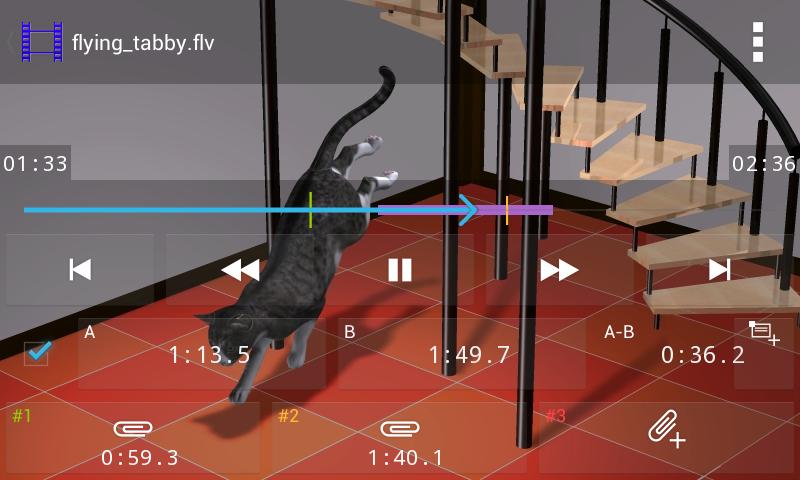
- Not only A-B repeat, but also indexes (replay points).
- Hot spots (invisible buttons), which do not obscure the screen.
- Time line with the replay points.
- Adjustment of the replay point with still preview.
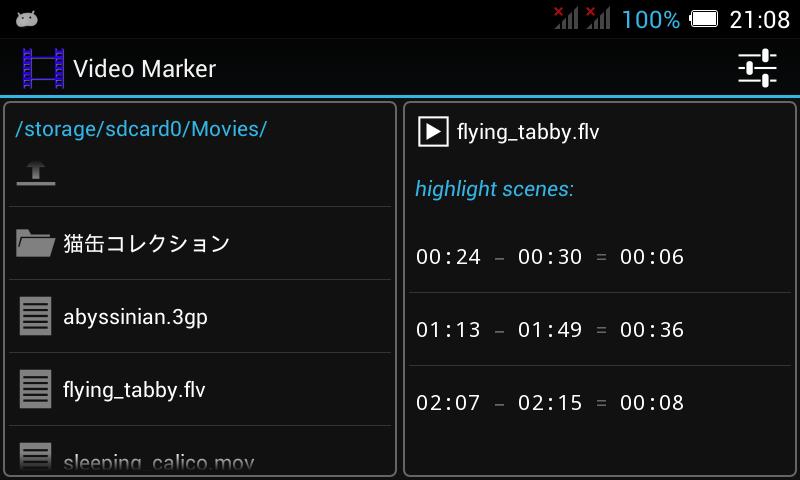
- Built-in simple filer. Thumbnail is available.
HOW TO REPLAY #1
- Choose a video file on the build-in filer and click its start button.
HOW TO REPLAY #2
- Choose a video file on your filer, and start this app.
- This app can play a video file on the network, too. But it may not play smoothly because of the buffering.
HOW TO REPLAY #3
- Choose a video file on the history.
- If a file on the network, keep your filer.
HOW TO REPLAY #4
- Choose a video file on the build-in filer to repeat replay.
- And choose a scene from its highlight scenes.
HOW TO MARK A HIGHLIGHT SCENE
(1) Anchor both A and B while replaying.
(2) Don't care of the state of the left checkbox.
(3) And click the right button to mark it.
LONG CLICK
You can long click the following buttons.
- play/pause button (hot spot is included)
- forward/backward frame-by-frame buttons
- A/B buttons
- A-B laptime
- mark button
- indexes #1, #2, #3 (however hot spots are excluded)
- +/- buttons on the dialogue
- file names in the list of files
- items in the history
- items in the highlight scene
SLOW/FAST MOTION
- Long click play/pause button to choose playback speed.
- This feature does not work on Android 4.4 or 5.0 or 5.1.
GOP (Group Of Picture)
When not seek to the position where you wish, try to reduce the GOP size of the video file.
But its file size increases.
For example,
ffmpeg -i original.flv -vcodec libx264 -acodec copy -b 360k -g 0 converted.flv
GESTURE OPERATIONS
- rewind/fastforward by swipe the screen toward right/left
- play/pause by long click the screen
NOTES
- The supported kinds of video file depend on your device.
- If .mp4 container, some devices can not seek even if GOP=0.
ดูตัวอย่าง
ข้อมูล
นักพัฒนา
sweet_baked_pie
เวอร์ชั่นล่าสุด
2.12
อัพเดทล่าสุด
2020-09-25
หมวดหมู่
Video-players-editors
มีจำหน่ายที่
Google Play
แสดงมากขึ้น
วิธีเล่น Video Marker ด้วย GameLoop บน PC
1. ดาวน์โหลด GameLoop จากเว็บไซต์ทางการ จากนั้นเรียกใช้ไฟล์ exe เพื่อติดตั้ง GameLoop
2. เปิด GameLoop และค้นหา "Video Marker" ค้นหา Video Marker ในผลการค้นหาแล้วคลิก "ติดตั้ง"
3. สนุกกับการเล่น Video Marker บน GameLoop
Minimum requirements
OS
Windows 8.1 64-bit or Windows 10 64-bit
GPU
GTX 1050
CPU
i3-8300
Memory
8GB RAM
Storage
1GB available space
Recommended requirements
OS
Windows 8.1 64-bit or Windows 10 64-bit
GPU
GTX 1050
CPU
i3-9320
Memory
16GB RAM
Storage
1GB available space