Smart Settings PC
Root Uninstaller
ดาวน์โหลด Smart Settings บนพีซีด้วย GameLoop Emulator
Smart Settings บน PC
Smart Settings มาจากผู้พัฒนา Root Uninstaller ที่เคยรันบนระบบปฏิบัติการ Android มาก่อน
ตอนนี้คุณสามารถเล่น Smart Settings บนพีซีด้วย GameLoop ได้อย่างราบรื่น
ดาวน์โหลดในไลบรารี GameLoop หรือผลการค้นหา ไม่ต้องสนใจแบตเตอรี่หรือโทรผิดเวลาอีกต่อไป
เพียงเพลิดเพลินกับ Smart Settings PC บนหน้าจอขนาดใหญ่ฟรี!
Smart Settings บทนำ
Smart Settings is a tool to automate and optimize device settings, for both context-awareness and power saver.
For example, when the device connect to meeting room’s Wifi, the “Meeting” profile will be automatically activated, or when you leave your company’s Wifi, it turns to “Outdoor” profile.
How Smart Setting works
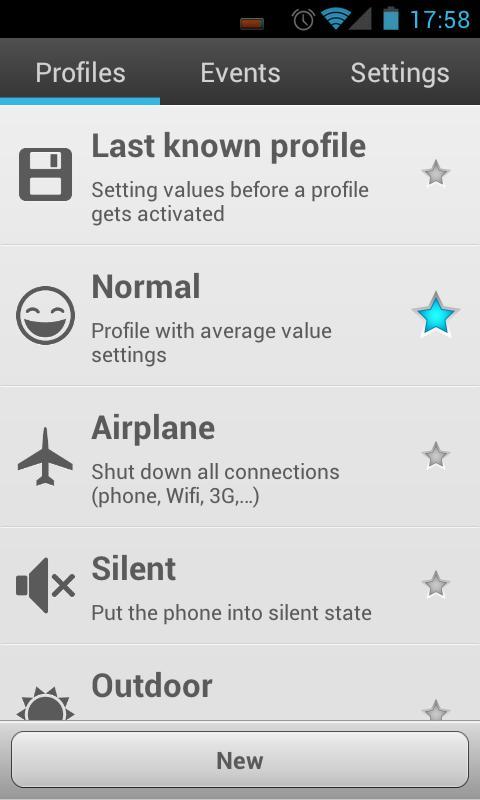
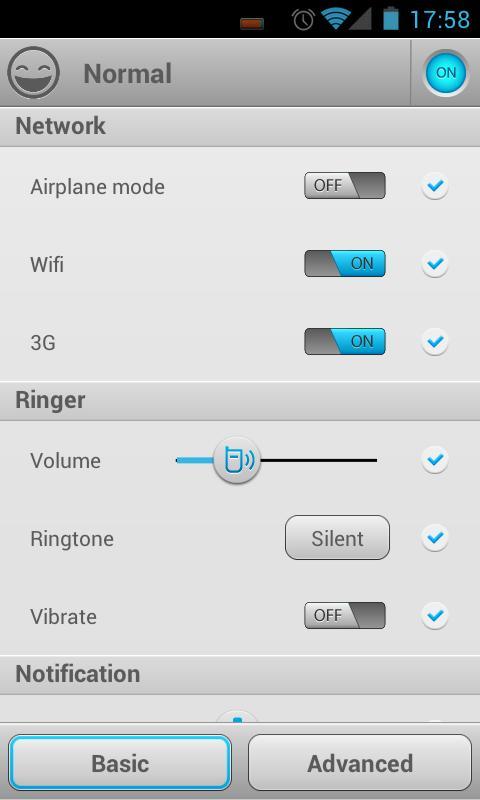
A profile is a group of device settings, including:
☆ Network (airplane mode, Wifi, mobile data, GPS, bluetooth),
☆ Ringer (volume, ringtone, vibrate),
☆ Notification (volume, ringtone, vibrate),
☆ Alarm (volume, ringtone),
☆ Display (brightness, wallpaper)
☆ Other settings (sync, media, DTMF, voice call, system).
One can use pre-defined common profiles and custom profiles
☆ Normal,
☆ Silent,
☆ Outdoor,
☆ Battery Saver
☆ Last known profile (special profile to restore last settings)
☆ Custom profiles (as many as you want)
A profile can be activated manually or by an event.
3 types of events:
☆ Battery: when battery drops to a certain level (highest priority)
☆ Wifi: connect or disconnect to a wifi network
☆ Time: specific time or repeatedly (lowest priority)
more events will be added in next versions.
Profile activation:
☆ Automatically: An event can be mapped to a profile. When an event is triggered, the mapped profile will be activated. If a event is triggered while a profile is activated by a higher priority event, it may be ignored.
☆ Manually: 5 ways to manually activate a profile:
- Notification bar: configure which profile will be displayed in the notification area.
- Quick switching screen: A new shortcut will be shown in your app drawer. You can select a profile in this screen.
- Toggle “star” icon on Profiles tab
- Create shortcut on home screen
- Using 1Tap Quick Bar app. As notification bar, but alot of customization.
kw: battery saver, context-aware, ifttt, tasker, toggle
Website: http://rootuninstaller.com/smart-settings/
Facebook: http://goo.gl/Brr99
ดูตัวอย่าง
ข้อมูล
นักพัฒนา
Root Uninstaller
เวอร์ชั่นล่าสุด
1.41
อัพเดทล่าสุด
2013-03-15
หมวดหมู่
เครื่องมือ
มีจำหน่ายที่
Google Play
แสดงมากขึ้น
วิธีเล่น Smart Settings ด้วย GameLoop บน PC
1. ดาวน์โหลด GameLoop จากเว็บไซต์ทางการ จากนั้นเรียกใช้ไฟล์ exe เพื่อติดตั้ง GameLoop
2. เปิด GameLoop และค้นหา "Smart Settings" ค้นหา Smart Settings ในผลการค้นหาแล้วคลิก "ติดตั้ง"
3. สนุกกับการเล่น Smart Settings บน GameLoop
Minimum requirements
OS
Windows 8.1 64-bit or Windows 10 64-bit
GPU
GTX 1050
CPU
i3-8300
Memory
8GB RAM
Storage
1GB available space
Recommended requirements
OS
Windows 8.1 64-bit or Windows 10 64-bit
GPU
GTX 1050
CPU
i3-9320
Memory
16GB RAM
Storage
1GB available space