Gaming Mode with GFX Tool PC
HRY Games Inc.
قم بتنزيل Gaming Mode with GFX Tool على جهاز الكمبيوتر باستخدام GameLoop Emulator
Gaming Mode with GFX Tool على الكمبيوتر الشخصي
Gaming Mode with GFX Tool ، القادم من المطور HRY Games Inc. ، يعمل على نظام Android في الماضي.
الآن ، يمكنك لعب Gaming Mode with GFX Tool على جهاز الكمبيوتر باستخدام GameLoop بسلاسة.
قم بتنزيله في مكتبة GameLoop أو في نتائج البحث. لا مزيد من الانتباه إلى البطارية أو المكالمات المحبطة في الوقت الخطأ بعد الآن.
ما عليك سوى الاستمتاع بجهاز Gaming Mode with GFX Tool على الشاشة الكبيرة مجانًا!
Gaming Mode with GFX Tool مقدمة
Best Rated Gaming Mode
Gaming Mode App is developed in consideration of disturbance because of notifications and unwanted calls.
Here we are with a great app that let you play games without any disturbance.
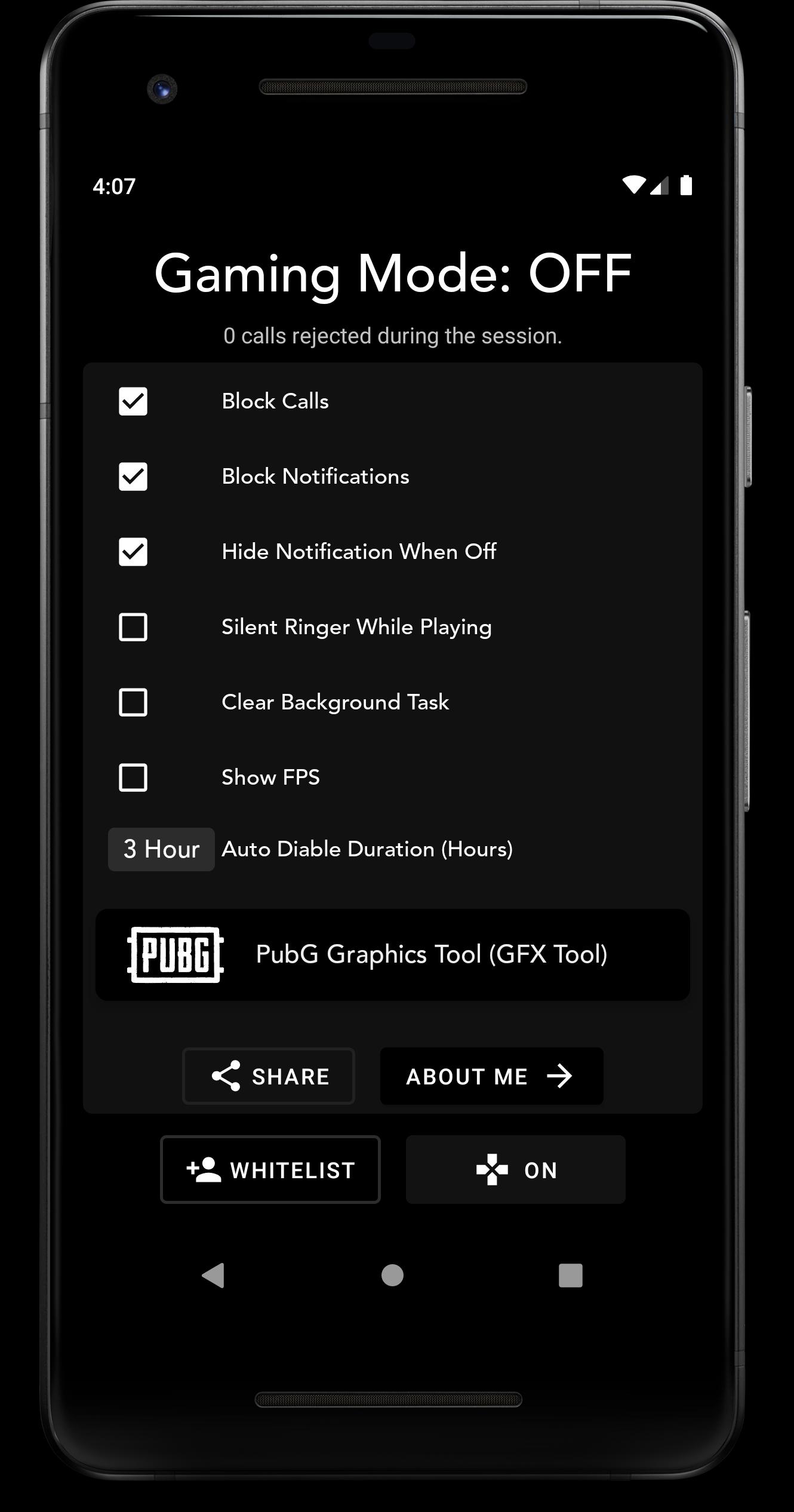
Gaming Mode automatically rejects calls and blocks notifications when we are playing games. Just turn On the gaming mode before playing and see the magic.
Gaming Mode comes with auto disable option by which Gaming Mode automatically disables after certain amount of time.
Why Use Gaming Mode
- Only Gaming Mode with a lot of features inbuilt.
- 100% Secure, We do not use or get any of your information.
- It's totally offline.
Features:
- Unlock High Graphics of PubG Mobile with inbuilt GFX Tool (Please use at your own risk)
- Basic & Advanced GFX Settings for Ease
- Disturbance Free Games.
- Auto Disable Mode.
- Change Auto Disable Time.
- FPS Overlay when playing Games.
- Rejects Calls Automatically while Gaming Mode is Enabled.
- Blocks All Notifications while Gaming Mode.
- Whitelist Contacts to make your important calls not to be rejected.
- Instant On, Off from Gaming Mode Notification Panel
- More Features Coming Soon
Make Your Gaming Life Disturbance Free
Note: PubG has now changed there terms and conditions which do not allow to change graphics settings by third party apps. So I will suggest to use PubG GFX on your own risk.
I am trying to find out which will avoid PubG Ban for using PubG GFX, for now, Please use GFX Tool at your own risk.
معاينة
العلامات
أدواتمعلومة
مطور
HRY Games Inc.
احدث اصدار
2.4.0
آخر تحديث
2021-05-20
فئة
أدوات
متاح على
Google Play
أظهر المزيد
كيف تلعب Gaming Mode with GFX Tool مع GameLoop على جهاز الكمبيوتر
1. قم بتنزيل GameLoop من الموقع الرسمي ، ثم قم بتشغيل ملف exe لتثبيت GameLoop.
2. افتح GameLoop وابحث عن "Gaming Mode with GFX Tool" ، وابحث عن Gaming Mode with GFX Tool في نتائج البحث وانقر على "تثبيت".
3. استمتع بلعب Gaming Mode with GFX Tool على GameLoop.
Minimum requirements
OS
Windows 8.1 64-bit or Windows 10 64-bit
GPU
GTX 1050
CPU
i3-8300
Memory
8GB RAM
Storage
1GB available space
Recommended requirements
OS
Windows 8.1 64-bit or Windows 10 64-bit
GPU
GTX 1050
CPU
i3-9320
Memory
16GB RAM
Storage
1GB available space