السعودية
  • Global
  • México
  • 中國台灣
  • India
  • Indonesia
  • Türkiye
  • Việt Nam
  • ประเทศไทย
  • Brasil
  • Perú
  • Colombia
  • Argentina
  • Россия
  • السعودية
  • مصر
  • پاکستان
  • Malaysia
  • 日本
  • 中国香港
  • Philippines
تحميل
Dialogue Designer

Dialogue Designer

50 إيجابي / 20 التقييمات | الإصدار: 1.0.0

radmatt

  • Saudi Arabia
    21.95SR21.95SR
    اذهب للمتجر
  • Argentina
    1.39SR1.39SR
    اذهب للمتجر
  • Turkey
    2.49SR2.49SR
    اذهب للمتجر

قم بتنزيل Dialogue Designer على جهاز الكمبيوتر باستخدام GameLoop Emulator


Dialogue Designer ، هي لعبة بخار شهيرة تم تطويرها بواسطة radmatt. يمكنك تنزيل Dialogue Designer وأهم ألعاب البخار باستخدام GameLoop للعب على جهاز الكمبيوتر. انقر فوق الزر "الحصول" ثم يمكنك الحصول على أحدث أفضل الصفقات في GameDeal.

احصل على لعبة Dialogue Designer البخارية

Dialogue Designer ، هي لعبة بخار شهيرة تم تطويرها بواسطة radmatt. يمكنك تنزيل Dialogue Designer وأهم ألعاب البخار باستخدام GameLoop للعب على جهاز الكمبيوتر. انقر فوق الزر "الحصول" ثم يمكنك الحصول على أحدث أفضل الصفقات في GameDeal.

ميزات Dialogue Designer

A powerful (but easy to use) branching dialogue editor designed for story-driven games like RPGs and Visual Novels.

Create complex non-linear data structures in seconds, no programming experience required!

Works with Unity, Unreal 4, Godot, Construct 3, GameMaker Studio 2 and many more!

DIALOGUE DESIGNER in a nutshell:

  • Create non-linear stories

  • Design in-game cutscenes

  • Write branching conversations with multiple choise answers

  • Control your dialogues and cutscenes with variables and conditions

  • Create simple visual scripting systems

  • Organize your characters and variables in databases

  • Export to / Import from a single JSON file

No license required. Pay once, and it's yours forever (along with any future updates).

-----------

FEATURES:

LIGHT-WEIGHT AND EASY TO USE

The editor was created for non-programmers. It is easy to understand and navigate. It is also fast and lightweight - it runs smoothly even on less powerful PCs.

BEAUTIFUL INTERFACE

Minimalistic, highly usable interface. Two themes available: Blue and Dark.

DATABASES

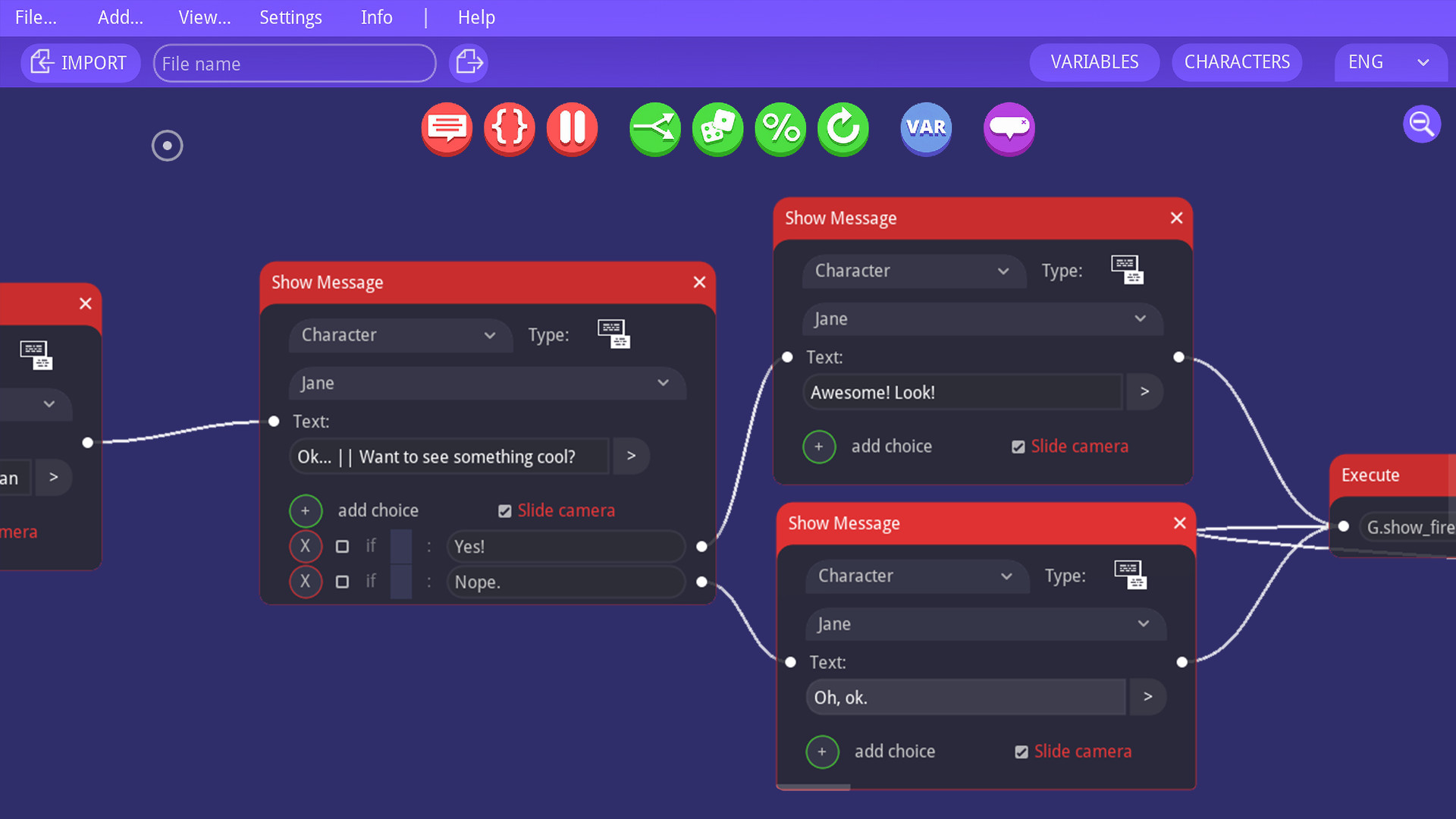
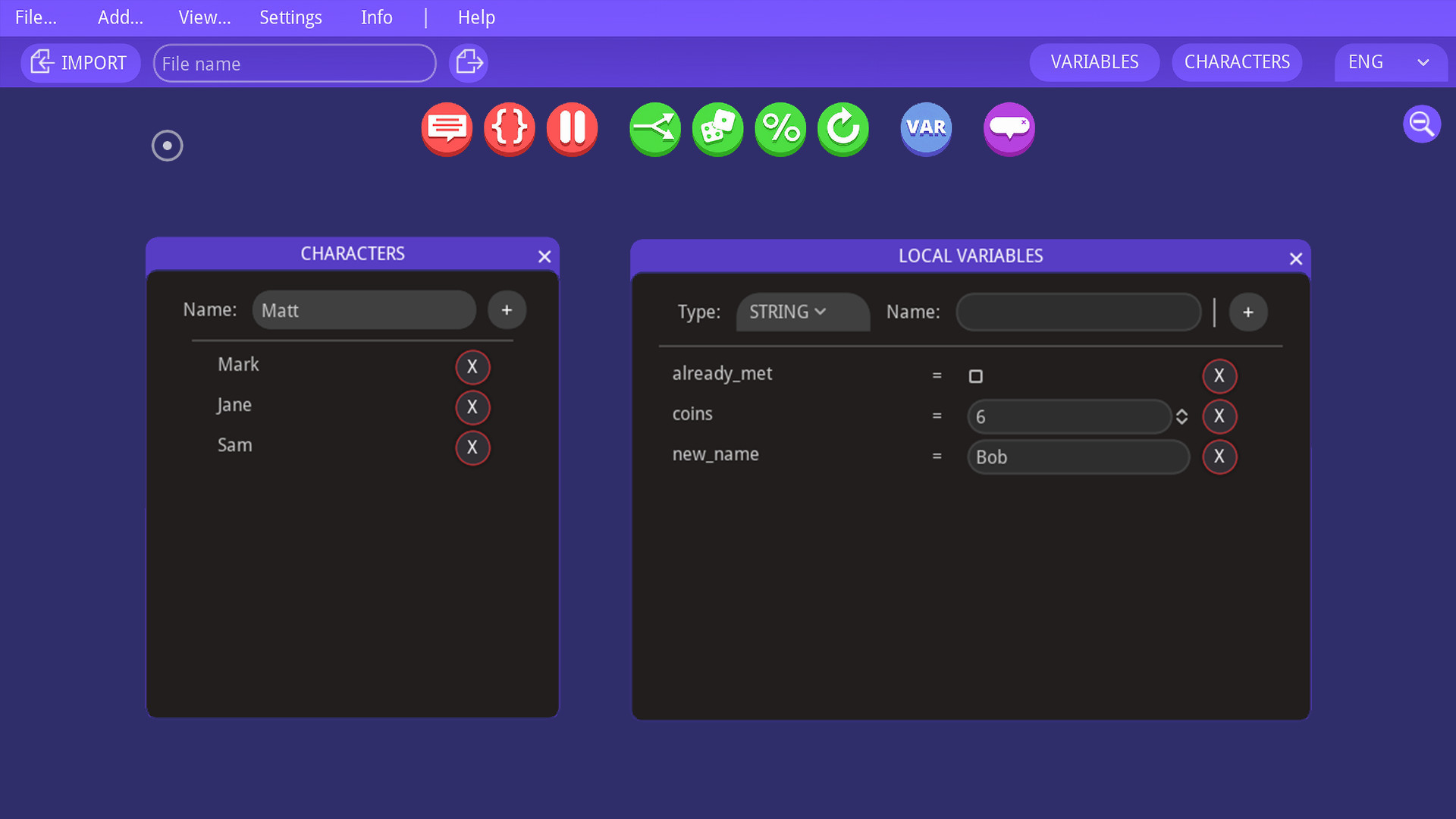
The editor includes a characters database and local variables database (strings, integers, booleans). They are incredibly helpful in organising the dialogue and keeping track of player's progress.

SUPPORT FOR MULTIPLE LANGUAGES

Change the dialogue language by selecting it from a drop-down menu. There are no limits for the amount of languages you can use.

EXPORT TO JSON FILE

Export your dialogue with one click to a JSON text file.

JSON files are simple text files, which are easy to read by a human (one like you!). In it, each key is assigned a set of values, for example:

character: "Matt",

message: "Hello!",

is_happy_to_see_you: TRUE

That way it is very simple to import into your favourite game engine or framework, most of which already have lots of tutorials and plugins for importing JSON files and creating dialogues using them.

AVAILABLE NODES (input types):

  • Show Message - Shows a dialogue message

  • Wait - Pauses the dialogue for a given amount of time

  • Execute - Executes a line of code

  • Condition - Takes different paths based on a condition

  • Chance - Has a chance of taking one of two paths

  • Random - Takes different paths at random

  • Repeat - Repeats a part of the dialogue x amount of times

  • Set Variable - Changes a local variable

  • Comment - Used for organizing the dialogue.

The above usage of each node is just a proposition, you can easily repurpose each node to suit your needs.

-----------

See the documentation if you need more help or contact me and ask a question!

أظهر المزيد

قم بتنزيل Dialogue Designer على جهاز الكمبيوتر باستخدام GameLoop Emulator

احصل على لعبة Dialogue Designer البخارية

Dialogue Designer ، هي لعبة بخار شهيرة تم تطويرها بواسطة radmatt. يمكنك تنزيل Dialogue Designer وأهم ألعاب البخار باستخدام GameLoop للعب على جهاز الكمبيوتر. انقر فوق الزر "الحصول" ثم يمكنك الحصول على أحدث أفضل الصفقات في GameDeal.

ميزات Dialogue Designer

A powerful (but easy to use) branching dialogue editor designed for story-driven games like RPGs and Visual Novels.

Create complex non-linear data structures in seconds, no programming experience required!

Works with Unity, Unreal 4, Godot, Construct 3, GameMaker Studio 2 and many more!

DIALOGUE DESIGNER in a nutshell:

  • Create non-linear stories

  • Design in-game cutscenes

  • Write branching conversations with multiple choise answers

  • Control your dialogues and cutscenes with variables and conditions

  • Create simple visual scripting systems

  • Organize your characters and variables in databases

  • Export to / Import from a single JSON file

No license required. Pay once, and it's yours forever (along with any future updates).

-----------

FEATURES:

LIGHT-WEIGHT AND EASY TO USE

The editor was created for non-programmers. It is easy to understand and navigate. It is also fast and lightweight - it runs smoothly even on less powerful PCs.

BEAUTIFUL INTERFACE

Minimalistic, highly usable interface. Two themes available: Blue and Dark.

DATABASES

The editor includes a characters database and local variables database (strings, integers, booleans). They are incredibly helpful in organising the dialogue and keeping track of player's progress.

SUPPORT FOR MULTIPLE LANGUAGES

Change the dialogue language by selecting it from a drop-down menu. There are no limits for the amount of languages you can use.

EXPORT TO JSON FILE

Export your dialogue with one click to a JSON text file.

JSON files are simple text files, which are easy to read by a human (one like you!). In it, each key is assigned a set of values, for example:

character: "Matt",

message: "Hello!",

is_happy_to_see_you: TRUE

That way it is very simple to import into your favourite game engine or framework, most of which already have lots of tutorials and plugins for importing JSON files and creating dialogues using them.

AVAILABLE NODES (input types):

  • Show Message - Shows a dialogue message

  • Wait - Pauses the dialogue for a given amount of time

  • Execute - Executes a line of code

  • Condition - Takes different paths based on a condition

  • Chance - Has a chance of taking one of two paths

  • Random - Takes different paths at random

  • Repeat - Repeats a part of the dialogue x amount of times

  • Set Variable - Changes a local variable

  • Comment - Used for organizing the dialogue.

The above usage of each node is just a proposition, you can easily repurpose each node to suit your needs.

-----------

See the documentation if you need more help or contact me and ask a question!

أظهر المزيد

معاينة

  • gallery
  • gallery

معلومة

  • مطور

    radmatt

  • احدث اصدار

    1.0.0

  • آخر تحديث

    2020-04-17

  • فئة

    Steam-game

أظهر المزيد

المراجعات

  • gamedeal user

    Jul 12, 2020

    Looks okay on the surface but I had to refund straight away because there are only 2 zoom levels (which you toggle with a button). For that reason I can see this would be useless for navigating medium to large trees. Mouse wheel should be used for zooming.
  • gamedeal user

    Jul 7, 2021

    Great, simple dialog designer. Love it for what it is. However, I haven't a clue what to do with it in Unity, and the developer doesn't bother to explain. This is the typical case with a lot of Unity assets: the dev spends months or years making a great asset and then about ten minutes showing how to use them or not at all. You politely ask them how to use them and they reply paraphrased it's your stupid fault for not having a degree in C#! Well, that may be the case but not if you're selling a purportedly simple to use, codeless product. Referring a customer to the Unity help page for JSON importing is a cop-out, in my opinion. So, why not make a video showing how to implement this asset in Unity, or at least outline how to implement it. I don't know about you, but I'm sick and tired of wasting many, many hours tying to figure out how to use an asset. What use is Dialog Designer without being able to implement it in Unity? Not much at all; I suppose you could use it to map out dialog, but there's plenty of free ( to a point) dialog mappers, Whimsical and Lucid Chart etc, which do the same thing. If you can't code and want to use Dialog Designer in Unity, don't buy. Be warned.
  • gamedeal user

    Apr 28, 2020

    useful little program but: 1.Most important - Need auto save after any changes. (like some screenwriting programs and mobile apps - its very intuitive, fast and effective in modern world) If not AT LEAST ask about saving edited document before exit. lost some time on this one - intuitively closing document assuming it will ask to save or saving already like most programs i use. 2. wish it will have some ui improvements possibility to control everything from keyboard fast (e.g. shortcut for creating specific node, auto choose last type, choose character with arrows or other keys (like vim) hit enter, auto jump into text window after ctrl+enter jump to choosing variants or ctrl+enter and jump to creating new node with choosing type with shortcut or with arrows- theres not so many of them hit enter, shortcuts for fast navigation between nodes) create and choose nodes after dragging connection with mouse 3. use actual zoom scroll 4. less important for me but looking into possibility to edit theme and workflow environment like placement of elements and their size and colors.
  • gamedeal user

    Sep 4, 2020

    Short Version: If you're using Unity, I do not recommend this too. Use YardSpinner, free, openSource and integrates properly with Unity. https://yarnspinner.dev/docs/unity/installing/ If you're using Godot, then probably, as that's what it was built for. If you'r using something else, you need to build your own JSON parser, so I do not recommend. Use other better tools that you'd have to do that for anyway. I did use this for my last gamejam, in unity, but after using it, I realize it needs more work. It's easy to lose your data, no warning when closing. It's also unclear how "execute" works and there zero examples out there of how the variables should be set or used. Example, the boolean variable, how should it be checked? I am using https://github.com/BrianMacIntosh/DialogueDesignerUnity to get it working in unity. It would be nice too, see access all your conversations quickly and connect them to each other. You can't export to another file. if you Export it overwrites your json and then if you try and open that exported file it won't open and your screwed. Yeah you can change the name real quick, but if you forget.. you're sol. Doc doesn't say what the diff char types are. Doesn't say why I click the chat icon it changes from round to square icons. No idea what "slide camera" means. Unless this just all random things to code for manually. What's the syntax for checking conditions to choices.. etc. So yes, it works with the integration Brian MacIntosh created, but not sure how in-depth you can use it's features. I'm still doing trial/error to figure it out. Can you use string values in conversation? if so how? is it brackets? Does it work? sure with the integration from someone else. So Depends how you want to use it. If it's Unity I'd recommend don't use it and use yard spinner. If it's for Godot, I guess, haven't tried it with that game engine.
  • gamedeal user

    May 6, 2020

    I love the concept but the json it exports is too convoluted to implement manually, you'd be better off creating your own dialogue system.
  • gamedeal user

    Apr 18, 2020

    Advantages - Convenient and functional dialog editor. - Nice interface design. Easy and not loading system. - The editor can be used both for creating dialogs and for creating branched blocks of stories (for any type of game). - I was pleasantly surprised when I learned from the file structure that this editor was made on the Godot Engine (this is cool). Disadvantages - I haven’t noticed the cons yet, time will tell.
  • WiLLyRS

    Aug 31, 2023

    Very nice tool, the only problem I found is that the json export creates a mixed array for the characters list, with strings and numbers. This is a bit of a problem with strongly-typed languages like kotlin (that I'm using), so I need to edit the array each time I export it.. It would be cool to avoid creating mixed array and just put everything as string
  • gamedeal user

    May 16, 2020

    Great software. Would be great also a simpler "choose your own adventure" template :)
  • gamedeal user

    Apr 19, 2020

    I really like this, it has some issues and some important additions I think will be easy enough to add. In the following video we look at implementing it and the Godot Dialogue System https://www.youtube.com/watch?v=QqECpmfahZo Fantastic software, extremely user friendly and ideal for your creatives / writers and authors to start knocking out scripts for the coding team. The author should be extremely proud of what they have created! The only downside is that I'm not a big fan of the JSON output, writing a new parser for it will not be simple, there is a Godot Parser available. I've yet to try and pick it out and put it into my own framework. It is perhaps designed to be too user friendly at the expense of flexibility. What would be fantastic would be for the editor to allow for custom fields or tags, similar to characters / variables etc. Custom fields could be associated with the various nodes and have a specific query system in the parser. In my case I want to add custom elements like associated filenames for audio with particular nodes. I'm sure there will be more I need to add as well. Finally, not all of us need cameras, so it would nice to make the camera follow checkbox optional (even better, make it a custom field). Other than the above, I highly, highly recommend it and I invite the author to join me on live stream to talk about the project in more detail if he/she would like. We will certainly be looking to put it through it's paces in the next few episodes. What an exciting find!
  • gamedeal user

    Apr 23, 2020

    I highly recommend this software, especially for those who do not want the creative process to be stymied by a lot of coding or having to learn a new programming language. There are a TON of great features, and I'm sure the developers will continue to add to this impressive offering. In the future, and to echo what was said by another reviewer, it would be REALLY nice if it could export dialogues to the rpy script format for the Ren'Py engine (visual novel engine).
Load More

أسئلة وأجوبة

PC Games Cheaper On Gamedeal | Find The Best Deals of Games Here!

Finding the right place to get the best game deals can prove to be quite a hassle when comparing game prices on multiple sites. However, you can skip through all the trouble by letting Gamedeal handle the price comparisons and grab only the best deal prices for you!


We compare game prices on all the trusted storefronts and list game deals starting with the lowest price possible at the moment. Looking for something more specific? Search it on Gamedeal and find all the best deals and cd keys discount codes to make the most out of your bucks. 


Not sure what you looking for? Browse through our massive library of games from different genres to find epic deals for your favorite games from the biggest retailers in the market. Can’t afford the game you are looking for? Make sure to wishlist it and stay up-to-date with all the price changes in the future.


Say Bye to Hefty Game Deals!

Gamedeal is your one-stop shop to find all the best deals from your favorite retailers including Steam, Epic Games, Gamestop, and many more under one roof. Looking for games that cost you nothing? We have got you covered with our free games list that includes free PC and Playstation games.


We help you stay on top of the news with upcoming Steam sales and Gamestop promo codes to ensure you get the game of your choice at the lowest price possible. From old-school classics to modern AAA titles, there is something for everyone to play here.

المزيد من التطبيقات المشابهة

اظهار الكل

المزيد من التطبيقات المشابهة

اظهار الكل
انقر للتثبيت