Incoming Call Lock & App Lock PC
LashPash Apps
قم بتنزيل Incoming Call Lock & App Lock على جهاز الكمبيوتر باستخدام GameLoop Emulator
Incoming Call Lock & App Lock على الكمبيوتر الشخصي
Incoming Call Lock & App Lock ، القادم من المطور LashPash Apps ، يعمل على نظام Android في الماضي.
الآن ، يمكنك لعب Incoming Call Lock & App Lock على جهاز الكمبيوتر باستخدام GameLoop بسلاسة.
قم بتنزيله في مكتبة GameLoop أو في نتائج البحث. لا مزيد من الانتباه إلى البطارية أو المكالمات المحبطة في الوقت الخطأ بعد الآن.
ما عليك سوى الاستمتاع بجهاز Incoming Call Lock & App Lock على الشاشة الكبيرة مجانًا!
Incoming Call Lock & App Lock مقدمة
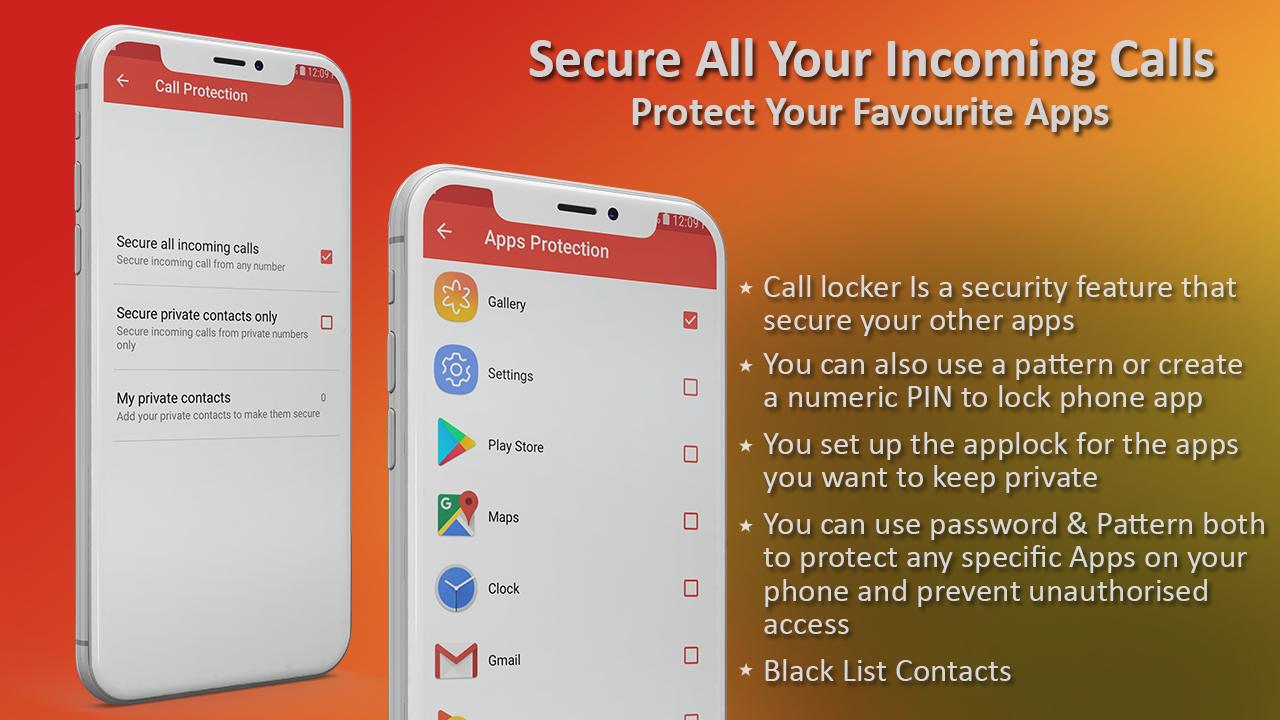
Applock Fingerprint - Pin & Pattern app lock - call locker Is a security feature that secure your other apps.it prevents access to your apps without a pattern and password. Applock Fingerprint - Pattern app lock.
If you have an applock on Facebook and other social Media Apps, people can,t get into your Facebook app and other social media apps without passwords.
You can use password & Pattern both to protect any specific Apps on your phone and prevent unauthorised access.
Applock Fingerprint - Pin & Pattern app lock - call locker allow you to hide photos and videos from gallery and store them in private vault.
After Download and install This locker app, you will need to create master pattern lock or Pin lock every time to access the applications.
Applock Fingerprint - Pin & Pattern app lock - call locker that allows you to use your fingerprint sensor to lock apps. You can also use a pattern or create a numeric PIN to lock phone app.you can use your fingerprint. When you set up the app it asks for access to your contacts. We were able to reject authorisation without any negative effects. As a plan B for a forgotten pattern.
Pin & Pattern app lock - call locker
The call lock module of fingerprint app lock and call lock application consist all features related to incoming calls.
Black List Contacts are those contacts that you want to protect incoming calls from all these numbers with fingerprint or pattern. Thus no one will be able to receive any incoming calls without your protected pattern or fingerprint.
White List Contacts are those contacts for which you don’t want the lock to be enabled. This feature is helpful in case you lost your mobile and found by some responsible person. So when you call him from that contact that is whitelisted in your app will be easily picked by them.
You set up the applock for the apps you want to keep private. It can be a good way to keep prying eyes out of your social media, your kids out of whatever app store you have, and keep friends out of your photos.
Pattern Fingerprint call lock features
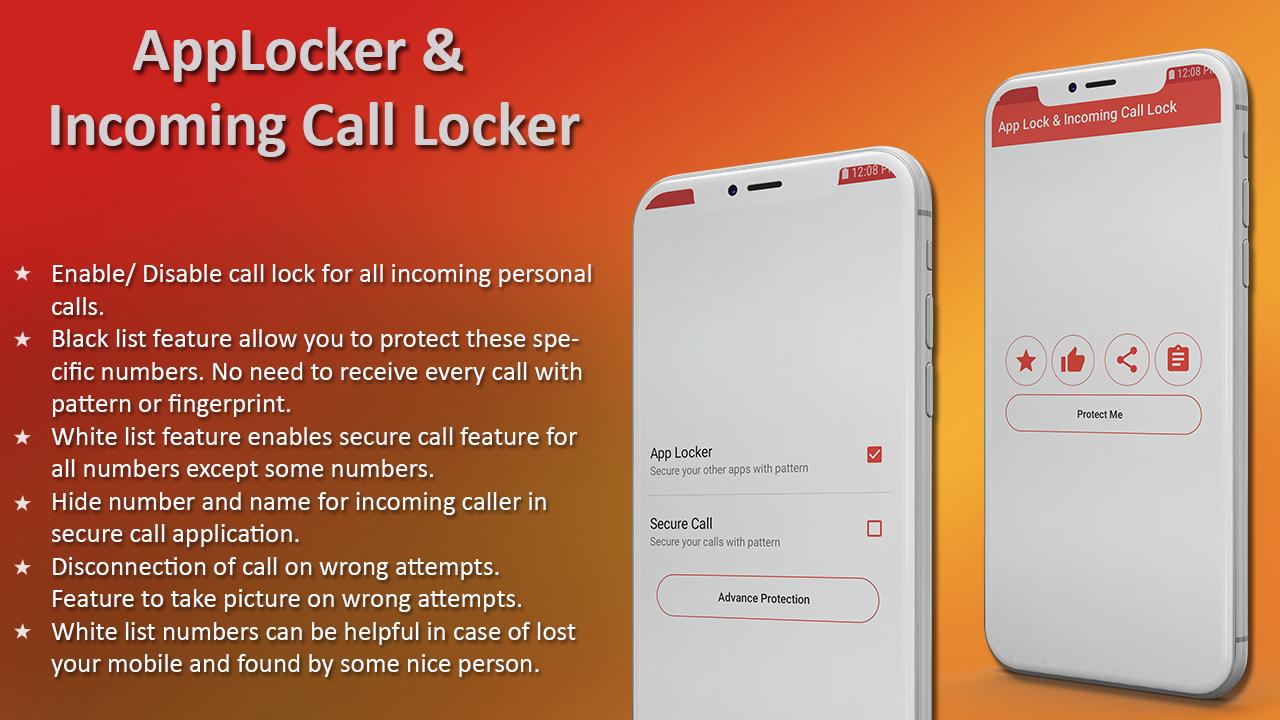
★ Enable/ Disable call lock for all incoming personal calls.
★ Black list feature allow you to protect these specific numbers. No need to receive every call with pattern or fingerprint.
★ White list feature enables secure call feature for all numbers except some numbers.
★ Hide number and name for incoming caller in secure call application.
★ Disconnection of call on wrong attempts.
★ Feature to take picture on wrong attempts.
★ White list numbers can be helpful in case of lost your mobile and found by some nice person.
General Features
✔ Add fingerprint option from advance setting by just enabling a checkbox.
✔ Change Pattern Security in App Lock and secure call lock.
✔ Change PIN Security in App Lock and secure Call Lock.
✔ Feature to set any background from themes gallery.
✔ Feature to set any colour of the background and pattern dots.
✔ Feature to take picture on wrong attempts and store it in SD card.
Supported Themes
✔ Butterfly Theme
✔ Mushroom Theme
✔ Halloween Theme
✔ Nature Theme
✔ Shark Theme
✔ Tiger Theme
Alert ! Access permissions This App uses permissions of usage access, read contacts for secure the call and read phone state for call.
Important Note: To use The finger print option your android phone must have a fingerprint sensors.
we really appreciate user suggestions and feedback, If you have any question related our software write us on at lashpashapps@gmail.com
معاينة
العلامات
إضفاء الطابع الشخصيمعلومة
مطور
LashPash Apps
احدث اصدار
1.5.0
آخر تحديث
2021-06-26
فئة
إضفاء الطابع الشخصي
متاح على
Google Play
أظهر المزيد
كيف تلعب Incoming Call Lock & App Lock مع GameLoop على جهاز الكمبيوتر
1. قم بتنزيل GameLoop من الموقع الرسمي ، ثم قم بتشغيل ملف exe لتثبيت GameLoop.
2. افتح GameLoop وابحث عن "Incoming Call Lock & App Lock" ، وابحث عن Incoming Call Lock & App Lock في نتائج البحث وانقر على "تثبيت".
3. استمتع بلعب Incoming Call Lock & App Lock على GameLoop.
Minimum requirements
OS
Windows 8.1 64-bit or Windows 10 64-bit
GPU
GTX 1050
CPU
i3-8300
Memory
8GB RAM
Storage
1GB available space
Recommended requirements
OS
Windows 8.1 64-bit or Windows 10 64-bit
GPU
GTX 1050
CPU
i3-9320
Memory
16GB RAM
Storage
1GB available space