NAVER Maps, Navigation на пк
NAVER Corp.
Скачать NAVER Maps, Navigation на ПК с помощью эмулятора GameLoop
NAVER Maps, Navigation на ПК
NAVER Maps, Navigation, исходящий от разработчика NAVER Corp., в прошлом работал на системе Android.
Теперь вы можете без проблем играть в NAVER Maps, Navigation на ПК с помощью GameLoop.
Загрузите его в библиотеке GameLoop или результатах поиска. Больше не нужно смотреть на аккумулятор или разочаровывать звонки в неподходящее время.
Просто наслаждайтесь NAVER Maps, Navigation на ПК на большом экране бесплатно!
NAVER Maps, Navigation Введение
South Korea's GPS navigation Get started right away
* Experience the completely new NAVER Map.
※ Are you traveling Korea?
Don't miss the smart tips to use NAVER Map: https://naver.me/GfCSj5Ut
[Key features]
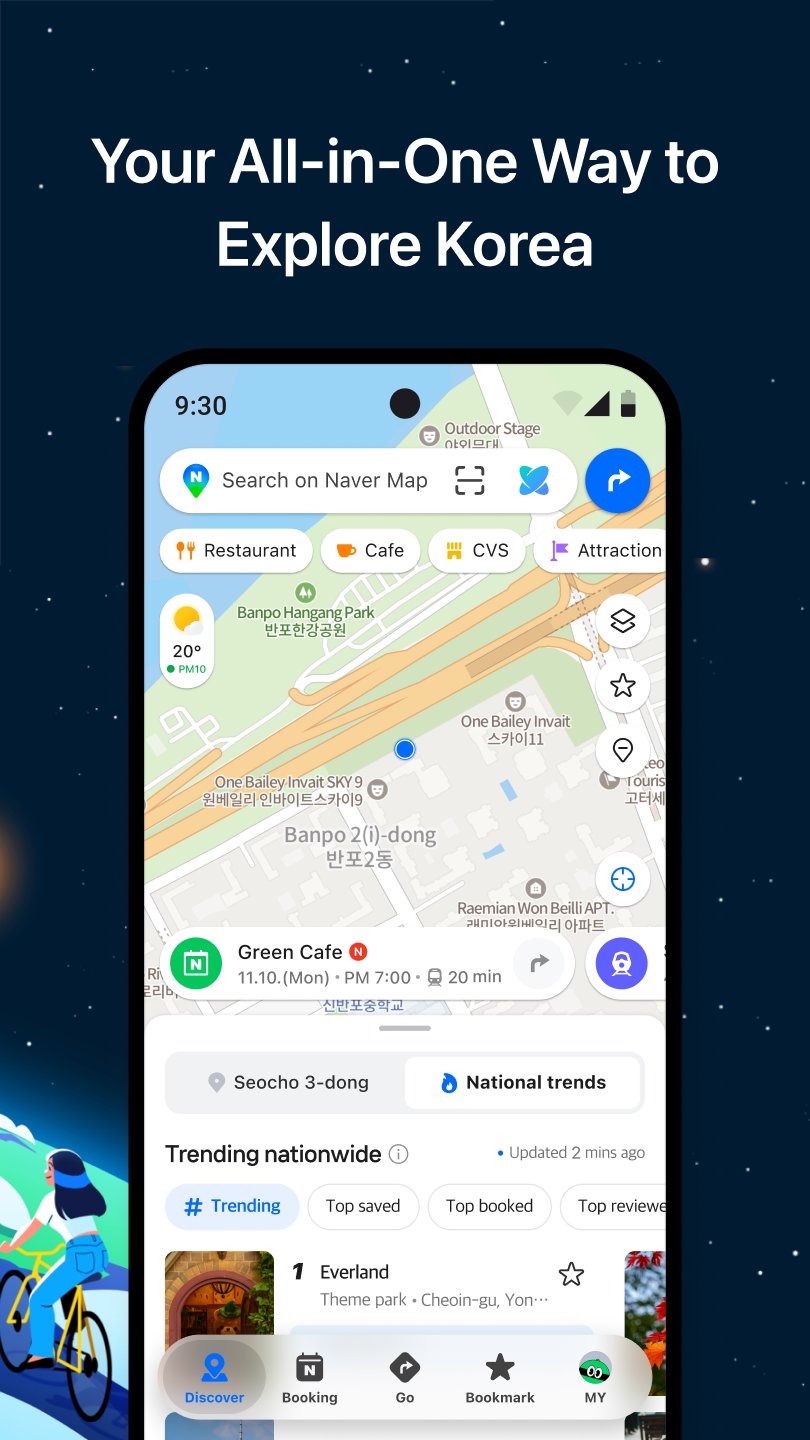
- Map Home Menu Tab
You can now conveniently use the Discover, Booking, Transit, Navigation, and Bookmark tabs on the Home.
- Simplified search
Search locations, buses, subway, and more in a comprehensive search bar.
- Discover
Helps you find new places nationwide and nearby. Enjoy real-time rankings, recommendation feeds, trending spots, bookmarked lists, and coupon offers.
- Booking
Explore a new Booking tab, a space that brings together businesses and products available for booking on NAVER. From nearby restaurants, hair salons, amusement parks, one-day classes to even train tickets, you can find them all in one place on the booking tab.
- Navigation
Fast and accurate navigation with real-time traffic info and optimized usability for any driving condition.
- Vector map
360 degrees rotation-enabled vector map with 3D view of key landmarks via tilting.
- Transit
You can easily reach your destination by using transit directions for various modes of transportation, real-time departure and arrival times, and notifications for when to get on/off.
- Street view
Seamless street and aerial views provided for location search and route planning.
- Bookmark
Easily save your best restaurants and must-visit tourist spots on NAVER Map and share them with others.
- MY
View all your maps, reviews, and bookings in one place and write reviews with ease.
- Instant search
View useful info about your query, such as opening/closing times for supermarkets while you search.
- Language
Korean/English/Japanese/Chinese maps and English navigation provided.
*Requires Android OS 8.0 or later
*Find out more tips on how to use NAVER Map
- NAVER Map customer service: http://naver.me/GYywEiT4
- NAVER Map blog: https://blog.naver.com/naver_map
----
* Required permissions for using NAVER Maps
- Location: Used to show your location when you use the map, directions, navigation, and more. (Allow all the time must be selected to display location information in the widget.)
- Microphone: Used for voice search and Clova voice commands.
- Physical activity: Used to detect your step count in walking directions. (Only on devices running OS 10.0 or later)
- Phone: Used to check call status and make calls when entering and using navigation.
- Call logs: Accessed to confirm recipients when making calls or sending messages during navigation. (Call logs are no longer used as of NAVER Maps v6.3.)
- SMS: Used to send messages during navigation. (SMS is no longer used as of NAVER Maps v6.3.)
- Contacts: Used to make calls with Clova voice commands and to save phone numbers from place search results.
- Camera: Used for suggesting edits to place information, verifying MY Place receipts, providing AR directions, scanning QR codes, and verifying passports.
- Files and media (photos and videos): Used to save and read content on your device in order to provide navigation and other services smoothly. (Not used on devices running OS 13.0 or later.)
- Notifications: Used to send important notices, events, and promotional information. (Only on devices running OS 13.0 or later)
- Nearby devices: Used to launch the app automatically when Bluetooth is connected. (Only on devices running OS 12.0 or later)
----
*Contact: 1588-3820
*Address: 95, Jeongjail-ro, Bundang-gu, Seongnam-si, Gyeonggi-do, Republic of Korea
Предварительный просмотр
Теги
Travel-&Maps-&Настольные игрыИнформация
Разработчик
NAVER Corp.
Последняя версия
6.12.2.4
Последнее обновление
2026-11-10
Категория
Travel-local
Доступно на
Google Play
Показать больше
Как играть в NAVER Maps, Navigation с GameLoop на ПК
1. Загрузите GameLoop с официального сайта, затем запустите исполняемый файл для установки GameLoop.
2. Откройте GameLoop и выполните поиск NAVER Maps, Navigation, найдите NAVER Maps, Navigation в результатах поиска и нажмите Установить.
3. Наслаждайтесь игрой в NAVER Maps, Navigation на GameLoop.
Minimum requirements
OS
Windows 8.1 64-bit or Windows 10 64-bit
GPU
GTX 1050
CPU
i3-8300
Memory
8GB RAM
Storage
1GB available space
Recommended requirements
OS
Windows 8.1 64-bit or Windows 10 64-bit
GPU
GTX 1050
CPU
i3-9320
Memory
16GB RAM
Storage
1GB available space