
Rate your Hangar - War Thunder на пк
1011011
Скачать Rate your Hangar - War Thunder на ПК с помощью эмулятора GameLoop
Rate your Hangar - War Thunder на ПК
Rate your Hangar - War Thunder, исходящий от разработчика 1011011, в прошлом работал на системе Android.
Теперь вы можете без проблем играть в Rate your Hangar - War Thunder на ПК с помощью GameLoop.
Загрузите его в библиотеке GameLoop или результатах поиска. Больше не нужно смотреть на аккумулятор или разочаровывать звонки в неподходящее время.
Просто наслаждайтесь Rate your Hangar - War Thunder на ПК на большом экране бесплатно!
Rate your Hangar - War Thunder Введение
War Thunder
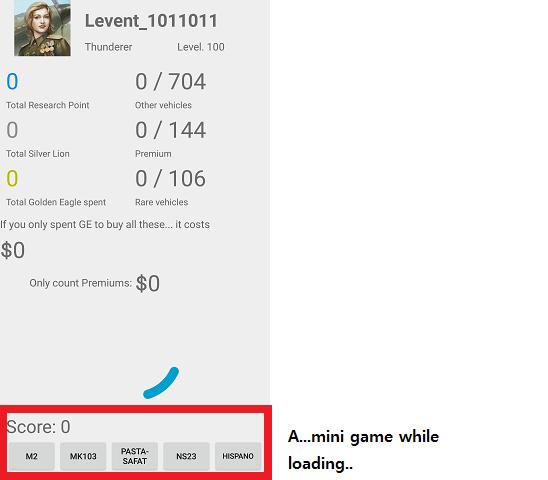
How much does your War Thunder account worth?
How much money have you spent on War Thunder?
How many aircrafts do you have?
Are you a zealous collector of Aircrafts?
Use this app to rate now!
How to use
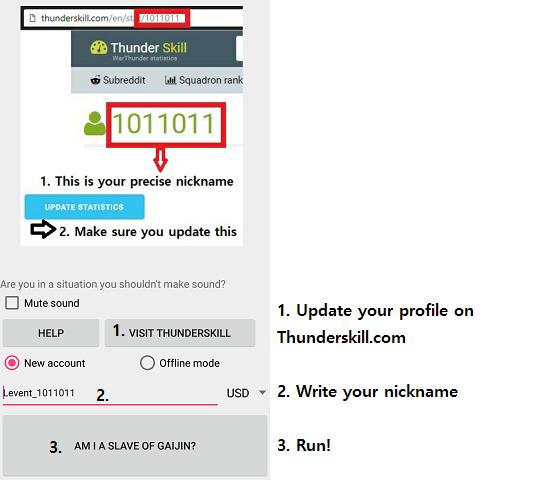
1. go to your thunderskill page, update your database
2. Enter your nickname
*Your nickname must be precise. It should match your Thunderskill nickname, case sensitive, hyphens and all the letters symbols.
3. Get disappointed at your Gaijin life.
===
Troubleshooting
1. If App suddenly terminates with error message, usually it is solve if you restart the app.
If you continue to have problems, send a mail to bismark439@gmail.com
with your WT nickname and the situation.
2. If there are more or less vehicles in your Hangar, try
- Update your Thunderskill
- Make at least 1 play record in game and update Thunderskill
- Manually add vehicles
* Supports Aviation + Ground vehicles
Предварительный просмотр
Информация
Разработчик
1011011
Последняя версия
8.7.4
Последнее обновление
2018-11-04
Категория
Обучающие
Доступно на
Google Play
Показать больше
Как играть в Rate your Hangar - War Thunder с GameLoop на ПК
1. Загрузите GameLoop с официального сайта, затем запустите исполняемый файл для установки GameLoop.
2. Откройте GameLoop и выполните поиск Rate your Hangar - War Thunder, найдите Rate your Hangar - War Thunder в результатах поиска и нажмите Установить.
3. Наслаждайтесь игрой в Rate your Hangar - War Thunder на GameLoop.
Minimum requirements
OS
Windows 8.1 64-bit or Windows 10 64-bit
GPU
GTX 1050
CPU
i3-8300
Memory
8GB RAM
Storage
1GB available space
Recommended requirements
OS
Windows 8.1 64-bit or Windows 10 64-bit
GPU
GTX 1050
CPU
i3-9320
Memory
16GB RAM
Storage
1GB available space