Smart Settings PC
Root Uninstaller
گیم لوپ ایمولیٹر کے ساتھ PC پر Smart Settings ڈاؤن لوڈ کریں۔
پی سی پر Smart Settings
Smart Settings، جو ڈویلپر Root Uninstaller سے آرہا ہے، ماضی میں اینڈرائیڈ سسٹم پر چل رہا ہے۔
اب، آپ پی سی پر Smart Settings آسانی سے GameLoop کے ساتھ چلا سکتے ہیں۔
اسے GameLoop لائبریری یا تلاش کے نتائج میں ڈاؤن لوڈ کریں۔ مزید غلط وقت پر بیٹری یا مایوس کن کالوں پر نظر نہیں ڈالی جائے گی۔
بس بڑی سکرین پر Smart Settings PC کا مفت میں لطف اٹھائیں!
Smart Settings تعارف
Smart Settings is a tool to automate and optimize device settings, for both context-awareness and power saver.
For example, when the device connect to meeting room’s Wifi, the “Meeting” profile will be automatically activated, or when you leave your company’s Wifi, it turns to “Outdoor” profile.
How Smart Setting works
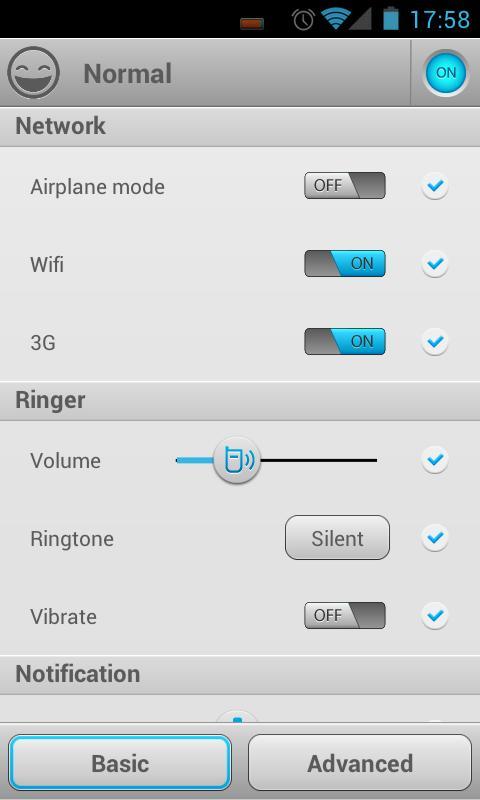
A profile is a group of device settings, including:
☆ Network (airplane mode, Wifi, mobile data, GPS, bluetooth),
☆ Ringer (volume, ringtone, vibrate),
☆ Notification (volume, ringtone, vibrate),
☆ Alarm (volume, ringtone),
☆ Display (brightness, wallpaper)
☆ Other settings (sync, media, DTMF, voice call, system).
One can use pre-defined common profiles and custom profiles
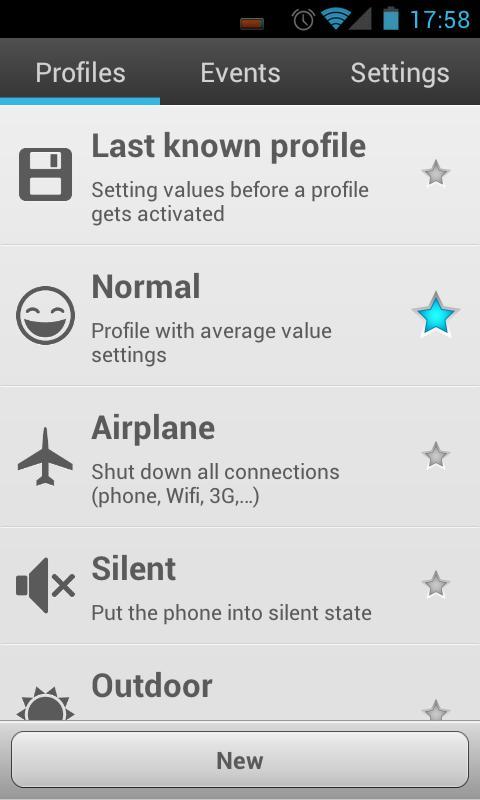
☆ Normal,
☆ Silent,
☆ Outdoor,
☆ Battery Saver
☆ Last known profile (special profile to restore last settings)
☆ Custom profiles (as many as you want)
A profile can be activated manually or by an event.
3 types of events:
☆ Battery: when battery drops to a certain level (highest priority)
☆ Wifi: connect or disconnect to a wifi network
☆ Time: specific time or repeatedly (lowest priority)
more events will be added in next versions.
Profile activation:
☆ Automatically: An event can be mapped to a profile. When an event is triggered, the mapped profile will be activated. If a event is triggered while a profile is activated by a higher priority event, it may be ignored.
☆ Manually: 5 ways to manually activate a profile:
- Notification bar: configure which profile will be displayed in the notification area.
- Quick switching screen: A new shortcut will be shown in your app drawer. You can select a profile in this screen.
- Toggle “star” icon on Profiles tab
- Create shortcut on home screen
- Using 1Tap Quick Bar app. As notification bar, but alot of customization.
kw: battery saver, context-aware, ifttt, tasker, toggle
Website: http://rootuninstaller.com/smart-settings/
Facebook: http://goo.gl/Brr99
پیش نظارہ
معلومات
ڈویلپر
Root Uninstaller
تازہ ترین ورژن
1.41
آخری تازہ کاری
2013-03-15
قسم
اوزار
پر دستیاب ہے۔
Google Play
مزید دکھائیں
پی سی پر گیم لوپ کے ساتھ Smart Settings کیسے کھیلا جائے۔
1. آفیشل ویب سائٹ سے گیم لوپ ڈاؤن لوڈ کریں، پھر گیم لوپ انسٹال کرنے کے لیے exe فائل چلائیں۔
2. گیم لوپ کھولیں اور "Smart Settings" تلاش کریں، تلاش کے نتائج میں Smart Settings تلاش کریں اور "انسٹال کریں" پر کلک کریں۔
3. گیم لوپ پر Smart Settings کھیلنے کا لطف اٹھائیں۔
Minimum requirements
OS
Windows 8.1 64-bit or Windows 10 64-bit
GPU
GTX 1050
CPU
i3-8300
Memory
8GB RAM
Storage
1GB available space
Recommended requirements
OS
Windows 8.1 64-bit or Windows 10 64-bit
GPU
GTX 1050
CPU
i3-9320
Memory
16GB RAM
Storage
1GB available space