Linksys Connect PC
Linksys LLC
گیم لوپ ایمولیٹر کے ساتھ PC پر Linksys Connect ڈاؤن لوڈ کریں۔
پی سی پر Linksys Connect
Linksys Connect، جو ڈویلپر Linksys LLC سے آرہا ہے، ماضی میں اینڈرائیڈ سسٹم پر چل رہا ہے۔
اب، آپ پی سی پر Linksys Connect آسانی سے GameLoop کے ساتھ چلا سکتے ہیں۔
اسے GameLoop لائبریری یا تلاش کے نتائج میں ڈاؤن لوڈ کریں۔ مزید غلط وقت پر بیٹری یا مایوس کن کالوں پر نظر نہیں ڈالی جائے گی۔
بس بڑی سکرین پر Linksys Connect PC کا مفت میں لطف اٹھائیں!
Linksys Connect تعارف
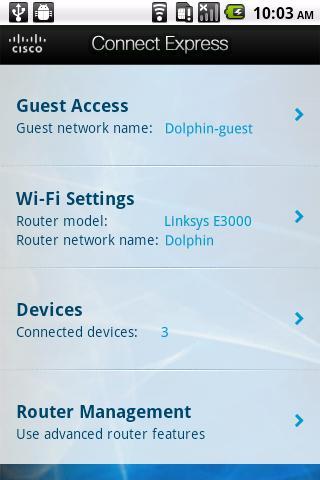
Home networking just got easier. When connected to your home Wi-Fi, use the Linksys Connect mobile app to add devices to your network, manage guest access, and change Wi-Fi and router information. Now Linksys E-Series, X-Series and Valet router users can have their real-time network information at their fingertips from anywhere in the home.
Key Features:
Guest access – An easy way for visitors to get online. Give password-protected Internet access to visiting friends and family while keeping your own information private. No need to remember the guest password, it’s in the app. Simply email the password to your guest and they’ll be online in no time.
Add devices to your network – Quickly connect your computers, gaming consoles, tablets, and other Wi-Fi enabled devices to your network.
Access Wi-Fi settings – Access your network name and password at anytime from anywhere in your home. If you need your password to add a device manually, quickly access it via your app.
Access router features – Keep your router up-to-date. Check for firmware updates and view details about your router, including model name and number, serial number, firmware version, and more. Plus, easily get a new WAN IP address or reboot your router.
Disclaimer: An active, customer purchased Internet Service Provider broadband account is required for connection of your router and other connected computers and devices to the Internet.
System Requirements:
• This product will only work with a Linksys E-Series, X-Series or Valet home router. To view the full list of supported routers, click here:http://www.linksyssmartwifi.com/ustatic/mobile/supportedRouters.html
• Requires an active Wi-Fi connection to your Linksys E-Series, X-Series or Valet home router.
• Android 2.2.1 or greater
Home networking just got easier. When connected to your home Wi-Fi, use the Cisco Connect Express App to add devices to your network, manage guest access, and change Wi-Fi and router information. Now Linksys E-Series, X-Series and Valet router users can have their real-time network information at their fingertips from anywhere in the home.
پیش نظارہ
ٹیگز
اوزارمعلومات
ڈویلپر
Linksys LLC
تازہ ترین ورژن
1.3.1
آخری تازہ کاری
2014-10-31
قسم
اوزار
پر دستیاب ہے۔
Google Play
مزید دکھائیں
پی سی پر گیم لوپ کے ساتھ Linksys Connect کیسے کھیلا جائے۔
1. آفیشل ویب سائٹ سے گیم لوپ ڈاؤن لوڈ کریں، پھر گیم لوپ انسٹال کرنے کے لیے exe فائل چلائیں۔
2. گیم لوپ کھولیں اور "Linksys Connect" تلاش کریں، تلاش کے نتائج میں Linksys Connect تلاش کریں اور "انسٹال کریں" پر کلک کریں۔
3. گیم لوپ پر Linksys Connect کھیلنے کا لطف اٹھائیں۔
Minimum requirements
OS
Windows 8.1 64-bit or Windows 10 64-bit
GPU
GTX 1050
CPU
i3-8300
Memory
8GB RAM
Storage
1GB available space
Recommended requirements
OS
Windows 8.1 64-bit or Windows 10 64-bit
GPU
GTX 1050
CPU
i3-9320
Memory
16GB RAM
Storage
1GB available space