
DeuterIDE - Compiler and IDE PC
Didactic Development
گیم لوپ ایمولیٹر کے ساتھ PC پر DeuterIDE - Compiler and IDE ڈاؤن لوڈ کریں۔
پی سی پر DeuterIDE - Compiler and IDE
DeuterIDE - Compiler and IDE، جو ڈویلپر Didactic Development سے آرہا ہے، ماضی میں اینڈرائیڈ سسٹم پر چل رہا ہے۔
اب، آپ پی سی پر DeuterIDE - Compiler and IDE آسانی سے GameLoop کے ساتھ چلا سکتے ہیں۔
اسے GameLoop لائبریری یا تلاش کے نتائج میں ڈاؤن لوڈ کریں۔ مزید غلط وقت پر بیٹری یا مایوس کن کالوں پر نظر نہیں ڈالی جائے گی۔
بس بڑی سکرین پر DeuterIDE - Compiler and IDE PC کا مفت میں لطف اٹھائیں!
DeuterIDE - Compiler and IDE تعارف
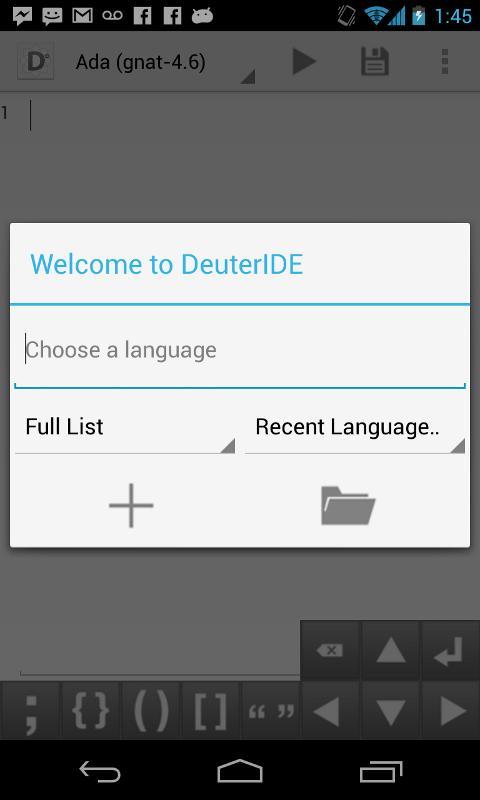
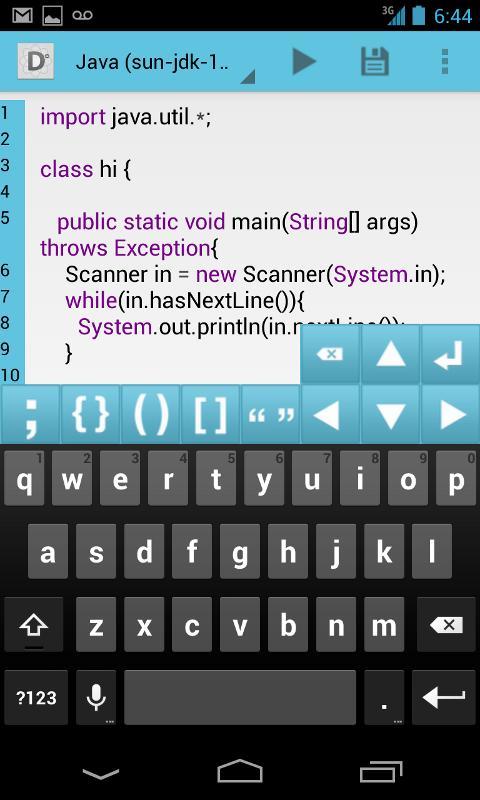
A mobile based programming text editor, online compiler, and integrated development environment built for Android. Complete with virtual keys for commonly used programming symbols, syntax highlighting, and support for over 40 programming languages, writing code on the go has never been easier.
For a demonstration of the new syntax highlighter, download Deuterium Editor here: https://play.google.com/store/apps/details?id=com.didactic.syntaxhighlighter
DeuterIDE takes its name from the anion of hydrogen-2 isotope deuterium, known as heavy hydrogen. You'll find, however, that there is nothing heavy at all about this fully functional editor. This application was made with one thing in mind – fulfilling the need of a lightweight, easy to use way to write code on the go. Applications just like this start with a flash of inspiration; with the mobile platform provided by DeuterIDE, you’ll be ready.
DeuterIDE - [Li]ght platform, [H]eavy coding.
No account required to compile and run. Ideal for use on tablets or other devices with large displays.
Internet connection required. DeuterIDE only supports console programs, standard libraries, and std. input/output.
Pre-Honeycomb devices will no longer be receiving official support past version 2.0.
Features:
- Online source code compiler and run results for over 40 languages
- Develop on this mobile IDE with syntax highlighting, automatic indentation, and bracket matching support
- Open text files and use as default text editor
- Facebook and Twitter integration to share code with your friends
- Search and replace, undo and redo, jump to line, auto indent, copy and paste, and other editor functions
- Virtual keys for commonly used programming symbols
- History of compiled submissions
- HTML previewing
- User defined templates
- Option to use your own ideone login
Supported languages :
Ada Compiler
Assembler Compiler
AWK Compiler
Bash Compiler
bc Compiler
Brainfuck Compiler
C Compiler
C# Compiler
C++ Compiler
C++0x Compiler
C99 strict Compiler
CLIPS Compiler
Clojure Compiler
COBOL Compiler
Common Lisp Compiler
CSS
D Compiler
Erlang Compiler
F# Compiler
Factor Compiler
Falcon Compiler
Forth Compiler
Fortran Compiler
Go Compiler
Groovy Compiler
Haskell Compiler
HTML
Icon Compiler
Intercal Compiler
Java Compiler
JavaScript Compiler
LaTeX
Lua Compiler
Nemerle Compiler
Nice Compiler
Nimrod Compiler
Objective-C Compiler
Ocaml Compiler
Oz Compiler
Pascal Compiler
Perl Compiler
PHP Compiler
Pike Compiler
Prolog Compiler
Python Compiler
R Compiler
Ruby Compiler
Scala Compiler
Scheme Compiler
Smalltalk Compiler
SQL Compiler
Tcl Compiler
Unlambda Compiler
Visual Basic .NET Compiler
Whitespace Compiler
پیش نظارہ
معلومات
ڈویلپر
Didactic Development
تازہ ترین ورژن
2.0.61
آخری تازہ کاری
2014-07-31
قسم
اوزار
پر دستیاب ہے۔
Google Play
مزید دکھائیں
پی سی پر گیم لوپ کے ساتھ DeuterIDE - Compiler and IDE کیسے کھیلا جائے۔
1. آفیشل ویب سائٹ سے گیم لوپ ڈاؤن لوڈ کریں، پھر گیم لوپ انسٹال کرنے کے لیے exe فائل چلائیں۔
2. گیم لوپ کھولیں اور "DeuterIDE - Compiler and IDE" تلاش کریں، تلاش کے نتائج میں DeuterIDE - Compiler and IDE تلاش کریں اور "انسٹال کریں" پر کلک کریں۔
3. گیم لوپ پر DeuterIDE - Compiler and IDE کھیلنے کا لطف اٹھائیں۔
Minimum requirements
OS
Windows 8.1 64-bit or Windows 10 64-bit
GPU
GTX 1050
CPU
i3-8300
Memory
8GB RAM
Storage
1GB available space
Recommended requirements
OS
Windows 8.1 64-bit or Windows 10 64-bit
GPU
GTX 1050
CPU
i3-9320
Memory
16GB RAM
Storage
1GB available space