
QR Attendance, Scanner, Reader PC
INNOVACIA SDN BHD
گیم لوپ ایمولیٹر کے ساتھ PC پر QR Attendance, Scanner, Reader ڈاؤن لوڈ کریں۔
پی سی پر QR Attendance, Scanner, Reader
QR Attendance, Scanner, Reader، جو ڈویلپر INNOVACIA SDN BHD سے آرہا ہے، ماضی میں اینڈرائیڈ سسٹم پر چل رہا ہے۔
اب، آپ پی سی پر QR Attendance, Scanner, Reader آسانی سے GameLoop کے ساتھ چلا سکتے ہیں۔
اسے GameLoop لائبریری یا تلاش کے نتائج میں ڈاؤن لوڈ کریں۔ مزید غلط وقت پر بیٹری یا مایوس کن کالوں پر نظر نہیں ڈالی جائے گی۔
بس بڑی سکرین پر QR Attendance, Scanner, Reader PC کا مفت میں لطف اٹھائیں!
QR Attendance, Scanner, Reader تعارف
Easy QR attendance.
Innovacia QR Scanner has been equipped with a feature to create a QR Code for attendance.
Nowadays, most business and offices will require their visitors to fill up attendance. Once you have created the QR Attendance, print it out and put it at your business or office entrance.
When a visitor scans the QR Code Attendance with a mobile phone, it will open up an attendance form for them to fill up (name, phone number and date/time) and send it online.
The business or office owner (QR Code Attendance Creator) can view their visitor attendance list from the app. Use the Search function to filter by date.
To create QR Code Attendance:-
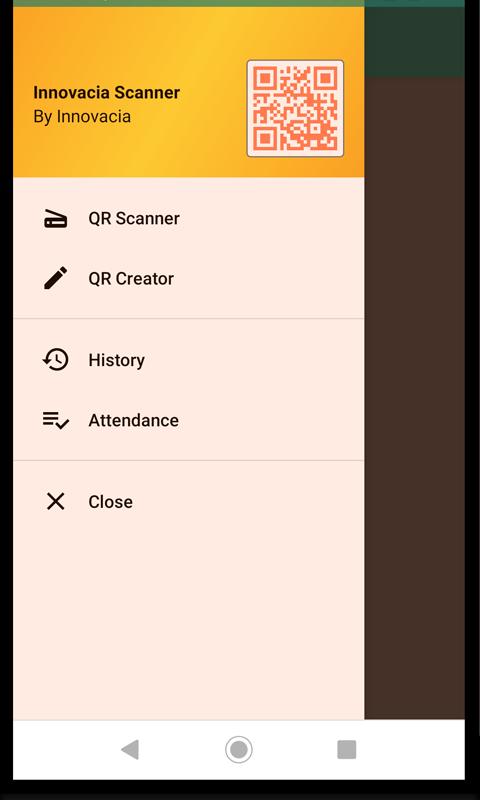
1. Select QR Creator from the left navigator
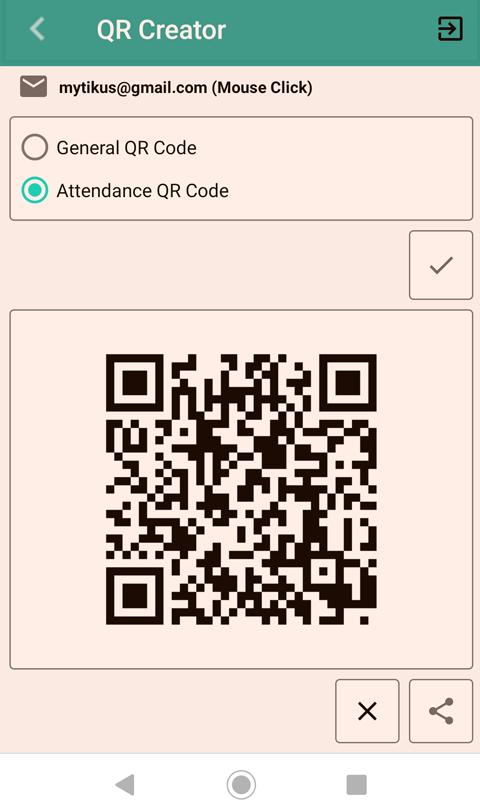
2. Login with your Gmail account
3. Select Attendance QR Code and click the Tick button to generate the QR code for attendance.
4. Then click on the Share button to print, email or send to other apps for print out.
To view Attendance List:-
1. Select Attendance from the left navigator
2. Login with your Gmail account that you've used to create the QR code
3. View attendance list
4. Click on the Search button to filter the information
To print out Attendance List:-
1. Select Attendance from the left navigator
2. At the menu, select Export All
Besides QR Attendance, Innovacia Scanner can also perform QR code scanner for VCard. The Innovacia scanner will automatically detect the QR format and if the QR code contains VCard information format, you can store the scanned information as a business card which may contain Name, Designation, Company Name, Address, Telephone, Email and URL.
Once the QR code has been scanned, you will have the option to save the information in the database.
To retrieve the QR code information in the future, you can open up from the Biz Card Listing or History Listing. From the listing, you can manage to delete or open the information.
پیش نظارہ
ٹیگز
اوزارمعلومات
ڈویلپر
INNOVACIA SDN BHD
تازہ ترین ورژن
1.11
آخری تازہ کاری
2022-04-06
قسم
اوزار
پر دستیاب ہے۔
Google Play
مزید دکھائیں
پی سی پر گیم لوپ کے ساتھ QR Attendance, Scanner, Reader کیسے کھیلا جائے۔
1. آفیشل ویب سائٹ سے گیم لوپ ڈاؤن لوڈ کریں، پھر گیم لوپ انسٹال کرنے کے لیے exe فائل چلائیں۔
2. گیم لوپ کھولیں اور "QR Attendance, Scanner, Reader" تلاش کریں، تلاش کے نتائج میں QR Attendance, Scanner, Reader تلاش کریں اور "انسٹال کریں" پر کلک کریں۔
3. گیم لوپ پر QR Attendance, Scanner, Reader کھیلنے کا لطف اٹھائیں۔
Minimum requirements
OS
Windows 8.1 64-bit or Windows 10 64-bit
GPU
GTX 1050
CPU
i3-8300
Memory
8GB RAM
Storage
1GB available space
Recommended requirements
OS
Windows 8.1 64-bit or Windows 10 64-bit
GPU
GTX 1050
CPU
i3-9320
Memory
16GB RAM
Storage
1GB available space