Guide for Smartwatch 2 SW2 PC
AmazingAppDeveloperBNM
گیم لوپ ایمولیٹر کے ساتھ PC پر Guide for Smartwatch 2 SW2 ڈاؤن لوڈ کریں۔
پی سی پر Guide for Smartwatch 2 SW2
Guide for Smartwatch 2 SW2، جو ڈویلپر AmazingAppDeveloperBNM سے آرہا ہے، ماضی میں اینڈرائیڈ سسٹم پر چل رہا ہے۔
اب، آپ پی سی پر Guide for Smartwatch 2 SW2 آسانی سے GameLoop کے ساتھ چلا سکتے ہیں۔
اسے GameLoop لائبریری یا تلاش کے نتائج میں ڈاؤن لوڈ کریں۔ مزید غلط وقت پر بیٹری یا مایوس کن کالوں پر نظر نہیں ڈالی جائے گی۔
بس بڑی سکرین پر Guide for Smartwatch 2 SW2 PC کا مفت میں لطف اٹھائیں!
Guide for Smartwatch 2 SW2 تعارف
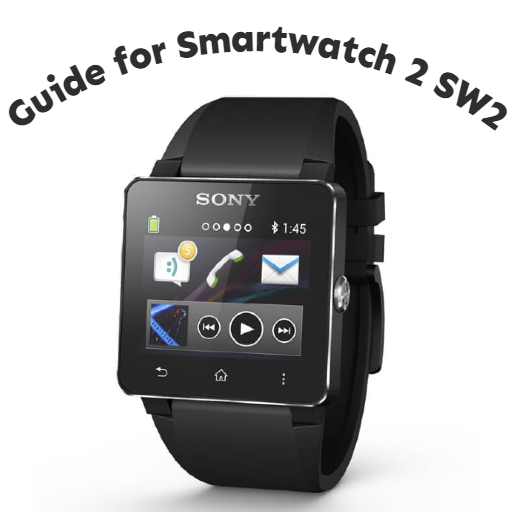
This mobile application is a guide that gives information about sony smart watch sw2. From this app, you can get information about device settings, smartwatch 2 setup, screen lock setting, charging the device, software update and Smartwatch sw 2 watch face change.
Note:
This mobile application is a guide. It is not an official app or part of an official app product. Download this guide to learn about sony smart watch sw2.
Informer brings notifications from different apps to your Sony device: SmartWatch MN2, SmartWatch SW2, headsets SBH50 SBH52.
You can turn on messages from instant messengers, mail clients, social networks and even games.
Also Informer shows missed calls.
Need more? Vote for a new source here
https://plus.google.com/communities/111956836074157080165
For SmartWatch 3 we develop another app:
https://play.google.com/store/apps/details?id=com.komparato.informer.wear
Informer Pro gives you premium options:
✔ Reply to messages from watch
✔ Add apps from your list
✔ Mute selected chats
✔ View images received by messengers
✔ Mark as read syncronization
✔ Set hours for night silence
✔ Mute when phone is active
✔ Filter unknown contacts
✔ Low phone battery alert
NOTICE: Turn Informer service on!
Settings > Security > Notification Access
Widget for Sony Smartwatch 2 watchface to display phone battery level. In the watchface editor two new widgets will appear - small - with only the icon - and large - with icon and percentage.
Widgets are refreshed every time watchface is displayed and then after configurable time has passed (default 5 minutes).
The widget does not display on the watchface by itself. After installing the app YOU NEED TO open the watchface editor and ADD one of the provided widgets to the watchface.
Permissions explained:
* Other - Communication with Smartwatch 2 application.
Smart Connect extension for SmartWatch 2
This small extension for the Sony Smartwatch SW2 will pass generic bluetooth media control events to the phone. Events include:
* Play
* Pause
* Next
* Previous
* Seek Forward
* Seek Backward
* Volume Up
* Volume Down
New premium features!
*Add widgets for all functions to your watchface
*Customize the colors
*Option to vibrate when button is clicked
☆MOST OF WIDGETS ARE FOR JAPANESE LOCALE BECAUSE I AM JAPANESE.
☆Please read this entire description before installing.
☆There is a bug in the previous version of SmartWatch2 firmware that causes the "Date" and "Day of the week" widgets to crash. Be sure to update to the latest version (2015-01-14) before installing.
★If you don't know what SmartWatch2 is, please do not install it.
★Operation can only be confirmed with SmartWatch2 SW2 + Xperia A. The design collapses on other terminals.
★ "Day of the week" is available only in Japanese environment.
★ Permission to view/switch device status, but no internet access.
★Please use Gmail to report bugs. If it is a carrier mail, the reply from here will be blocked and will not arrive.
Smartwatch2 Notify works like a bridge between your Smartphone and Smartwatch2 accessory, providing content and event notifications. Supported platforms Smart Connect extension for SmartWatch 2
LiveWare™ extension for SmartWatch
Features:
✔ Enable service to run on power on
✔ Enable service to exclude any process management application
✔ Test options
✔ Filtering based on all apps running on your device
✔ Control notifications from accessory(open on device / dismiss)
✔ Mute when phone is active
✔ Low phone battery alert
✔ Mark as read synchronization
Permissions:
*Billing - for purchase of premium features
*Get accounts - in order to tie the premium purchase to your chosen account (if more than one exists)
*Note there is no permission to access the internet. All billing is handled by Google.
Note:
Certain functions (such as Play) may cause action from multiple apps. This will depend on which apps are installed and the bluetooth control settings of each app.
Download the guide for smartwatch 2 sw2 app now
پیش نظارہ
ٹیگز
اوزارمعلومات
ڈویلپر
AmazingAppDeveloperBNM
تازہ ترین ورژن
6
آخری تازہ کاری
2022-12-03
قسم
اوزار
پر دستیاب ہے۔
Google Play
مزید دکھائیں
پی سی پر گیم لوپ کے ساتھ Guide for Smartwatch 2 SW2 کیسے کھیلا جائے۔
1. آفیشل ویب سائٹ سے گیم لوپ ڈاؤن لوڈ کریں، پھر گیم لوپ انسٹال کرنے کے لیے exe فائل چلائیں۔
2. گیم لوپ کھولیں اور "Guide for Smartwatch 2 SW2" تلاش کریں، تلاش کے نتائج میں Guide for Smartwatch 2 SW2 تلاش کریں اور "انسٹال کریں" پر کلک کریں۔
3. گیم لوپ پر Guide for Smartwatch 2 SW2 کھیلنے کا لطف اٹھائیں۔
Minimum requirements
OS
Windows 8.1 64-bit or Windows 10 64-bit
GPU
GTX 1050
CPU
i3-8300
Memory
8GB RAM
Storage
1GB available space
Recommended requirements
OS
Windows 8.1 64-bit or Windows 10 64-bit
GPU
GTX 1050
CPU
i3-9320
Memory
16GB RAM
Storage
1GB available space