Android Transfer PC
Pratik Raut
گیم لوپ ایمولیٹر کے ساتھ PC پر Android Transfer ڈاؤن لوڈ کریں۔
پی سی پر Android Transfer
Android Transfer، جو ڈویلپر Pratik Raut سے آرہا ہے، ماضی میں اینڈرائیڈ سسٹم پر چل رہا ہے۔
اب، آپ پی سی پر Android Transfer آسانی سے GameLoop کے ساتھ چلا سکتے ہیں۔
اسے GameLoop لائبریری یا تلاش کے نتائج میں ڈاؤن لوڈ کریں۔ مزید غلط وقت پر بیٹری یا مایوس کن کالوں پر نظر نہیں ڈالی جائے گی۔
بس بڑی سکرین پر Android Transfer PC کا مفت میں لطف اٹھائیں!
Android Transfer تعارف
Android Transfer shares the device's internal storage over Wi-Fi or Hotspot for easy transfer and access of files to/from the device.
Features
- Shares internal storage over wifi and hotspot
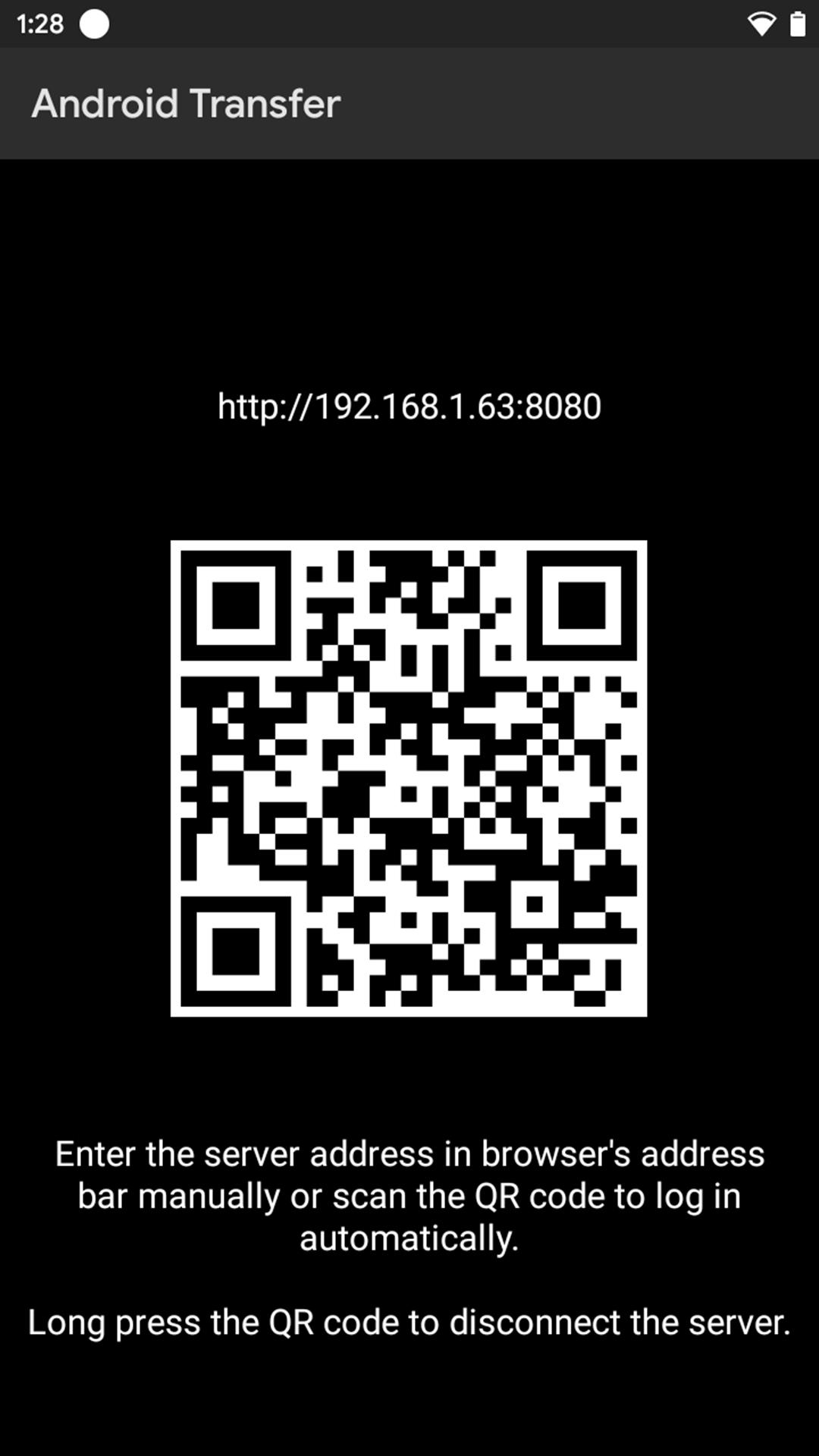
- QR code for quick access
- Can use the device while transferring files to/from device
- Supports all android versions through Android 4.4 (Kitkat)
Instructions
Creating and connecting to the server
1. Make sure that the device has successfully been connected to a wifi or hotspot network before launching Android Transfer app.
2. Open the app only after successful connection of wifi or hotspot network.
3. Android Transfer won't launch without wifi or hotspot network connection.
4. Devices should be connected to the same wifi network.
Disconnecting the server
Default method
1. While using the device during file transfer or after finishing all the file transfers, make sure to disconnect the server by long pressing the QR code.
Other alternative methods
2. Clear the recent apps.
3. Restart the device.
Note
1. Internal Storage should be in '/storage/emulated/0' format.
2. The browser should not be too old as also Internet Explorer has been replaced by Microsoft Edge.
3. Do not uninstall the installer as if done so, then Android Transfer won't be receiving future updates.
4. After transferring of files is done, disconnect the server by long pressing the QR code.
Changelog
v1.2
- Bug fixes
v1.1
- Initial release
- Supports all android versions through Android 4.4 (Kitkat)
- Works on all browsers
(Internet Explorer has been replaced by Microsoft Edge)
v1.0
- Promo release
پیش نظارہ
ٹیگز
اوزارمعلومات
ڈویلپر
Pratik Raut
تازہ ترین ورژن
1.2
آخری تازہ کاری
2022-09-29
قسم
اوزار
پر دستیاب ہے۔
Google Play
مزید دکھائیں
پی سی پر گیم لوپ کے ساتھ Android Transfer کیسے کھیلا جائے۔
1. آفیشل ویب سائٹ سے گیم لوپ ڈاؤن لوڈ کریں، پھر گیم لوپ انسٹال کرنے کے لیے exe فائل چلائیں۔
2. گیم لوپ کھولیں اور "Android Transfer" تلاش کریں، تلاش کے نتائج میں Android Transfer تلاش کریں اور "انسٹال کریں" پر کلک کریں۔
3. گیم لوپ پر Android Transfer کھیلنے کا لطف اٹھائیں۔
Minimum requirements
OS
Windows 8.1 64-bit or Windows 10 64-bit
GPU
GTX 1050
CPU
i3-8300
Memory
8GB RAM
Storage
1GB available space
Recommended requirements
OS
Windows 8.1 64-bit or Windows 10 64-bit
GPU
GTX 1050
CPU
i3-9320
Memory
16GB RAM
Storage
1GB available space