ThingSpeak (IoT) PC
Brillo Solutions Pvt. Ltd.
گیم لوپ ایمولیٹر کے ساتھ PC پر ThingSpeak (IoT) ڈاؤن لوڈ کریں۔
پی سی پر ThingSpeak (IoT)
ThingSpeak (IoT)، جو ڈویلپر Brillo Solutions Pvt. Ltd. سے آرہا ہے، ماضی میں اینڈرائیڈ سسٹم پر چل رہا ہے۔
اب، آپ پی سی پر ThingSpeak (IoT) آسانی سے GameLoop کے ساتھ چلا سکتے ہیں۔
اسے GameLoop لائبریری یا تلاش کے نتائج میں ڈاؤن لوڈ کریں۔ مزید غلط وقت پر بیٹری یا مایوس کن کالوں پر نظر نہیں ڈالی جائے گی۔
بس بڑی سکرین پر ThingSpeak (IoT) PC کا مفت میں لطف اٹھائیں!
ThingSpeak (IoT) تعارف
For high speed, free and unlimited IoT implementation visit iGadget application:
https://play.google.com/store/apps/details?id=aarsoftronix.com.igadget
*** To monitor water (Fluid) level and control pump via internet (ThingSpeak), visit iFluid application from link given below:
https://play.google.com/store/apps/details?id=aarsoftronix.com.ifluidthingspeak
We are back again with a sweet, lightweight and easy to use app for the users those are fascinated by Internet of Things. So, are you ready to talk to appliances at home over the internet using most popular server ThingSpeak?
If so, then you are at right place and watching at what you were looking for! This is an app by which you can talk to your ThingSpeak channel without any restriction. This app is gonna give you everything you want.
Excited to know how it works? Here we go!
1. Install and open app.
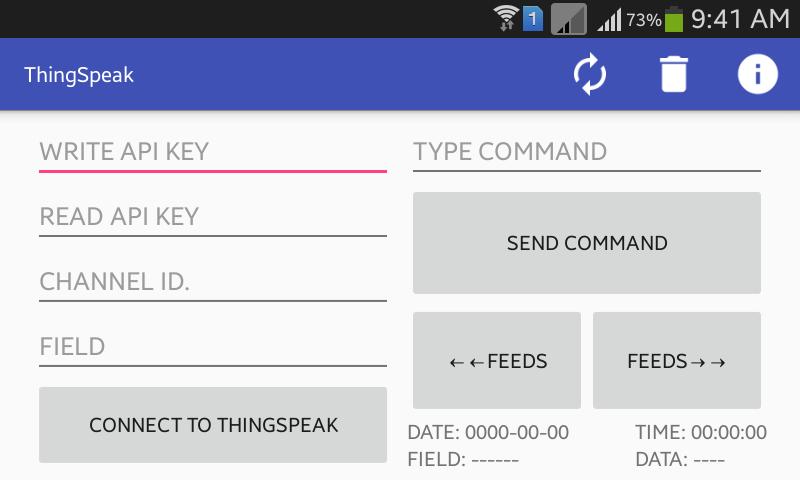
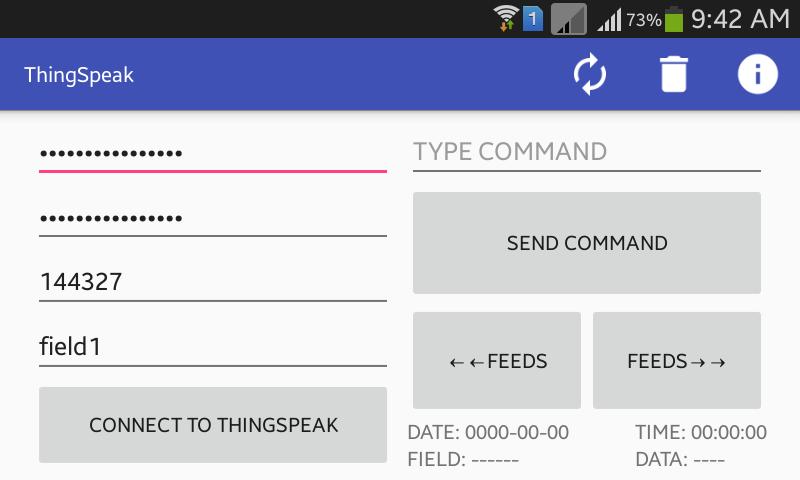
2. Type your READ API KEY, WRITE API KEY, CHANNEL ID, and FIELD.
3. Tap CONNECT TO THINGSPEAK button in order to connect app with ThingSpeak server.
4. If you want to disconnect app from server then tap DISCONNECT FROM THINGSPEAK button.
5. If field of your channel already contains data then after connecting app to server it will show you last data with date and time.
6. If you want to read previous or next feeds of your channel then tap rev. FEEDS or fwd. FEEDS button.
7. ***Note that after tapping either of FEEDS button, auto sync of data will be OFF, in order to turn auto sync ON to make app always fetch recently updated data (last feed), tap REFRESH button from menu bar at top.
8. In order to delete your channel details at one go, tap DELETE button from menu bar.
Kindly rate us and give your valuable review.
پیش نظارہ
ٹیگز
پیداواری صلاحیتمعلومات
ڈویلپر
Brillo Solutions Pvt. Ltd.
تازہ ترین ورژن
1.0.4
آخری تازہ کاری
2018-02-01
قسم
پیداواری صلاحیت
پر دستیاب ہے۔
Google Play
مزید دکھائیں
پی سی پر گیم لوپ کے ساتھ ThingSpeak (IoT) کیسے کھیلا جائے۔
1. آفیشل ویب سائٹ سے گیم لوپ ڈاؤن لوڈ کریں، پھر گیم لوپ انسٹال کرنے کے لیے exe فائل چلائیں۔
2. گیم لوپ کھولیں اور "ThingSpeak (IoT)" تلاش کریں، تلاش کے نتائج میں ThingSpeak (IoT) تلاش کریں اور "انسٹال کریں" پر کلک کریں۔
3. گیم لوپ پر ThingSpeak (IoT) کھیلنے کا لطف اٹھائیں۔
Minimum requirements
OS
Windows 8.1 64-bit or Windows 10 64-bit
GPU
GTX 1050
CPU
i3-8300
Memory
8GB RAM
Storage
1GB available space
Recommended requirements
OS
Windows 8.1 64-bit or Windows 10 64-bit
GPU
GTX 1050
CPU
i3-9320
Memory
16GB RAM
Storage
1GB available space