Clap To Find My Phone : Finder PC
iPrank Studio
گیم لوپ ایمولیٹر کے ساتھ PC پر Clap To Find My Phone : Finder ڈاؤن لوڈ کریں۔
پی سی پر Clap To Find My Phone : Finder
Clap To Find My Phone : Finder، جو ڈویلپر iPrank Studio سے آرہا ہے، ماضی میں اینڈرائیڈ سسٹم پر چل رہا ہے۔
اب، آپ پی سی پر Clap To Find My Phone : Finder آسانی سے GameLoop کے ساتھ چلا سکتے ہیں۔
اسے GameLoop لائبریری یا تلاش کے نتائج میں ڈاؤن لوڈ کریں۔ مزید غلط وقت پر بیٹری یا مایوس کن کالوں پر نظر نہیں ڈالی جائے گی۔
بس بڑی سکرین پر Clap To Find My Phone : Finder PC کا مفت میں لطف اٹھائیں!
Clap To Find My Phone : Finder تعارف
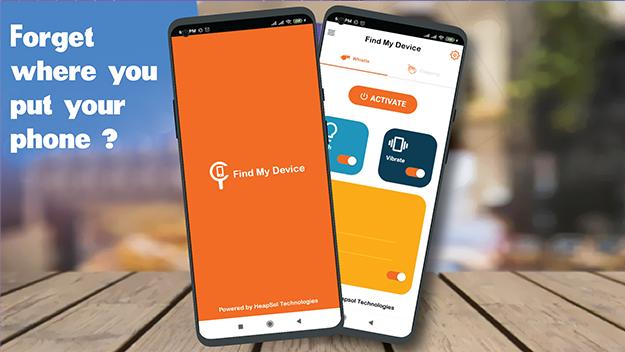
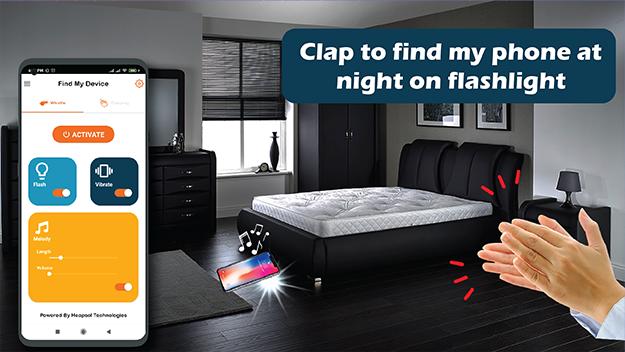
Clap to find my phone & whistle to find my phone is a very helpful free Phone tracking app to locate your lost phone with a clap or whistle. The phone will respond with an alert tune with Flashlight and vibration. This app is very helpful, when you can't remember where you put your phone.
phone finder provides flashlight on call, flash alert on notification & SMS, call blocking, Battery level alert and PIN protection all these features are available in this single app. This phone finder gadget can work in offline mode
How to use Find My Phone clap/whistle?
1. Click on the "Find My Phone" button to enable this feature.
2. You can adjust sound frequency, notification and flash blink speed in Settings.
3. Choose tone/ language which desired is available in phone tracking app
4. Sound detector is based on the environment which you can set from 1 to 10.
5. You can toggle flashlight on/off or set the interval time to vary between 50 to 1500 ms.
Features of phone finder by whistle or clap:
• Find your lost phone with a whistle or clap.
• Select any ringtone to find your lost phone
• Flashlight signal with more settings options
• Set battery level for flash notification
• Time setting in phone finder for DND mode
• lost phone finder has Talker System
• All your SMS content speaks louder
• set the pitch of the speech Sound detector
Functionality to Find My Phone can help you find your lost phone easily:
Find My Phone:
This Phone Tracker section contains the settings for finding your phone by clapping/whistle. Include four sub-tags: Clap To Find, Whistle To Find, Don’t Touch, and Pocket Mode. In the second, you can select the alert ringtone.
Flash Alerts and DND:
you put flashlight on incoming calls or messages. This option includes two toggles for calls & SMS. Settings include flash mode, notification setting, flash count, blinking speed and DND mode settings.
Caller & SMS Name Announcer:
This feature shows the name of the person who had made a call or SMS to you. You can set prefixes and suffixes as well as SMS settings and speech speed in this clap phone finder app.
Charger Disconnect & Battery alert:
Set phone whistle when your phone is connected or disconnected from the charger. It alerts when the battery level drops below a selected percentage.
Don't touch my phone:
If you want to receive an alarm when someone touches your phone, you can use the "Don't Touch" feature in whistle Phone Tracker. Features include flash setting, tone selection, PIN protection system and volume setting.
Access Permissions in find phone by whistle/clap:
Answer Phone Calls: Answer phone calls permission in this app is used to block calls which are added to the block list.
Read Phone Status: Read phone status permission (for flash alerts during incoming calls) in this application to get the status of any ongoing call.
Bind Accessibility Service: This Service permission is used in free app phone tracking app to monitor device actions to receive flash alerts while receiving notifications.
Download phone finder by clap/whistle and save your time in finding your lost phone.
پیش نظارہ
ٹیگز
پیداواری صلاحیتمعلومات
ڈویلپر
iPrank Studio
تازہ ترین ورژن
1.6
آخری تازہ کاری
2023-09-04
قسم
پیداواری صلاحیت
پر دستیاب ہے۔
Google Play
مزید دکھائیں
پی سی پر گیم لوپ کے ساتھ Clap To Find My Phone : Finder کیسے کھیلا جائے۔
1. آفیشل ویب سائٹ سے گیم لوپ ڈاؤن لوڈ کریں، پھر گیم لوپ انسٹال کرنے کے لیے exe فائل چلائیں۔
2. گیم لوپ کھولیں اور "Clap To Find My Phone : Finder" تلاش کریں، تلاش کے نتائج میں Clap To Find My Phone : Finder تلاش کریں اور "انسٹال کریں" پر کلک کریں۔
3. گیم لوپ پر Clap To Find My Phone : Finder کھیلنے کا لطف اٹھائیں۔
Minimum requirements
OS
Windows 8.1 64-bit or Windows 10 64-bit
GPU
GTX 1050
CPU
i3-8300
Memory
8GB RAM
Storage
1GB available space
Recommended requirements
OS
Windows 8.1 64-bit or Windows 10 64-bit
GPU
GTX 1050
CPU
i3-9320
Memory
16GB RAM
Storage
1GB available space