Tablet Clock PC
GreenLog
گیم لوپ ایمولیٹر کے ساتھ PC پر Tablet Clock ڈاؤن لوڈ کریں۔
پی سی پر Tablet Clock
Tablet Clock، جو ڈویلپر GreenLog سے آرہا ہے، ماضی میں اینڈرائیڈ سسٹم پر چل رہا ہے۔
اب، آپ پی سی پر Tablet Clock آسانی سے GameLoop کے ساتھ چلا سکتے ہیں۔
اسے GameLoop لائبریری یا تلاش کے نتائج میں ڈاؤن لوڈ کریں۔ مزید غلط وقت پر بیٹری یا مایوس کن کالوں پر نظر نہیں ڈالی جائے گی۔
بس بڑی سکرین پر Tablet Clock PC کا مفت میں لطف اٹھائیں!
Tablet Clock تعارف
This is open source project. You can find sources here - https://github.com/Nikolay-Kha/TabletClock
Do you have old tablet? Or do you want to make your lovely device to show time and weather forecast when it on charging? This application for you!
Nowadays wall clock are quite stupid, but price for them is a little bit less that price for tablet PC. And weather station is expensive. So, why do you need to buy stupid clock or expensive weather station when you can take this application and the cheapest table pc or old useless one and get smart clock:
- they wouldn't lost time during blackouts. And it even doesn't require batteries for that, because device already has rechargeable battery
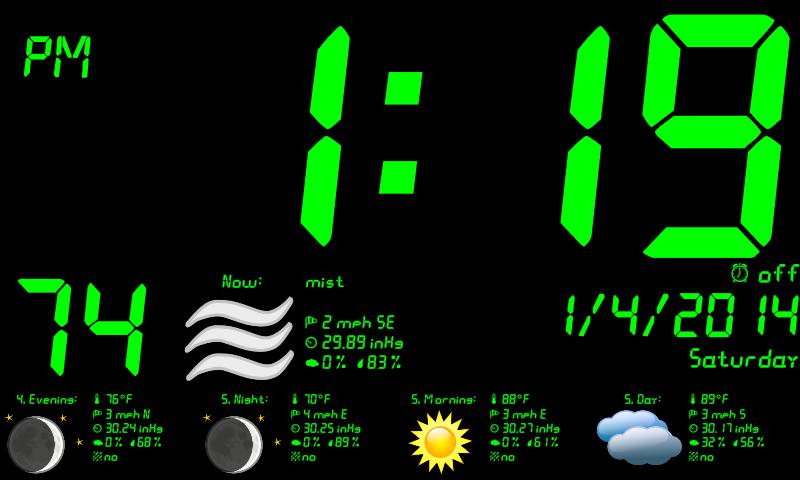
- screen brightness is auto adjustable. Even if your device has not light sensor - application use camera as light sensor (disabled in settings by default)
- you can choose one of 16 million color for displaying
- alarm clock from Android OS
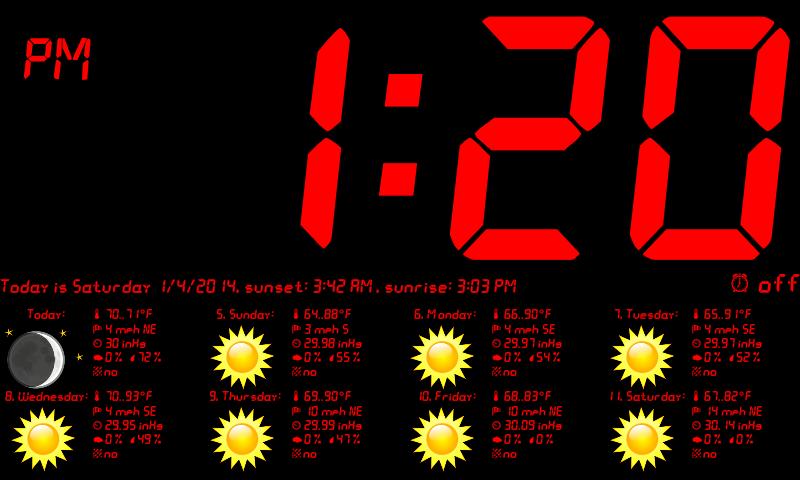
- displaying current date, sunset and sunrise
- weather now, forecast for one day each 6 hour and forecast on next week: temperature, wind speed and direction, pressure, clouds, precipitation and if sky is clear - moon phase, Units for temperature, speed and pressure are adjustable.
- automatic start and close application on plugged/unplugged charger ( disabled in settings by default )
- and even do not have to set up time on this clock, because Android OS could take time from network and you will have exact time!
You can use this application for your lovely device like screen saver while charging. Especially for devices with dock stations. Just turn on autorun and autoclose feature in settings and clock will appear while device is docking.
Tips:
On first launch choose your city for weather forecast.
If your device have navigation bar, it will be hidden on application start. Any touch return navigation bar to screen, is not affecting on application.
Touch the alarm clock icon to show system alarm clock.
Touch the time to show application menu (the same as menu button, in case if your device does not have menu button).
Touch the weather to switch two types of forecast - dayly and weekly.
If your device does not has a light sensor, but it has camera, better front, turn on brightness adjusting using camera in settings - it will measure light every 30 seconds. But if you run this on unplugged device it will decrease on-battery time.
Time and date format are taken from system.
If you need brightness lower that your device allows, change in settings -> text color value R, G, B to lower ones. For example: if you change green (#00FF00) to 80 instead of FF, brightness will twice lower.
You can choose screen rotation in settings.
Weather provided by OpenWeatherMap - http://openweathermap.org
All weather data are provided under the CC-BY-SA 2.0 license - http://creativecommons.org/licenses/by-sa/2.0
پیش نظارہ
معلومات
ڈویلپر
GreenLog
تازہ ترین ورژن
1.3
آخری تازہ کاری
2015-10-25
قسم
پرسنلائزیشن
پر دستیاب ہے۔
Google Play
مزید دکھائیں
پی سی پر گیم لوپ کے ساتھ Tablet Clock کیسے کھیلا جائے۔
1. آفیشل ویب سائٹ سے گیم لوپ ڈاؤن لوڈ کریں، پھر گیم لوپ انسٹال کرنے کے لیے exe فائل چلائیں۔
2. گیم لوپ کھولیں اور "Tablet Clock" تلاش کریں، تلاش کے نتائج میں Tablet Clock تلاش کریں اور "انسٹال کریں" پر کلک کریں۔
3. گیم لوپ پر Tablet Clock کھیلنے کا لطف اٹھائیں۔
Minimum requirements
OS
Windows 8.1 64-bit or Windows 10 64-bit
GPU
GTX 1050
CPU
i3-8300
Memory
8GB RAM
Storage
1GB available space
Recommended requirements
OS
Windows 8.1 64-bit or Windows 10 64-bit
GPU
GTX 1050
CPU
i3-9320
Memory
16GB RAM
Storage
1GB available space