
T2 Remote PC
Starkey Hearing Technologies
گیم لوپ ایمولیٹر کے ساتھ PC پر T2 Remote ڈاؤن لوڈ کریں۔
پی سی پر T2 Remote
T2 Remote، جو ڈویلپر Starkey Hearing Technologies سے آرہا ہے، ماضی میں اینڈرائیڈ سسٹم پر چل رہا ہے۔
اب، آپ پی سی پر T2 Remote آسانی سے GameLoop کے ساتھ چلا سکتے ہیں۔
اسے GameLoop لائبریری یا تلاش کے نتائج میں ڈاؤن لوڈ کریں۔ مزید غلط وقت پر بیٹری یا مایوس کن کالوں پر نظر نہیں ڈالی جائے گی۔
بس بڑی سکرین پر T2 Remote PC کا مفت میں لطف اٹھائیں!
T2 Remote تعارف
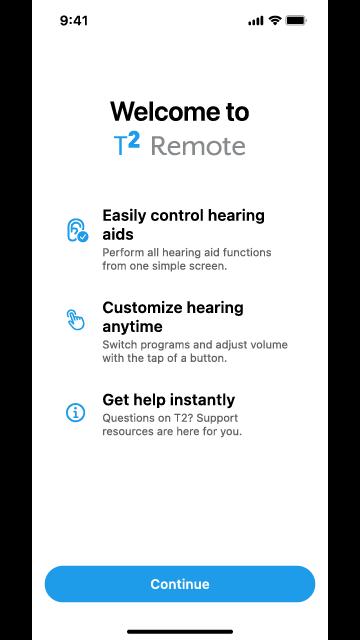
Controlling your hearing aids has never been easier with the T2 Remote app. This user-friendly app gives your mobile device the functionality of a remote control that allows you to conveniently operate your hearing aids from the palm of your hand.
HOW T2 REMOTE APP WORKS
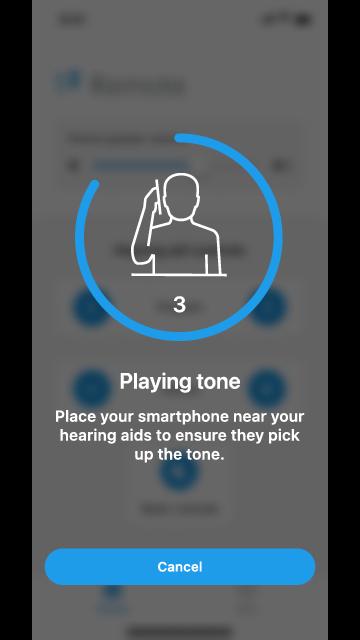
Simply make the hearing aid adjustment you want by tapping the Program, Volume, or Mute/Unmute buttons. Your mobile device will then play a tone. Hold your mobile device to your ear to ensure your hearing aids pick up the tone and then respond to it by making the adjustment. It’s that easy.
The T2 Remote app features the following benefits:
EASILY CONTROL HEARING AIDS
Increase, decrease or mute/unmute volume. Switch between programs. Adjust your phone speaker volume. All from one simple screen.
CUSTOMIZE HEARING ANYTIME
Convenient mobile device interface allows you to adjust your listening experience on the go.
GET HELP INSTANTLY
Questions about T2? Support resources are here for you, including easy-access to a searchable user guide and our Customer Support team.
Hearing aid ease and convenience awaits—check out T2 now.
پیش نظارہ
ٹیگز
طرز زندگیمعلومات
ڈویلپر
Starkey Hearing Technologies
تازہ ترین ورژن
4.0.0
آخری تازہ کاری
2025-08-13
قسم
طرز زندگی
پر دستیاب ہے۔
Google Play
مزید دکھائیں
پی سی پر گیم لوپ کے ساتھ T2 Remote کیسے کھیلا جائے۔
1. آفیشل ویب سائٹ سے گیم لوپ ڈاؤن لوڈ کریں، پھر گیم لوپ انسٹال کرنے کے لیے exe فائل چلائیں۔
2. گیم لوپ کھولیں اور "T2 Remote" تلاش کریں، تلاش کے نتائج میں T2 Remote تلاش کریں اور "انسٹال کریں" پر کلک کریں۔
3. گیم لوپ پر T2 Remote کھیلنے کا لطف اٹھائیں۔
Minimum requirements
OS
Windows 8.1 64-bit or Windows 10 64-bit
GPU
GTX 1050
CPU
i3-8300
Memory
8GB RAM
Storage
1GB available space
Recommended requirements
OS
Windows 8.1 64-bit or Windows 10 64-bit
GPU
GTX 1050
CPU
i3-9320
Memory
16GB RAM
Storage
1GB available space