
EZ Calendar Widget PC
INFOLIFE LLC
گیم لوپ ایمولیٹر کے ساتھ PC پر EZ Calendar Widget ڈاؤن لوڈ کریں۔
پی سی پر EZ Calendar Widget
EZ Calendar Widget، جو ڈویلپر INFOLIFE LLC سے آرہا ہے، ماضی میں اینڈرائیڈ سسٹم پر چل رہا ہے۔
اب، آپ پی سی پر EZ Calendar Widget آسانی سے GameLoop کے ساتھ چلا سکتے ہیں۔
اسے GameLoop لائبریری یا تلاش کے نتائج میں ڈاؤن لوڈ کریں۔ مزید غلط وقت پر بیٹری یا مایوس کن کالوں پر نظر نہیں ڈالی جائے گی۔
بس بڑی سکرین پر EZ Calendar Widget PC کا مفت میں لطف اٹھائیں!
EZ Calendar Widget تعارف
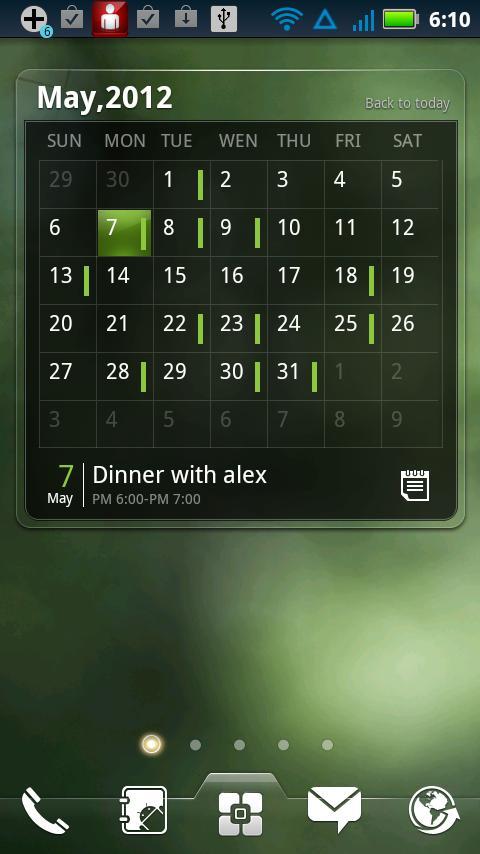
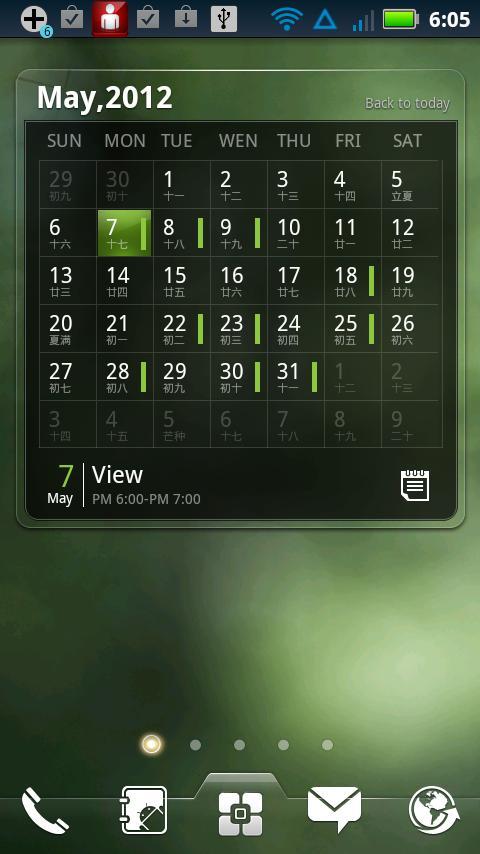
Pretty & Powerful scrollable Calendar & Agenda widget! Brings the real calendar to your home screen.
Notice: this widget is only supported by EZ Launcher, please install EZ Launcher first.
It features:
============
- Show Calendar
- Show Agenda
- Support Flip and Scoll
- Coming agenda remind.
- Add,check,edit agenda
- Support Chinese Lunar
- Support Us festival
Widgets on Android work a bit differently than a normal application. Unlike regular programs they don't just install themselves in the application tray so you have to add them manually. They will not open or launch.
Here's how to add a widget on your Android home screen.
STEPS HOW TO ADD A WIDGET
==========================
1.On your Android home screen, tap any blank or “empty” area with size 4X3 and hold down your finger.
2.An “Add to Home screen” window will pop up. From that window, tap “EZ Widgets”.
3.You’ll be presented with a list of all the installed Widgets on your Android device.
4.Select the widget to add to your home screen by tapping it.
Notes
=====
ROM users-> make sure the widget is NOT moved on SD card.
Widgets are not supposed to be on SD card. Move it back to the phone storage.
پیش نظارہ
معلومات
ڈویلپر
INFOLIFE LLC
تازہ ترین ورژن
v0.9.1 beta 3
آخری تازہ کاری
2012-11-25
قسم
طرز زندگی
پر دستیاب ہے۔
Google Play
مزید دکھائیں
پی سی پر گیم لوپ کے ساتھ EZ Calendar Widget کیسے کھیلا جائے۔
1. آفیشل ویب سائٹ سے گیم لوپ ڈاؤن لوڈ کریں، پھر گیم لوپ انسٹال کرنے کے لیے exe فائل چلائیں۔
2. گیم لوپ کھولیں اور "EZ Calendar Widget" تلاش کریں، تلاش کے نتائج میں EZ Calendar Widget تلاش کریں اور "انسٹال کریں" پر کلک کریں۔
3. گیم لوپ پر EZ Calendar Widget کھیلنے کا لطف اٹھائیں۔
Minimum requirements
OS
Windows 8.1 64-bit or Windows 10 64-bit
GPU
GTX 1050
CPU
i3-8300
Memory
8GB RAM
Storage
1GB available space
Recommended requirements
OS
Windows 8.1 64-bit or Windows 10 64-bit
GPU
GTX 1050
CPU
i3-9320
Memory
16GB RAM
Storage
1GB available space