
Philips Sonicare PC
Philips Consumer Lifestyle
گیم لوپ ایمولیٹر کے ساتھ PC پر Philips Sonicare ڈاؤن لوڈ کریں۔
پی سی پر Philips Sonicare
Philips Sonicare، جو ڈویلپر Philips Consumer Lifestyle سے آرہا ہے، ماضی میں اینڈرائیڈ سسٹم پر چل رہا ہے۔
اب، آپ پی سی پر Philips Sonicare آسانی سے GameLoop کے ساتھ چلا سکتے ہیں۔
اسے GameLoop لائبریری یا تلاش کے نتائج میں ڈاؤن لوڈ کریں۔ مزید غلط وقت پر بیٹری یا مایوس کن کالوں پر نظر نہیں ڈالی جائے گی۔
بس بڑی سکرین پر Philips Sonicare PC کا مفت میں لطف اٹھائیں!
Philips Sonicare تعارف
Do you remember when you learned to brush? Neither do we! It turns out, most people don’t brush properly.
If you’ve ever wondered how well you’re brushing or if you’re reaching every spot, the Philips Sonicare app is here to help. The app brings more clarity, more confidence and more personal insights into your routine.
When you connect your Sonicare toothbrush, you’ll unlock personalized coaching designed to help you strengthen your habits and brighten your smile.
Please note you must have a connected toothbrush to use the app. By connecting to the app, you’ll also receive the latest updates to your brushing experience.
Our most advanced toothbrush – the Next-Generation Sonicare DiamondClean 9900 Prestige – harmonizes with the app, creating an experience that’s smart and supportive, including:
- Real-time guided brushing that helps you feel confident every session
- SenseIQ technology that senses and adapts to you
- Auto-sync so your brushing data stays updated, even when your phone’s not around
Your Sonicare app experience will vary depending on which toothbrush you own and where you live:
PREMIUM
- Next-Generation DiamondClean 9900 Prestige, Next-Generation DiamondClean 9500, Next-Generation DiamondClean 9000, Next-Generation DiamondClean 8700, Next-Generation DiamondClean 8500, Next-Generation DiamondClean 8000 and DiamondClean Prestige 9900 — SenseIQ, mouth map, personalized guidance and tips.
ADVANCED
- DiamondClean Smart and FlexCare Platinum Connected – mouth map with position guidance and missed area notifications.
ESSENTIAL
- Sonicare 6500, Sonicare 7100, DiamondClean 9000 and ExpertClean - SmarTimer and brushing guides.
In the Sonicare app:
Brushing check-in
You will receive an assessment of your technique after the first time you brush your teeth. This will provide a starting point to track improvements to your oral health routine over time.
Real-time brushing guidance
The Sonicare app checks your habits, like if you’re reaching all areas of your mouth, how long you brush or how much pressure you’re using, and coaches you with tailored advice. This coaching helps to ensure consistent, complete coverage, every time you brush.
Dental Diary
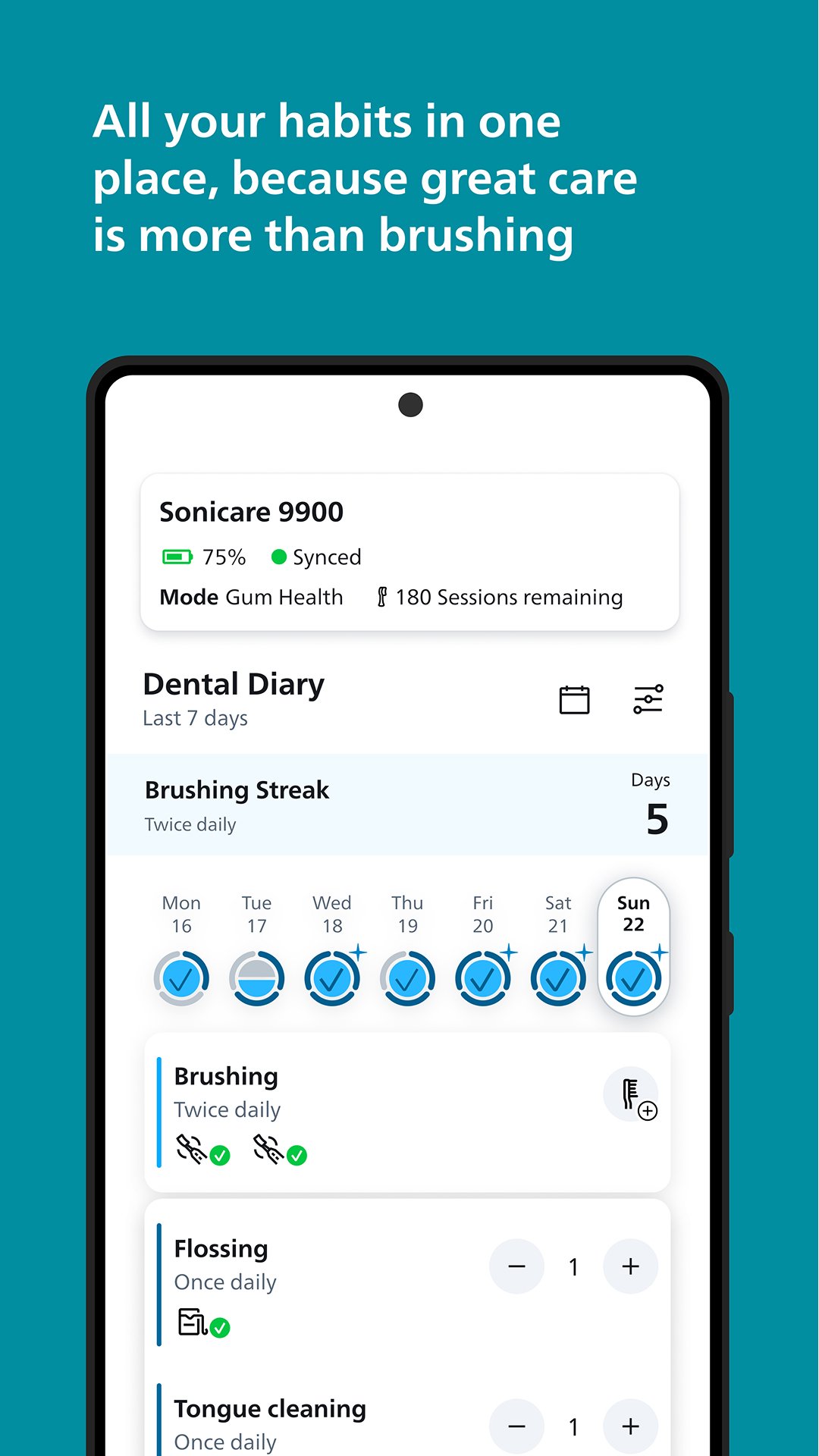
The Dental Diary helps you track all your oral health habits in one place – brushing, flossing, tongue cleaning, and mouth rinsing – so you can spot trends and build a consistent routine.
Brushing Streak
The Brushing Streak feature helps motivate you to brush at least twice daily – morning and night – as recommended by dentists to prevent plaque buildup.
Dashboard
The Dashboard syncs with your Sonicare toothbrush to collect and display your brushing habits. You receive an easy-to-read report with insights to help support and improve your oral health.
Brush head monitoring
Automatically know when it’s time to replace your brush head. Bristles wear out and start losing effectiveness after about three months, so having a fresh replacement ensures the best cleaning.
Automatic brush head reordering service
Always have a fresh brush head when you need one. As the Sonicare app checks your brush head’s usage, the reordering service reminds you when you need a replacement, and can automatically place an order so it arrives just in time. The brush head smart reordering service is available in the United States, United Kingdom, Germany, France, Spain, Italy and Japan.
پیش نظارہ
ٹیگز
Health-&معلومات
ڈویلپر
Philips Consumer Lifestyle
تازہ ترین ورژن
10.20.0
آخری تازہ کاری
2026-06-24
قسم
Health-fitness
پر دستیاب ہے۔
Google Play
مزید دکھائیں
پی سی پر گیم لوپ کے ساتھ Philips Sonicare کیسے کھیلا جائے۔
1. آفیشل ویب سائٹ سے گیم لوپ ڈاؤن لوڈ کریں، پھر گیم لوپ انسٹال کرنے کے لیے exe فائل چلائیں۔
2. گیم لوپ کھولیں اور "Philips Sonicare" تلاش کریں، تلاش کے نتائج میں Philips Sonicare تلاش کریں اور "انسٹال کریں" پر کلک کریں۔
3. گیم لوپ پر Philips Sonicare کھیلنے کا لطف اٹھائیں۔
Minimum requirements
OS
Windows 8.1 64-bit or Windows 10 64-bit
GPU
GTX 1050
CPU
i3-8300
Memory
8GB RAM
Storage
1GB available space
Recommended requirements
OS
Windows 8.1 64-bit or Windows 10 64-bit
GPU
GTX 1050
CPU
i3-9320
Memory
16GB RAM
Storage
1GB available space