
CaptionCall PC
MachineGenius
گیم لوپ ایمولیٹر کے ساتھ PC پر CaptionCall ڈاؤن لوڈ کریں۔
پی سی پر CaptionCall
CaptionCall، جو ڈویلپر MachineGenius سے آرہا ہے، ماضی میں اینڈرائیڈ سسٹم پر چل رہا ہے۔
اب، آپ پی سی پر CaptionCall آسانی سے GameLoop کے ساتھ چلا سکتے ہیں۔
اسے GameLoop لائبریری یا تلاش کے نتائج میں ڈاؤن لوڈ کریں۔ مزید غلط وقت پر بیٹری یا مایوس کن کالوں پر نظر نہیں ڈالی جائے گی۔
بس بڑی سکرین پر CaptionCall PC کا مفت میں لطف اٹھائیں!
CaptionCall تعارف
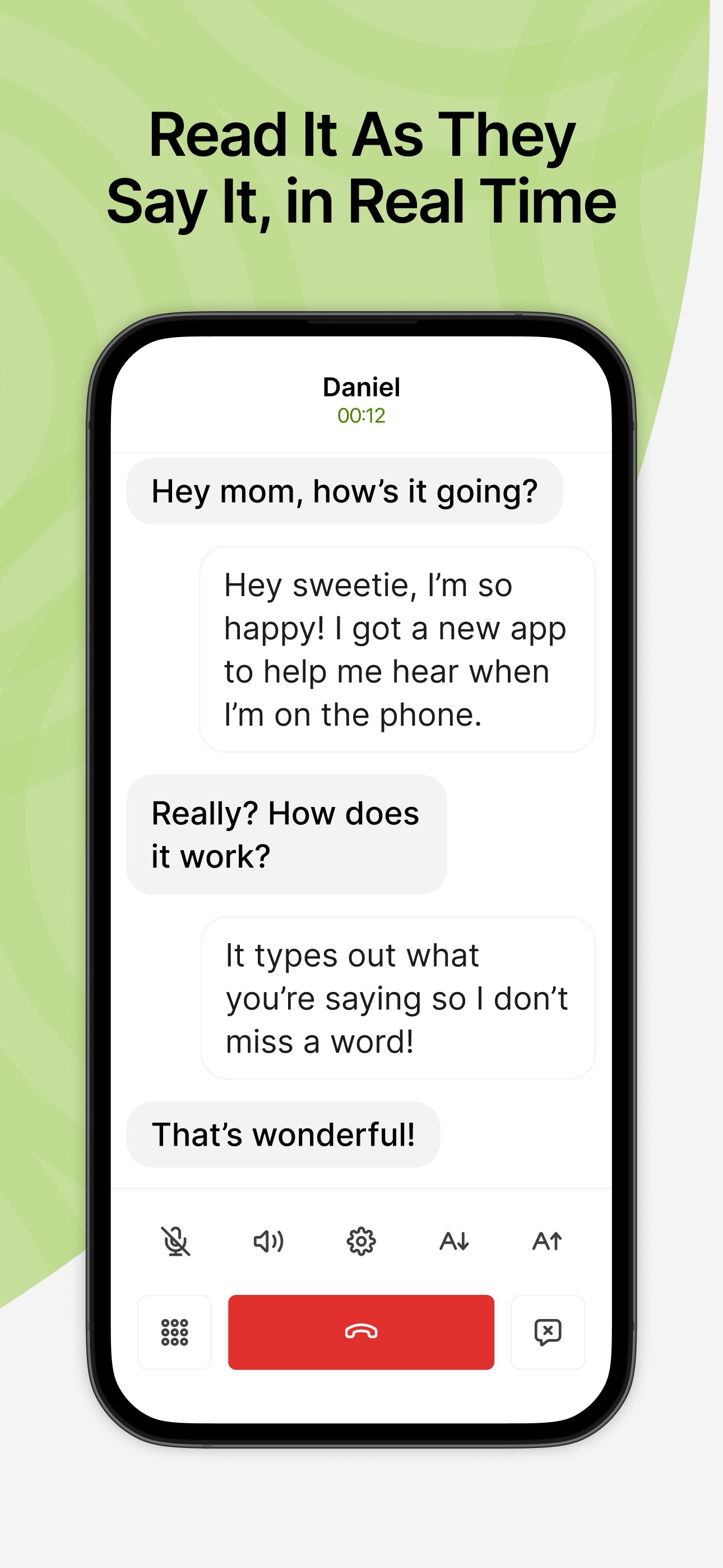
CaptionCall Mobile empowers deaf and hard-of-hearing individuals to make and receive phone calls with instant live captions. CaptionCall Mobile offers captioned phone calls in real-time at no cost to qualified deaf and hard-of-hearing users in an easy-to-use mobile app that integrates seamlessly into daily life and work.
Why CaptionCall?
No more landlines. CaptionCall Mobile goes where you go, allowing you to make and receive captioned calls from your mobile device anywhere with WiFi or mobile data service.
Fast, accurate, and easy, CaptionCall automatically transcribes both sides of your conversation in a customizable easy-to-read format, using advanced voice to text for deaf and hard-of-hearing that is 100% private and secure.
Accurate call captions appear in real-time for free-flowing, natural conversation.
No cost, ever. As an FCC-approved captioned call service, CaptionCall provides 100% no-cost call captioning to those with qualified hearing loss, thanks to a federally-administered fund.
GETTING STARTED WITH CAPTIONCALL MOBILE IS EASY:
1. Install the CaptionCall Mobile app
2. Create an account. You must provide accurate account information to meet federal requirements and enable your service.
3. Receive your new CaptionCall Mobile phone number for making and receiving captioned calls. Or you can continue using your existing phone number and automatically forward them to CaptionCall Mobile on your mobile device or tablet for captioning.
4. Tap “Allow” when asked to grant permissions to CaptionCall Mobile. You'll have quick access to your saved contacts, captioned voicemail and voicemail alerts, and can dial and receive calls from any phone number, just like your regular phone.
5. Use CaptionCall Mobile to start making calls with instant live captions.
CaptionCall Mobile is exclusively for people with hearing loss who need captions to use the phone effectively in the United States only.
CaptionCall and CaptionCall Mobile are available in the United States only. FEDERAL LAW PROHIBITS ANYONE BUT REGISTERED USERS WITH HEARING LOSS FROM USING INTERNET PROTOCOL (IP) CAPTIONED TELEPHONES WITH THE CAPTIONS TURNED ON. IP captioned telephone service may use a live operator. The operator generates captions of what the other party to the call says. These captions are then sent to your phone. There is a cost for each minute of captions generated, paid from a federally administered fund. No costs are passed along to individuals who qualify for the service. The CaptionCall phone and app remain the property of Sorenson in order to provide ongoing support, service, and upgrades. Patent information: www.Sorenson.com/Legal.
Please report any bugs and feedback to
Happy calling!
Thanks,
The CaptionCall Mobile Team
پیش نظارہ

ٹیگز
مواصلاتمعلومات
ڈویلپر
MachineGenius
تازہ ترین ورژن
32.1.2601
آخری تازہ کاری
2026-01-30
قسم
مواصلات
پر دستیاب ہے۔
Google Play
مزید دکھائیں
پی سی پر گیم لوپ کے ساتھ CaptionCall کیسے کھیلا جائے۔
1. آفیشل ویب سائٹ سے گیم لوپ ڈاؤن لوڈ کریں، پھر گیم لوپ انسٹال کرنے کے لیے exe فائل چلائیں۔
2. گیم لوپ کھولیں اور "CaptionCall" تلاش کریں، تلاش کے نتائج میں CaptionCall تلاش کریں اور "انسٹال کریں" پر کلک کریں۔
3. گیم لوپ پر CaptionCall کھیلنے کا لطف اٹھائیں۔
Minimum requirements
OS
Windows 8.1 64-bit or Windows 10 64-bit
GPU
GTX 1050
CPU
i3-8300
Memory
8GB RAM
Storage
1GB available space
Recommended requirements
OS
Windows 8.1 64-bit or Windows 10 64-bit
GPU
GTX 1050
CPU
i3-9320
Memory
16GB RAM
Storage
1GB available space