
Hoseline PC
BrandMeister Dev Team
گیم لوپ ایمولیٹر کے ساتھ PC پر Hoseline ڈاؤن لوڈ کریں۔
پی سی پر Hoseline
Hoseline، جو ڈویلپر BrandMeister Dev Team سے آرہا ہے، ماضی میں اینڈرائیڈ سسٹم پر چل رہا ہے۔
اب، آپ پی سی پر Hoseline آسانی سے GameLoop کے ساتھ چلا سکتے ہیں۔
اسے GameLoop لائبریری یا تلاش کے نتائج میں ڈاؤن لوڈ کریں۔ مزید غلط وقت پر بیٹری یا مایوس کن کالوں پر نظر نہیں ڈالی جائے گی۔
بس بڑی سکرین پر Hoseline PC کا مفت میں لطف اٹھائیں!
Hoseline تعارف
The BrandMeister DMR development team has been working on a new web-based talkgroups audio streaming platform, known as “Hoseline”. It has been re-programmed from scratch and packs a lot of new jaw-dropping features. See and hear for yourself
New interface
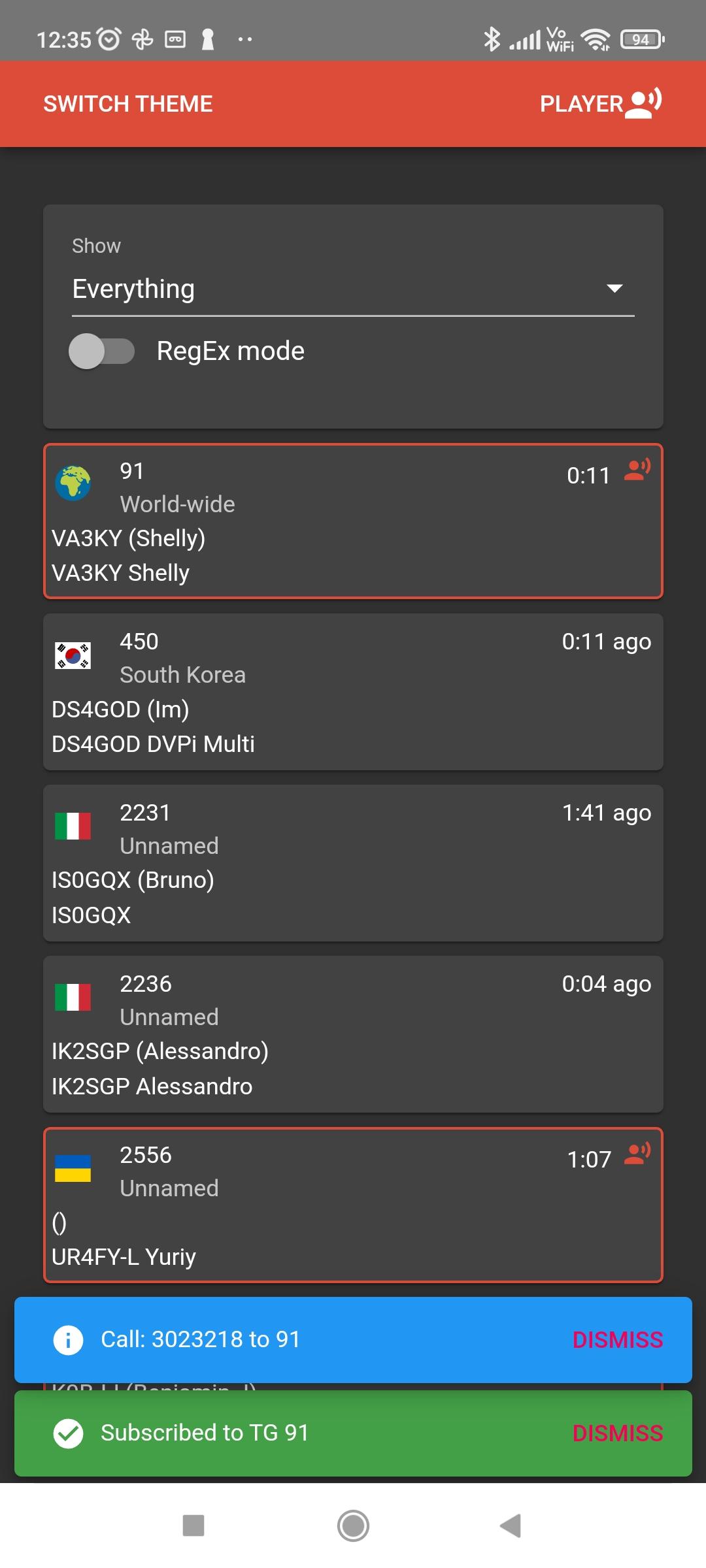
Hoseline shows a list of “blocks”. Each block represents a talkgroup, along with the current or last transmission information. New blocks will appear as new traffic comes up. If you want to listen to a talkgroup, simply click on the corresponding block.
To avoid clutter, only talkgroups between 90 and 99999 are showing up. You can listen to talkgroups above this limit by using the “Multiple Talkgroup Listening” option (see below).
Single Talkgroup Listening
When you click on one block from the homepage, you will register to this talkgroup, and any QSO will play on your speakers. If you click on another block, you will be unregistered from the previous talkgroup and registered to listen to the talkgroup matching the new block you clicked on.
Multiple Talkgroup Listening
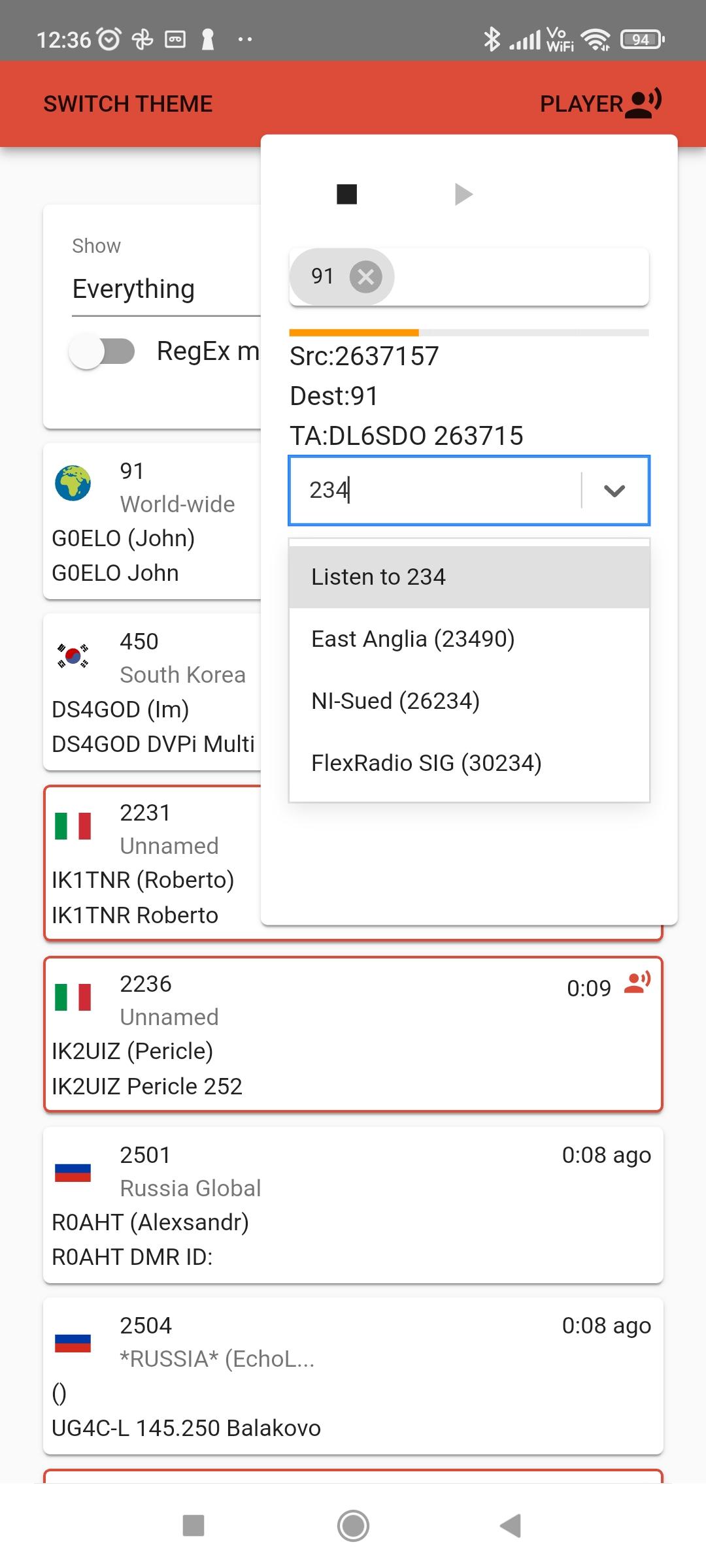
If you click on the “Player” link at the top right of the page, you will have the ability to select multiple talkgroups (using the drop-down list, or typing the talkgroup number directly). You will see the list of talkgroups showing up in Talkgroup traffic will start playing right away in a list of bubbles. Audio will start playing right away for talkgroups in your list. You can remove a talkgroup by clicking on the “X” after the number.
Solo Mode
When you are in the player, looking at multiple talkgroups you registered to; you may click on a bubble’s talkgroup number to enable Solo Mode. This will mute all other talkgroups while keeping this one active. You can click again this talkgroup number to exit Solo Mode and listen to traffic on all groups listed. Clicking on another bubble number moves the Solo Mode to this new group.
New features
As you use the new Hoseline, you will notice these new awesome features only available on the Brandmeister DMR network:
Improved Audio Quality
BM’s developer’s secret sauce is bringing a stunning and unmatched audio quality. You won’t believe your ears!
Real-Time Vu Meter
A brand new VU-Meter was added inside the player, just below the talkgroup number(s). It measures the audio before AGC. It is done within the BrandMeister platform and reported independently from the supplied audio. The color coding is as follow:
– Yellow: less than -20 dBm
– Green: between -20dBm and -3dBm
– Red: above -3dBm
Volume Normalizing
Are you tired of turning the volume up and down because people are coming in louder or quieter than others? So were we, and now the volume on Hoseline is automatically normalized. Everyone’s audio is at the same level!
Auto-Reconnect
Are you having you internet connection hiccups? No problem, Hoseline will seamlessly reconnect you as soon as your internet connection is back.
Instant play on subscribe and unsubscribe
If you click a talkgroup block or add a talkgroup in the player where there is current traffic, the audio will play instantly. You will not need to wait for the next transmission. Likewise, if you are subscribed to several talkgroups and two of them become active around the same time, you will hear audio from the talkgroup that started a transmission first. If you decide to unregister from this talkgroup while its audio is playing, the second talkgroup audio will begin right away without waiting for the next transmission. It’s that fast!
Subscriptions list auto-save
You closed your browser, or Windows restarted your computer without asking? No problem, your talkgroups subscription list is saved and will be in the player when you go back to the new hoseline page. Just click on play and you’re back where you were!
پیش نظارہ
ٹیگز
مواصلاتمعلومات
ڈویلپر
BrandMeister Dev Team
تازہ ترین ورژن
2.6.3
آخری تازہ کاری
2023-09-18
قسم
مواصلات
پر دستیاب ہے۔
Google Play
مزید دکھائیں
پی سی پر گیم لوپ کے ساتھ Hoseline کیسے کھیلا جائے۔
1. آفیشل ویب سائٹ سے گیم لوپ ڈاؤن لوڈ کریں، پھر گیم لوپ انسٹال کرنے کے لیے exe فائل چلائیں۔
2. گیم لوپ کھولیں اور "Hoseline" تلاش کریں، تلاش کے نتائج میں Hoseline تلاش کریں اور "انسٹال کریں" پر کلک کریں۔
3. گیم لوپ پر Hoseline کھیلنے کا لطف اٹھائیں۔
Minimum requirements
OS
Windows 8.1 64-bit or Windows 10 64-bit
GPU
GTX 1050
CPU
i3-8300
Memory
8GB RAM
Storage
1GB available space
Recommended requirements
OS
Windows 8.1 64-bit or Windows 10 64-bit
GPU
GTX 1050
CPU
i3-9320
Memory
16GB RAM
Storage
1GB available space