
Chrome River SNAP PC
Chrome River Technologies, Inc.
گیم لوپ ایمولیٹر کے ساتھ PC پر Chrome River SNAP ڈاؤن لوڈ کریں۔
پی سی پر Chrome River SNAP
Chrome River SNAP، جو ڈویلپر Chrome River Technologies, Inc. سے آرہا ہے، ماضی میں اینڈرائیڈ سسٹم پر چل رہا ہے۔
اب، آپ پی سی پر Chrome River SNAP آسانی سے GameLoop کے ساتھ چلا سکتے ہیں۔
اسے GameLoop لائبریری یا تلاش کے نتائج میں ڈاؤن لوڈ کریں۔ مزید غلط وقت پر بیٹری یا مایوس کن کالوں پر نظر نہیں ڈالی جائے گی۔
بس بڑی سکرین پر Chrome River SNAP PC کا مفت میں لطف اٹھائیں!
Chrome River SNAP تعارف
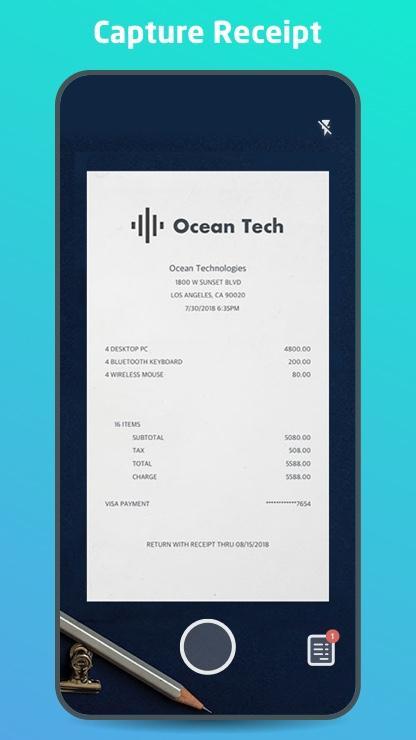
Managing paper expense receipts during a business trip can be a hassle and can slow down expense report creation and submission. Chrome River now offers Chrome River SNAP - an optional app for business travelers to eliminate the need to keep a stack of paper receipts and decrease the amount of time necessary to create an expense report later.
Note: This is a standalone utility app for capturing and uploading receipt images. To create and submit expense reports using the receipt images captured and uploaded automatically by this utility app, users should log into the Chrome River web app.
With Chrome River SNAP, you can:
• Capture and upload receipt images as expenses occur. Images will be uploaded to the Chrome River EXPENSE Receipt Gallery
• Share existing receipt images from your smartphone's photo gallery app or third-party photo apps
• Separate your business from your personal life. Images taken with Chrome River SNAP are uploaded to the EXPENSE Receipt Gallery and are not saved to your personal photo library.
Here's how Chrome River SNAP works:
• Simply take a photo of a receipt using the Chrome River SNAP app and upload!
• Share an existing receipt image, open the image in any photo gallery app and tap the "share" icon and look for the CR SNAP icon to upload your image to the EXPENSE Receipt Gallery.
• Go to the Upload Gallery to review all the pending and successfully uploaded receipts sent from your device.
CAN I USE THIS APP WITHOUT AN INTERNET CONNECTION?
Yes, whether you have an internet connection or not, you will be able to use Chrome River SNAP. There may be times when an internet connection is temporarily unavailable and in this case, the image will remain in Chrome River SNAP until you are in a location with a stronger connection, and it is then uploaded. We encourage you to not close the app until a green check mark has been designated to a photo, indicating that the photo has been successfully uploaded to Chrome River EXPENSE.
Learn more at www.chromeriver.com.
You must be an existing Chrome River EXPENSE user to use Chrome River SNAP.
System requirements: Chrome River is committed to provide support for mainstream Android devices, but we recognize that the Android hardware is so diverse that we cannot ensure adequate testing for all devices.
پیش نظارہ

ٹیگز
کاروبارمعلومات
ڈویلپر
Chrome River Technologies, Inc.
تازہ ترین ورژن
3.0.12
آخری تازہ کاری
2023-11-13
قسم
کاروبار
پر دستیاب ہے۔
Google Play
مزید دکھائیں
پی سی پر گیم لوپ کے ساتھ Chrome River SNAP کیسے کھیلا جائے۔
1. آفیشل ویب سائٹ سے گیم لوپ ڈاؤن لوڈ کریں، پھر گیم لوپ انسٹال کرنے کے لیے exe فائل چلائیں۔
2. گیم لوپ کھولیں اور "Chrome River SNAP" تلاش کریں، تلاش کے نتائج میں Chrome River SNAP تلاش کریں اور "انسٹال کریں" پر کلک کریں۔
3. گیم لوپ پر Chrome River SNAP کھیلنے کا لطف اٹھائیں۔
Minimum requirements
OS
Windows 8.1 64-bit or Windows 10 64-bit
GPU
GTX 1050
CPU
i3-8300
Memory
8GB RAM
Storage
1GB available space
Recommended requirements
OS
Windows 8.1 64-bit or Windows 10 64-bit
GPU
GTX 1050
CPU
i3-9320
Memory
16GB RAM
Storage
1GB available space