
Janjua IPTV - App TV ao vivo PC
Ao Vivo Tudos - Official Apps
Download Janjua IPTV - App TV ao vivo on PC With GameLoop Emulator
Janjua IPTV - App TV ao vivo sa PC
Ang Janjua IPTV - App TV ao vivo, na nagmumula sa developer na Ao Vivo Tudos - Official Apps, ay tumatakbo sa Android systerm sa nakaraan.
Ngayon, maaari mong laruin ang Janjua IPTV - App TV ao vivo sa PC gamit ang GameLoop nang maayos.
I-download ito sa GameLoop library o mga resulta ng paghahanap. Hindi na tumitingin sa baterya o nakakadismaya na mga tawag sa maling oras.
I-enjoy lang ang Janjua IPTV - App TV ao vivo PC sa malaking screen nang libre!
Janjua IPTV - App TV ao vivo Panimula
Hi,
Welcome to Janjua IPTV.
Janjua IPTV is perfect app for your IPTV File to play in your Mobile. If you have IPTV Channels from your internet TV provider then this app is for you.
Janjua IPTV don`t host channels or don`t provide any built-in channels, you need to have playlist with TV channels in order to use this app.
Features Of Janjua IPTV:
-> No ads*.
-> M3U, M3U8, TS, MP3, MP4 and all other possible format playlists support.
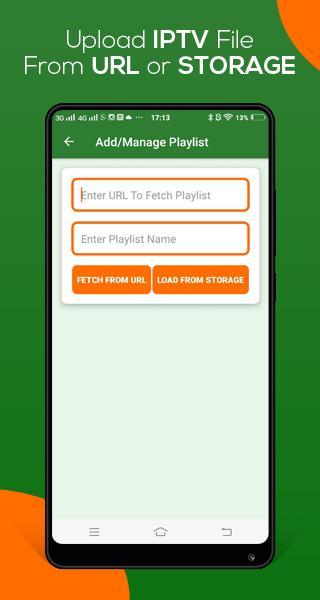
-> Load playlist from IPTV Provider URL or from your Mobile Storage.
-> Keep Multiple IPTV Playlists.
-> Grid view of TV channels
-> Add or Delete anytime. No need of deleting entire app for reinstalling IPTV Playlists.
-> Built-in lightest player.
-> Battery efficient, does`nt eat your mobile entire batter.
-> Search channels from list. No need to check entire list just type name and channel will in front of you.
FAQ:
Does app have built-in channels?
No, app don`t have any built-in channels. All users or clients need to upload their IPTV playlists.
Where to get IPTV playlists?
Please ask your internet TV provider to provide you IPTV playlist. Almost all IPTV providers have playlists to serve service of watching TV in your PC.
Is the app safe to use?
Yes, it is 100% legal app and is completely safe. The app don`t store any information of its clients as well as don`t store IPTV lists in Janjua IPTV servers. So it is completely legal & safe to use.
Important Note:
Copy of this app is strictly prohibited.
Contact US:
For any inquiry or suggestion please email us at support@aovivotudo.com
Preview
Tags
Video-PlayersInformation
Developer
Ao Vivo Tudos - Official Apps
Latest Version
1.7
Last Updated
2021-07-09
Category
Video-players-editors
Available on
Google Play
Show More
How to play Janjua IPTV - App TV ao vivo with GameLoop on PC
1. Download GameLoop from the official website, then run the exe file to install GameLoop
2. Open GameLoop and search for “Janjua IPTV - App TV ao vivo” , find Janjua IPTV - App TV ao vivo in the search results and click “Install”
3. Enjoy playing Janjua IPTV - App TV ao vivo on GameLoop
Minimum requirements
OS
Windows 8.1 64-bit or Windows 10 64-bit
GPU
GTX 1050
CPU
i3-8300
Memory
8GB RAM
Storage
1GB available space
Recommended requirements
OS
Windows 8.1 64-bit or Windows 10 64-bit
GPU
GTX 1050
CPU
i3-9320
Memory
16GB RAM
Storage
1GB available space