
FastVideo PC
DailySoftStudio
Download FastVideo on PC With GameLoop Emulator
FastVideo sa PC
Ang FastVideo, na nagmumula sa developer na DailySoftStudio, ay tumatakbo sa Android systerm sa nakaraan.
Ngayon, maaari mong laruin ang FastVideo sa PC gamit ang GameLoop nang maayos.
I-download ito sa GameLoop library o mga resulta ng paghahanap. Hindi na tumitingin sa baterya o nakakadismaya na mga tawag sa maling oras.
I-enjoy lang ang FastVideo PC sa malaking screen nang libre!
FastVideo Panimula
When watching a niche video or movie, do you want to speed it up? Looking for an app that can easily retain the "view video link" and is easy to use? Then this high-definition video player is definitely what you want!
It's super fast and 100% free.
Imagine that you are browsing a video app and you find some videos of interest. You want to save these videos and watch them later, or share them with your friends, or forward them to other social media. What do you need to do?
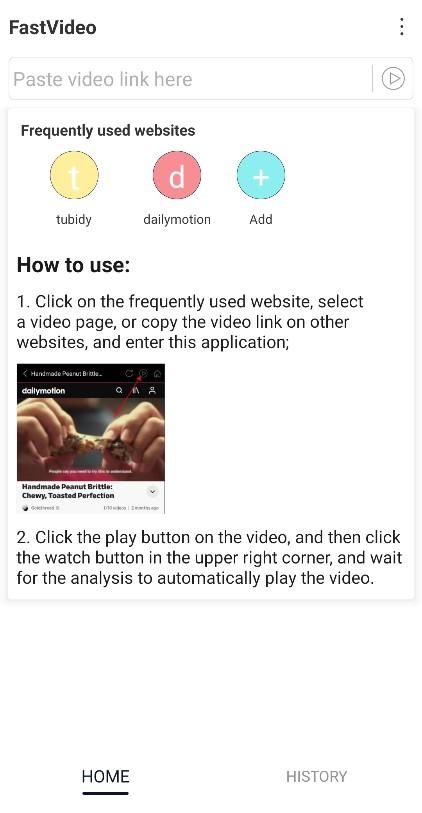
Use our "video loading and watching" player, you will no longer have troubles. It is very easy to use, just copy or share the post link in the post, and then the video analysis will start automatically. It is super simple, fast and easy to use. You can easily save the video address to your Android device. In this way, you can enjoy the video anytime, anywhere, or share it with others. You can also easily copy the link or title of the original post to forward it.
So, please install the "Video Loading Watch" player now to try it out!
how to use:
Use "copy link"
Step 1: Open the video app and click on the "copy link" of the video you are interested in
Step 2: Open the "Video Loading Watch" player
Finish! The video will be automatically parsed into this application.
Features:
-No need to log in
-Free to parse and save videos
-Support 0.75 times / 1 times / 1.25 times / 1.5 times / 2 times playback rate
-Using the built-in video player, you can play the video at any time
-Support copying links, sharing videos, all kinds of hype about you
-Support copying hashtags and titles, forwarding posts becomes very easy
-The application package is small, occupies less space, concise content, smooth experience, and very brisk
Precautions:
-Choose to apply to the "video loading watch" player, it has nothing to do with the website where the video is located. It is a useful tool for "video acceleration playback".
-We respect the copyright of the video owner (blogger). Therefore, please do not watch videos and clips without the permission of the owner.
If this app is helpful to you, please rate us five stars
If you need support, please send an email to DailySoftStudio@gmail.com
Follow our official Instagram account @DailySoftStudio
Finally, thank you very much for using the "Video Loading Watch" player, and I wish you a happy day.
Preview

Tags
Video-PlayersInformation
Developer
DailySoftStudio
Latest Version
1.2
Last Updated
2021-12-22
Category
Video-players-editors
Available on
Google Play
Show More
How to play FastVideo with GameLoop on PC
1. Download GameLoop from the official website, then run the exe file to install GameLoop
2. Open GameLoop and search for “FastVideo” , find FastVideo in the search results and click “Install”
3. Enjoy playing FastVideo on GameLoop
Minimum requirements
OS
Windows 8.1 64-bit or Windows 10 64-bit
GPU
GTX 1050
CPU
i3-8300
Memory
8GB RAM
Storage
1GB available space
Recommended requirements
OS
Windows 8.1 64-bit or Windows 10 64-bit
GPU
GTX 1050
CPU
i3-9320
Memory
16GB RAM
Storage
1GB available space