
Uninstaller -Quick App Manager PC
Root Uninstaller
Download Uninstaller -Quick App Manager on PC With GameLoop Emulator
Uninstaller -Quick App Manager sa PC
Ang Uninstaller -Quick App Manager, na nagmumula sa developer na Root Uninstaller, ay tumatakbo sa Android systerm sa nakaraan.
Ngayon, maaari mong laruin ang Uninstaller -Quick App Manager sa PC gamit ang GameLoop nang maayos.
I-download ito sa GameLoop library o mga resulta ng paghahanap. Hindi na tumitingin sa baterya o nakakadismaya na mga tawag sa maling oras.
I-enjoy lang ang Uninstaller -Quick App Manager PC sa malaking screen nang libre!
Uninstaller -Quick App Manager Panimula
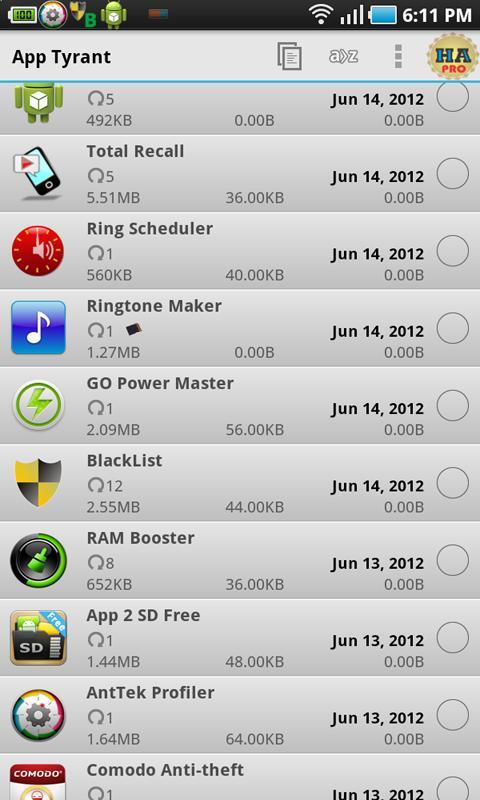
The most powerful tool to manage your apps: backup & restore, uninstall, permission viewer, sharing, (12 features)
Features
★ Uninstall app in one-click/in batch mode
★ Backup apps to Dropbox (PRO)
★ Permission viewer: find apps using strange permissions
★ Install apps from Sdcard, full mode view with icon/name for a .APK file annotated with newer/current/older version
★ Save/backup .apk files in one-click for all your apps.
★ One click to share Market links or as installable files.
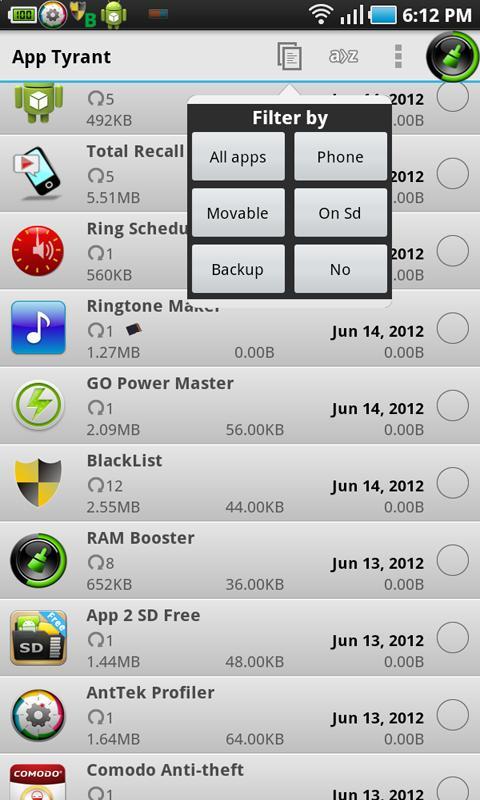
★ Filter multiple .APK by apps/install state
★ Sort apps by date/app size/cache size/ data size
★ Manage app: App2SD, clear cache, clear data
★ Auto backup
and more
★ Change on-click/on-long-click action (in app's settings)
★ UI is clean and easy to use.
★ Cache files to enhance .apk loading speed.
★ You can not send/save forward lock apps (most paid apps are forward lock)
★ APK installer is very fast
This app was renamed from "Fast Uninstaller & Installer" app and created by the author of the famous apps "Root Uninstaller",
** Affiliation **
App Tyrant is not affiliated with Uninstaller, App Monster, App Manager, App Backup & Restore, or App2SD.
Website: http://rootuninstaller.com/
Facebook: https://www.facebook.com/pages/Root-Uninstaller/200912803368166
Preview
Tags
ToolsInformation
Developer
Root Uninstaller
Latest Version
3.5
Last Updated
2015-10-14
Category
Tools
Available on
Google Play
Show More
How to play Uninstaller -Quick App Manager with GameLoop on PC
1. Download GameLoop from the official website, then run the exe file to install GameLoop
2. Open GameLoop and search for “Uninstaller -Quick App Manager” , find Uninstaller -Quick App Manager in the search results and click “Install”
3. Enjoy playing Uninstaller -Quick App Manager on GameLoop
Minimum requirements
OS
Windows 8.1 64-bit or Windows 10 64-bit
GPU
GTX 1050
CPU
i3-8300
Memory
8GB RAM
Storage
1GB available space
Recommended requirements
OS
Windows 8.1 64-bit or Windows 10 64-bit
GPU
GTX 1050
CPU
i3-9320
Memory
16GB RAM
Storage
1GB available space