![ComiPo! Battery Meter [Widget]](https://static.gameloop.com/img/ede0c64d2227a69d5c41d4518496aa19.png?imageMogr2/thumbnail/172.8x172.8/format/webp)
ComiPo! Battery Meter [Widget] PC
Tomoyuki Ono
Download ComiPo! Battery Meter [Widget] on PC With GameLoop Emulator
ComiPo! Battery Meter [Widget] sa PC
Ang ComiPo! Battery Meter [Widget], na nagmumula sa developer na Tomoyuki Ono, ay tumatakbo sa Android systerm sa nakaraan.
Ngayon, maaari mong laruin ang ComiPo! Battery Meter [Widget] sa PC gamit ang GameLoop nang maayos.
I-download ito sa GameLoop library o mga resulta ng paghahanap. Hindi na tumitingin sa baterya o nakakadismaya na mga tawag sa maling oras.
I-enjoy lang ang ComiPo! Battery Meter [Widget] PC sa malaking screen nang libre!
ComiPo! Battery Meter [Widget] Panimula
# (Oppo, Xiaomi, Redmi, Realme, Infinix, Vivo, TCL etc.)
If the phone has a function that blocks the auto-startup of apps, please exclude this app.
# This app is a WIDGET. After installed, you need to place it on your home.
-------------------------------------------------------------
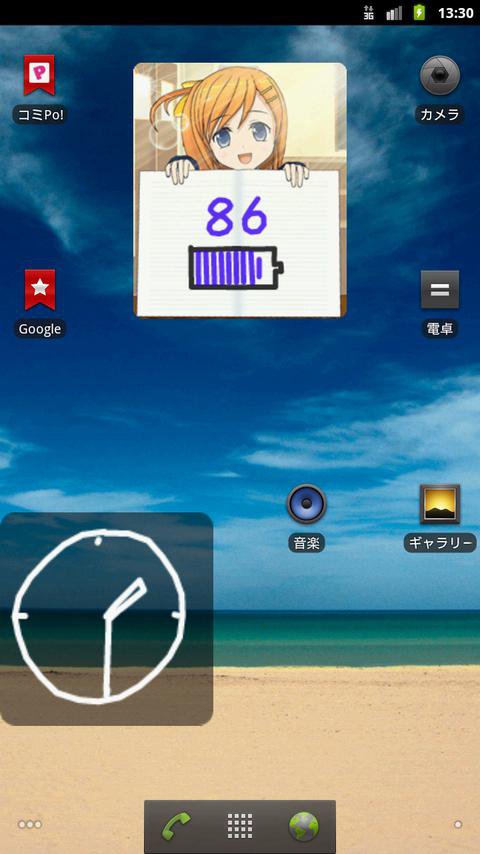
<> This is a battery checker widget, such as a handwitten sketch on the notebook.
Of course, every time redraw, will be completely different image.
* This app is the WIDGET. You must put it on your home from the widget list.
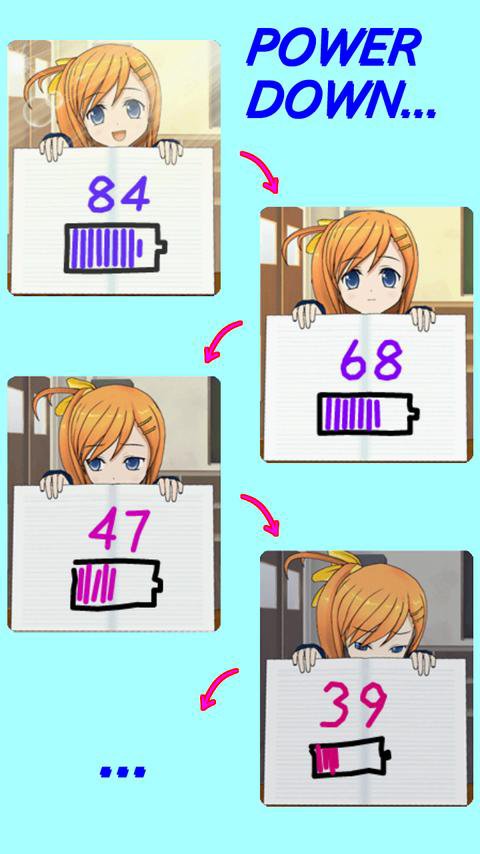
<> The skill will change.
Depends on the remaining, the skill will become more and more poor, and the vigor of the character will continue to decrease.
<> You can change the pen thickness, battery direction and numerical value position.
Meter and value color will change depending on the remaining.
<> Widget standard size is 2x2. You can change the size by long-tapping the widget.
<> This character is ComiPo-chan.
The images of this app were created by using "Manga Maker ComiPo!."
[ComiPo! Official Website (Eng)] http://www.comipo.com/en/
* This is not an official app of ComiPo!. This app is independent of production and sales company of ComiPo!.
-------------------------------------------------------------
[Settings]
- Drawing Skill
- Redraw interval
- Battery direction
- Display the numerical value
- Pen thickness
Preview
Tags
ToolsInformation
Developer
Tomoyuki Ono
Latest Version
3.6.2
Last Updated
2025-06-14
Category
Tools
Available on
Google Play
Show More
How to play ComiPo! Battery Meter [Widget] with GameLoop on PC
1. Download GameLoop from the official website, then run the exe file to install GameLoop
2. Open GameLoop and search for “ComiPo! Battery Meter [Widget]” , find ComiPo! Battery Meter [Widget] in the search results and click “Install”
3. Enjoy playing ComiPo! Battery Meter [Widget] on GameLoop
Minimum requirements
OS
Windows 8.1 64-bit or Windows 10 64-bit
GPU
GTX 1050
CPU
i3-8300
Memory
8GB RAM
Storage
1GB available space
Recommended requirements
OS
Windows 8.1 64-bit or Windows 10 64-bit
GPU
GTX 1050
CPU
i3-9320
Memory
16GB RAM
Storage
1GB available space